Capriccio is a full-featured music player. This application features a simple and easy-to-use user interface with a wealth of playback control options and functionalities, designed to provide high-quality audio playback and support flexible management of the music library. With Capriccio, users can freely choose the audio they are interested in, primarily for offline playback, and enjoy a pure music listening experience. Furthermore, the app includes a song recognition feature and access to online radio, significantly broadening the range of content available to users.
Plays FLAC, APE, WAV, MP3, OGG, OPUS, and more without conversion.
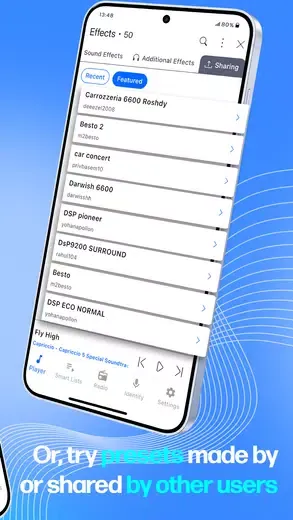
3D and standard effects with thousands of shared presets for any genre.
Queue-based sound effects so each playlist or session keeps its own vibe.
Manage music by folders or library; create playlists and edit on the fly.
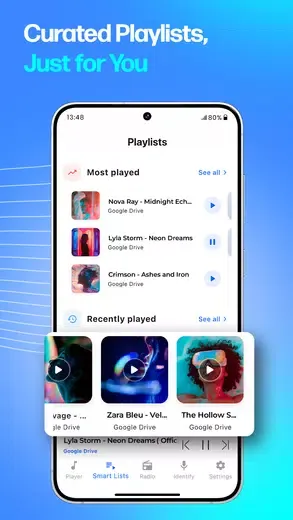
Access cloud drives, FTP, and WebDAV; copy, move, rename, or delete files.
Study tools: A-B repeat, speed and pitch control for learning tracks.
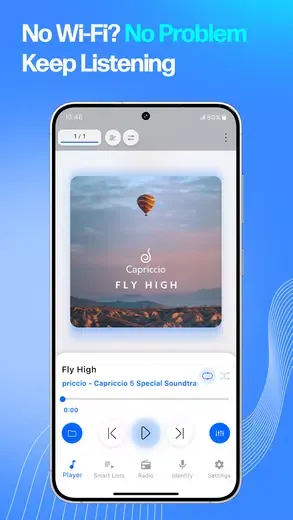
Capriccio presents your music in a tidy, visually appealing interface that feels geared toward serious listening rather than distraction. Navigation through folders or the internal music library is straightforward, and playback controls stay clear and uncluttered.
Lock screen control and remote control support keep basic actions handy while the screen is off, and a sleep timer together with screen lock prevention options help during longer listening sessions.
Audio is where Capriccio stands out. It plays a wide range of formats, including FLAC, APE, WV, MPC, WAV, M4A, MP3, OGG, AIFF, CAF, MID and OPUS, so lossless and compressed collections sit comfortably in the same app.
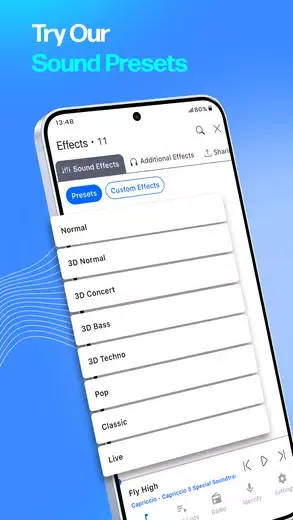
Sound customization is extensive. Alongside normal effects, Capriccio offers 3D sound effects and a 10 Band EQ, plus additional components such as reverb and other processing tools. Effects can be tied to the current queue, so you can tailor sound on a per‑queue basis instead of using one fixed profile.
Effect Sharing opens access to thousands of custom sound effect presets, which gives more advanced listeners a broad palette of ready made settings to explore and refine.
Lyrics embedded in audio files can be viewed and controlled inside the player. However, there is currently no built in feature for searching synchronized lyrics online and saving them directly into the music file, which would further enhance the lyric experience.
Pros
Wide audio format support
Audiophile-centric features
Built-in file manager
Some nice handy extras
Cons
Can slow down with large music collections
What is Capriccio APK used for?
Capriccio APK is used for playing music on Android with advanced audio effects, broad format support, and detailed file management.
Does Capriccio support lossless audio formats?
Yes, it supports formats like FLAC, APE, WAV, and other high-quality audio types without conversion.
Can Capriccio play music from cloud storage?
Capriccio can play music from services such as Google Drive, Dropbox, OneDrive, FTP, and WebDAV.
Does Capriccio require payment to use all features?
The app works for free with core features, while some advanced options are available through in-app purchases.
Capriccio incorporates valuable educational tools, such as A-B repeat, speed and pitch control, enhancing its utility for language learners or musicians. Its remote control and lock screen control capabilities improve usability, alongside a sleep timer feature and screen lock prevention. Whether you’re managing playlists or adjusting settings, Capriccio provides a seamless and feature-rich music experience.
Size:61.00MB Version:6.5.5
Requirements:Android 7.0+ Votes:205
Package Name:me.ideariboso.capriccio Signature:6e69ea1350ce2f6203df07c00eafdde2
Discover top radio apps in one place! Stream global stations with TuneIn, enjoy personalized music on Pandora, or explore diverse content on iHeartRadio. Perfect for music, news, and podcasts on any device. Find your favorite app and start listening now!
Dive into this comprehensive hub of music applications designed for every type of listener. Stream global hits, craft custom playlists tailored to your mood, or uncover hidden gems across diverse genres-all with intuitive, high-quality platforms. Discover both industry-leading streaming services and specialized apps offering exclusive features like AI-powered recommendations, social sharing, or advanced audio customization. Whatever your musical preference, find the ideal app to enhance your listening journey with effortless discovery and premium sound.
Music Player is a tool designed to play audio files, available as both software applications and dedicated hardware devices. It can be installed on electronic devices like smartphones, tablets, and computers, allowing users to stream or play locally stored music in various formats. Additionally, standalone hardware devices, such as MP3 players and digital audio players, are specifically built for high-quality music playback. Many modern music players support advanced features like equalizers, playlists, offline playback, and streaming service integration, enhancing the overall listening experience.
About us | Contact us | Privacy policy| DMCA
Copyright © 2026 Xiaohei All rights reserved.