WaveEditor is a professional-grade audio editing tool. This powerful application, designed specifically for Android devices, offers users a variety of functions including recording and editing. With WaveEditor, you can easily and efficiently edit your recorded audio materials; simply import the files into the editor interface to begin your creative journey. Furthermore, this application provides a user-friendly interface, making it easy for both editing beginners and audio editing experts to use. Click to download WaveEditor now and start your creative journey.
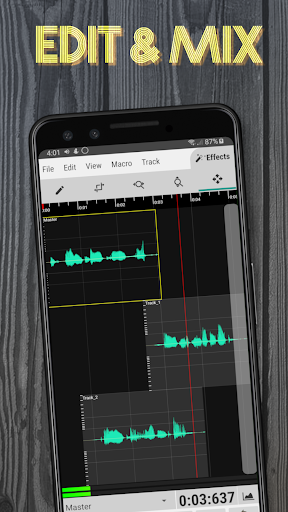
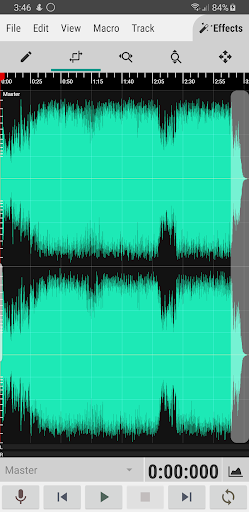
Multi-Track Editing: A full-featured editor for cutting, copying, pasting, and deleting audio clips. Create complex arrangements by mixing multiple tracks.
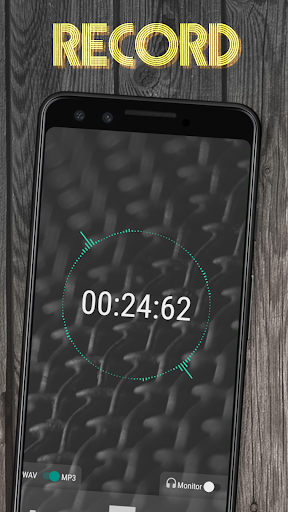
High-Quality Recording: Record audio directly within the app. The recorder supports external USB microphones for high-fidelity capture.
Professional Analysis: Analyze your audio with a suite of professional tools, including an FFT, Oscilloscope, Spectrogram, and Vectorscope. This allows for detailed visual inspection of your sound.
Extensive Format Support: Import and export a variety of audio formats, including WAV, MP3, FLAC, and OGG.
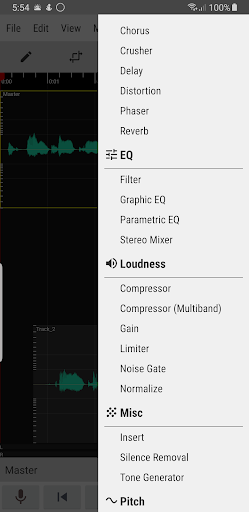
Built-in Effects: Access a collection of integrated effects like Graphic EQ, Chorus, Reverb, and Normalization to refine your tracks.
Simultaneous audio layers: The application will bring you extremely realistic and high-quality sound layers. The sounds in your recording files are extremely clear, as if recorded by the most professional equipment, giving you high-quality audio files that are not inferior to those recorded in professional studios.
Enhances creativity: With this application, your creativity will always go far without being constrained by any rules or limits, giving you extremely unique and interesting audio tracks that match your style and preferences, making you extremely satisfied and true to your wishes without having to edit too many times.
Detailed audio insights: The application will give you extremely detailed information about the sound. The information provided to you is extremely detailed and careful, giving you extremely convenient and attractive experiences so that you can manage your audio files accurately.
Precise editing help: Coming to this application, you will be able to use the most unique features and tools to edit audio easily and quickly, giving you extremely convenient and interesting user experiences.
To start with, Android users in WaveEditor can find themselves enjoying the comfortable editing experiences with dozens of supported formats for your audio files. Here, you can make your simple audio records with the two common file formats of WAV or MP3.
And when it comes to the supported import formats, your choices of audio files are greatly improved with dozens of file formats of 3GP, AAC, AIF, ALAC, AMR, FLAC, M4A, MP3, MP3, RAW, WAV, and many more. This allows users to fully utilize the available features in the app as well as your huge collection of sounds and audio effects. Also, the app does support audio format conversion, so you can easily switch your file formats whenever you need.
For exporting your edited files, WaveEditor will feature some of the most common audio files, which you can find compatible with any of the existing audio apps.
And to enable better experiences with their recorded or imported audio files, Android users in WaveEditor are also allowed to easily record audio using your devices’ built-in mic. Or alternatively, for better audio quality, the USB microphone support will allow you to make great edits with high-quality audio. And most importantly, to improve your overall experiences with the app, all your recorded audio will be automatically saved, in the case of accidental app shutdowns.
For those of you who’re interested, you can easily import any audio files inside your devices, using the intuitive built-in file browse app. Feel free to load up your audio files while staying in the app, or make uses of any external file browsers to look for your specific files.
For those of you who’re interested, you can make full uses of the intuitive interface in WaveEditor and easily access all of its available features. To start with, users will have access to the intuitive visual tools of FFT, oscilloscope, and spectrogram, which will make your audio files a lot more accessible. Thus, allowing users to make simple and effective edits of their records.
In addition, with the waveform colors from WaveEditor, Android users can expect better stereo visualizations on their audio files. Along with the amplitude meter, you’ll find it relatively easy to have any of your recorded sounds properly edited.
Also, the compact view settings, which were also optimized for devices with varied screen sizes, and the 32-bit floating-point signal processing will prove to be extremely helpful when working with the features in the app.
And to make the app a lot more interesting, Android users in WaveEditor will find themselves having access to the full-featured audio editor app with dozens of available features and hundreds of editing materials for you to make uses of.
Feel free to explore both the standalone recorder and audio editor experiences in a single app of WaveEditor. Enjoy single sample editing or experience professional-like works with multiple audio effects. Make uses of the simple and intuitive editing options of zooming, panning, and many selection functions to help you navigate through the app.
Explore the multi-channel audio editing interface with varied audio channels for you to add to your mix. Move your selected channels or add new ones with new effects. Make uses of the macro processes like fading, reversing, and inverting to improve the overall audio experiences with each record.
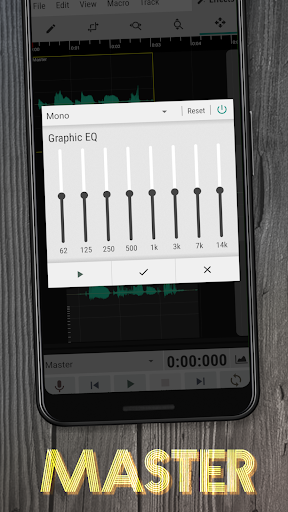
WaveEditor is an audio editing application available for the Android platform, designed to facilitate the recording, editing, and mastering of audio files. This app is particularly suitable for musicians, podcasters, and anyone looking to refine their audio recordings. Users can download WaveEditor to harness a range of powerful features that enhance their audio editing experience. The app's support for multiple formats and USB microphone compatibility further expands its usability. Whether for personal projects or professional endeavors, WaveEditor provides the necessary tools to take control of audio in a user-friendly manner.
Size:8.73MB Version:1.126
Requirements:Android Votes:134
Incrediblebox is a very popular music creation application that allows users to create their own music through simple drag and drop operations. This app makes music creation both simple and fun, suitable for users of all ages. This page also provides various mod versions for you to fully enjoy the charm of the game.
Music is an indispensable part of our lives, not only as a seasoning for our dull lives, but also as our spiritual nourishment. Without music, life lacks color. In this article, the editor recommends the best sound quality music app rankings. Good sound quality is important for us to enjoy music. These best sound quality music apps will bring you a different experience and add a bright color to your dull life.
About us | Contact us | Privacy policy| DMCA
Copyright © 2026 Xiaohei All rights reserved.