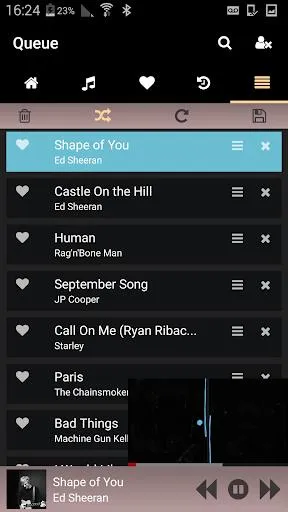
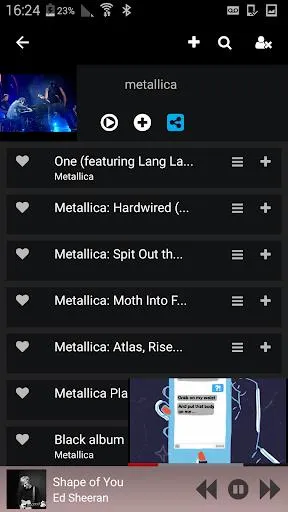
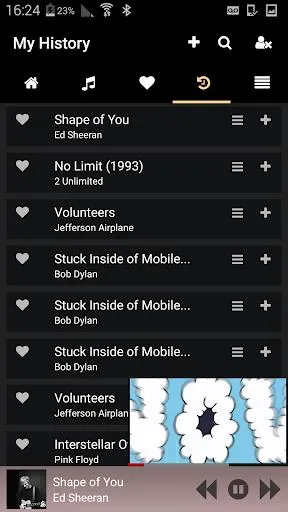
Welcome to the world of music with StreamSquid. Here you can find the latest and hottest playlists, check out new releases, and see what others are listening to. We offer personal playlists where you can add all your favorite songs and enjoy the most personalized music playback. Use the app's built-in search function to search for songs or artists using keywords; all the content is clearly presented to you, eliminating the need to search elsewhere. Furthermore, you can easily share songs with your friends and let them judge your taste!
- Popular Playlists: Get recommendations for the latest and hottest playlists
- Personal Playlists: Manage your personal playlists: Add tracks to existing or new playlists
- Favorites: Save your favorite songs to a dedicated section.
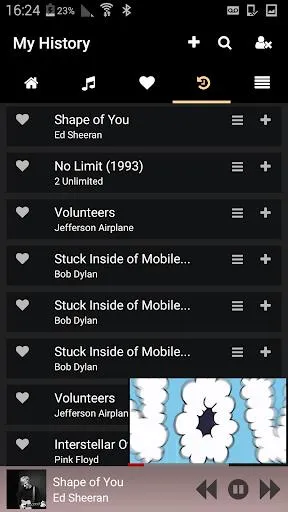
- History: Access your recently played tracks (i.e., your history).
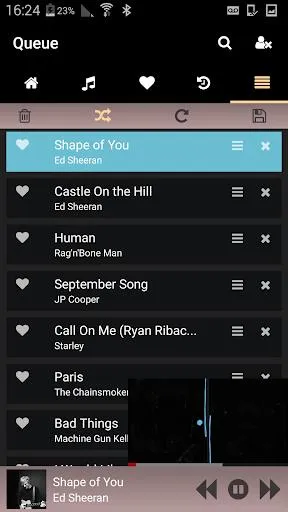
- Listening Queue: Manage your dynamic, real-time listening queue.
- Search: Search for keywords and get tracking results.
- Share: Share your favorite playlists and songs with friends.
This app is designed for content lovers, integrating all your favorite streaming services into an easy-to-use platform. With StreamSquid, you can explore a vast library of movies, TV shows, and live events, ensuring you don't miss any of the latest entertainment.
Its user-friendly interface allows you to easily browse various genres, create personalized watchlists, and get tailored recommendations based on your viewing habits. Enjoy a smooth, high-definition streaming experience, say goodbye to buffering, and take advantage of features like offline viewing to enjoy your favorite shows anytime, anywhere.
Share your thoughts and recommendations with friends, or explore what others are watching to stay connected. Whether you're a binge-watcher or looking for new entertainment, StreamSquid makes it easy to enjoy your favorite shows.
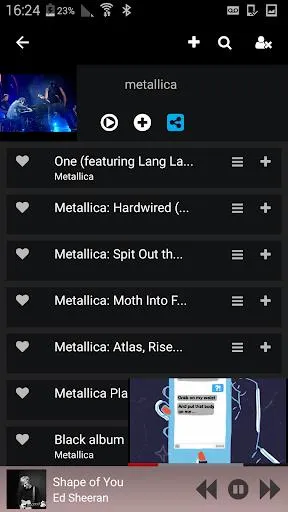
Explore Popular Playlists: Discover new music with the Explore Popular Playlists feature. StreamSquid offers recommendations for the latest playlists, giving you the opportunity to expand your musical horizons.
Customize your private playlists: Create personalized collections using the private playlist feature. You can add songs to existing playlists or create new ones to customize your music library according to your mood and preferences.
Save your favorite songs: Use the collection feature to save your favorite songs to a dedicated area. This way, you can easily access them at any time and create a playlist of your favorite songs.
Manage your playlists: Take control of your listening experience by efficiently organizing your playlists. This app supports dynamic management of your playlists, ensuring seamless transitions between songs and smooth music playback.
How much storage space does StreamSquid require?
Please reserve at least 5.6 MB of space, and an additional 100-500 MB for smooth updates and cache management after installation.
What are the system requirements for StreamSquid?
Your device must be running Android version 4.4 or higher (first released around October 2013). If your phone is not compatible, you can download an older version of the application.
How long will the download take?
The StreamSquid installation package is 5.6 MB. Download time may vary depending on your network connection. Typical speeds are as follows: - 4G: 30-100 MB/s - 5G: 170-400 MB/s - Wi-Fi: 50-500 MB/s.
Why did the download or installation fail?
The most common reasons for download or installation errors include: 1. Insufficient device storage space; 2. Device incompatibility; 3. Poor network connection.
StreamSquid is an excellent music streaming application that offers personalized playlists, private playlist management, favorites, history, real-time play queues, and powerful search functionality. With its clean and easy-to-use interface and ad-free experience, you can easily enjoy your favorite music and share your musical discoveries with friends.
Size:5.6MB Version:3.8
Requirements:Android Votes:76
Dive into this comprehensive hub of music applications designed for every type of listener. Stream global hits, craft custom playlists tailored to your mood, or uncover hidden gems across diverse genres-all with intuitive, high-quality platforms. Discover both industry-leading streaming services and specialized apps offering exclusive features like AI-powered recommendations, social sharing, or advanced audio customization. Whatever your musical preference, find the ideal app to enhance your listening journey with effortless discovery and premium sound.
In today's digital era, music enthusiasts seek platforms that provide vast music libraries, high-quality audio, and seamless accessibility-all without subscription fees. Our curated selection of free music streaming apps delivers the perfect blend of variety, performance, and convenience, ensuring every listener finds their ideal soundtrack. Whether you're exploring new genres or enjoying timeless classics, these apps offer an unbeatable listening experience at no cost.
Music Player is a tool designed to play audio files, available as both software applications and dedicated hardware devices. It can be installed on electronic devices like smartphones, tablets, and computers, allowing users to stream or play locally stored music in various formats. Additionally, standalone hardware devices, such as MP3 players and digital audio players, are specifically built for high-quality music playback. Many modern music players support advanced features like equalizers, playlists, offline playback, and streaming service integration, enhancing the overall listening experience.
About us | Contact us | Privacy policy| DMCA
Copyright © 2026 Xiaohei All rights reserved.