Play your Steam games on any Android device with Steam Link, the official Valve app for Android. That being said, it's basically a streaming tool, so you'll need a PC running the game for the app to function. Steam Link simply mirrors your computer screen to your Android device, so you have to pair your device to a computer with an installed Steam client to use the app, as well as a high speed WiFi connection, and if possible, a wired internet connection to your PC. Thanks to the Valve controller's latest firmware update, you can a pair a Steam Controller to your smartphone and use to play games on Steam Link, but you could use any bluetooth control system. Although mouse clicks are replaced by tapping on the screen, games that require a joystick require a physical controller. Play all your favorite steam titles away from your PC with the interesting app Steam Link, that has basically all the same features as the hardware it's named after.
Desktop gaming on your Android device: The Steam Link app allows you to enjoy your favorite desktop games on your Android device, bringing the immersive gaming experience right to your fingertips.
Easy controller pairing: Simply pair a Bluetooth controller or the Steam Controller to your Android device to seamlessly control your games and navigate through the interface.
Seamless connection to your computer: Connect to a computer running Steam and start playing your existing Steam games without any hassle. The app ensures a smooth and uninterrupted gaming experience.
Optimal performance with Android TV: For the best performance on Android TV, connect your computer and Android TV using Ethernet to your router, ensuring a reliable and fast connection for lag-free gaming.
Superior performance on tablets and phones: To achieve the best performance on tablets and phones, connect your computer using Ethernet to your 5Ghz WiFi router. Additionally, connect your Android device to the 5GHz band of your WiFi network, guaranteeing a stable and high-speed connection.
Stay within range for optimal experience: Keep your Android device within a reasonable range of your router to maintain a strong signal and enjoy uninterrupted gaming sessions.
Basically, the way Steam Link works is simply to support the transfer of images from computers to other devices over the internet. Therefore, users still need a computer with a high enough configuration to be able to experience all the games on Steam stably. At the same time, users can also use the connected device to control the game.
Besides, if you want to use Steam Link most effectively, you must meet certain requirements from the application. Typically, your device needs to be connected to a high-speed internet connection or Wifi with the 5GHz band.
As mentioned above, Steam Link is an application to stream from PC to other devices, not an application that allows you to play games directly from Steam. So users will have to start Steam on both PC and the Steam Link app on the supported device simultaneously. After completing the above steps, you just need to choose to connect immediately or search for the PC that is being used with the internet connection. Don’t forget to connect external devices like MFi or Steam Controller to make gaming even better.
Not only does it support Steam connectivity for mobile devices, but Steam Link also supports newer Chromebooks and Pixelbooks, or devices with larger screens like Android TV. Experiencing the game on many different platforms will give players new moments of enjoyment that PCs can’t have. In addition, publisher Valve Corporation will add many other supporting devices in the future to expand the cross-platform gaming experience.
In addition, users can also stream games at default 1080p quality on any device they want. If you want the resolution option to suit your needs, please visit Streaming Settings to adjust immediately. Depending on the requirements from Steam Link’s system, you should meet on the right devices to get the best gaming experience.
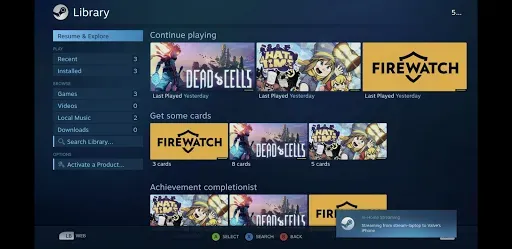
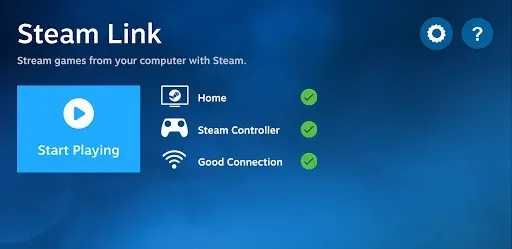
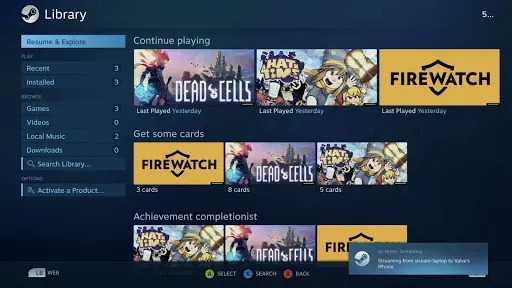
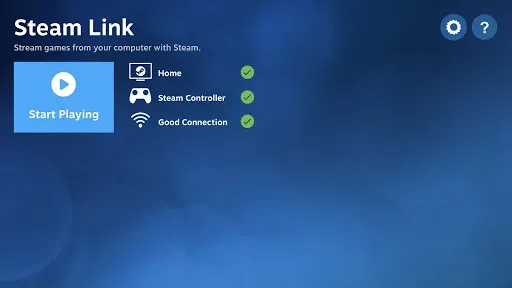
Steam Link’s interface design has a certain similarity with Steam to help users get acquainted from the first time. Most of the icons and main features are arranged in intuitive positions on the screen to bring certain convenience. Accordingly, the transition effect in the application also ensures the necessary smoothness, enough for you to feel the steady movement of the details in the game. In general, if you are a person who regularly plays games on Steam, you will not be too unfamiliar with the interface of this application.
Invest in a Bluetooth Controller: While touchscreen controls can work for casual games, a Bluetooth controller will enhance your gaming experience significantly. Consider investing in a quality controller for precise and comfortable gameplay.
Optimize Your Network: To maximize performance, it's crucial to have a stable and fast network connection. Connect your computer and Android device using Ethernet cables or ensure a strong 5GHz WiFi connection for the best gaming experience.
Keep Your Android Device Close to the Router: To minimize latency and maintain a stable connection, it's advisable to stay within a reasonable range of your WiFi router. Avoid areas with weak signals or obstacles that could interfere with your connection.
Steam Link is a mobile application that allows users to stream their existing Steam games to their Android devices. This app makes it possible for gamers to enjoy desktop gaming on their smartphones and tablets, providing a seamless connection to a computer running Steam. By downloading Steam Link, users can enhance their gaming experience by accessing their game library from virtually anywhere within their home network. The app supports various controllers, including Bluetooth controllers and the Steam Controller, allowing for flexibility in how users choose to play. This compatibility with different input devices ensures that gamers can find a control scheme that suits their preferences. Once the app is installed, users can easily pair their controllers to their Android device, creating a straightforward setup process that gets them ready to play in no time.
Size:117.79MB Version:1.3.15
Requirements:Android Votes:542


Meet Game BOX — your all-in-one game hub! Explore action, RPG, strategy, and more. Find games quickly, download fast, and play seamlessly on mobile. Simple, safe, and packed with top-rated titles. Perfect for gamers everywhere.
Utility apps are indispensable in our lives, making our daily routines more convenient. To help you find these apps more easily, this site has created a collection. This collection brings together a series of practical tools covering various aspects of life, work, and education, meeting all your needs. What are you waiting for? Try these apps now and make your life easier!
Transform your mobile device into a powerhouse of efficiency with these handpicked essential tools. Whether you need professional-grade photo editing, seamless file organization, smart task management, or real-time weather updates, our curated selection of premium apps delivers unbeatable performance. Streamline your daily routine, automate repetitive tasks, and boost your productivity with intuitive interfaces and powerful features. Designed for both professionals and casual users, these editor-approved applications will revolutionize how you work and play. Don't settle for an ordinary phone - upgrade your digital experience today and unlock your device's full potential!
About us | Contact us | Privacy policy| DMCA
Copyright © 2026 Xiaohei All rights reserved.