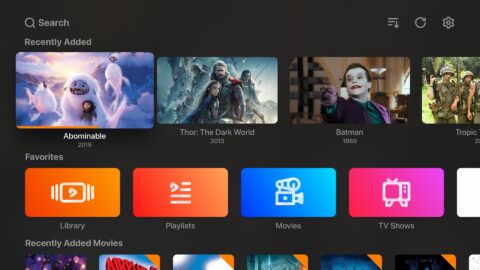
Smarters Player Lite is a powerful video player that allows users to import movies and TV shows from various platforms. Its powerful video decoder ensures a smooth and high-definition viewing experience. The software offers a wealth of customization options, allowing users to adjust playback speed, volume, and picture quality, as well as filter inappropriate video content, thus providing a healthy viewing environment for children. The software is also compatible with TV remote controls; after pairing, users can control playback via the remote.
Play your own content: Smarters Player Lite lets you stream Live TV, Movies, Series, and Radio from your own provider. You can also open local audio and video files stored on your device. Therefore, you can keep all the viewing in one place.
Flexible login and playlists: Smarters Player Lite supports Xtream Codes API, M3U and M3U8 links, single stream URLs, and local playlist files. You can also choose external players when needed. This flexibility makes setup quick with most providers.
TV guide and catch-up: Smarters Player Lite reads an electronic program guide and also supports external EPG sources. You can enable TV Catch Up where your provider offers it. As a result, you can browse schedules and replay eligible programs.
Better watching flow: Smarters Player Lite keeps your place with Continue Watching and an episode resume bar. It can auto next to the following episode in a series. In addition, you can adjust the buffer and choose the built-in player or an external player.
Profiles and parental controls: You can create multiple user profiles for households and guests. Smarters Player Lite includes parental controls to restrict content by category or profile. This helps you manage what younger viewers can access.

Customize your IPTV experience: Before you start using Smarters Player Lite on a regular basis, it is advisable to browse all the configuration options. You can adjust the color of the image, disable the subtitles by default, set parental controls and change the time format. You can also schedule stream recordings or have the app launch automatically when you turn on the device (especially useful on Android TVs).
Powerful IPTV app with everything you need: Download the Smarters Player Lite APK and start watching TV on your Android device instantly. Setting up the app is as simple as adding an m3u playlist. And finding a playlist for Smarters is as simple as carrying out a quick search on any search engine. A simple, lightweight and powerful app, thanks to which you can stream all the multimedia content you want, directly from your Android device.
Live TV, series and movies: You will know if you have correctly entered the URL of the playlist as you will see a screen with different options: Live TV, Movies and Series. If you choose the first button you can access the complete channel list. From the left-hand column, you can easily filter channels by category or, if you prefer, search directly for your favorites. Just hit the logo of a channel to start playing it. When streaming, as you might expect, you will have all the usual tools at your disposal: volume controls, subtitle activation, pause, and so on.

Well been using this for quite some time now. And when I do use it on the phone it workswell. I have a IPhone 15 Pro Max. All though most of the time I am watching on my 65inch with the app through the TV as I have downloaded the app to the actual TV. Workswell enough. Screen is a LG Model. Just always remember we are using something thattechnically we should Not be able to use in the first place. And you would show betterappreciation for its quirks when they arise. When it comes to using on my phone it worksdecent . I just usually use the adapter that plugs into the IPhone and the other has HDMIand a position for a charger in which you can plug to be charged and get power. And youout the HDMI to the Screen you are watching . Best way . Cast is Ok to use but wiredwould be best way . And Do Not forget. Although you can watch on different devices thatyou choose to watch it on. Unless you Pay to watch it on More Than 1 At A Time. YouCannot watch it on More Than 1 or Multiple at The Same Time. Do Not Forget that. Onlything I seem to Not be able to resolve is the Black Screen Bars at the Top and Bottom ofthe screen when using IPhone 15 Pro Max out to TV using my adapter as I mentioned.Even though I push to resize Screen it Does Not get rid of those 16:9 Wide Screen BarLines. Doesn't bother me much since I have learned to just except it. If it was like that onmy Big Screen at home when I use the app installed on my TV then we would have aproblem. But No Complaints from me I'm all Eyeballs when watching ;-) And appreciatebeing Able to do what I can do. That's all for now . Download Already and respect thequirks ..
I really live this player. All its features are nice and I can't wait until we are actually able topurchase through the app for the premium features (I'm on Iphone 13 pro max and Ican't)Also they could implement the update button in a all in one button, meaning onceyou click it, it will update no just the lists but EPG as well, and of course if possibleimplement a auto update feature maybe for premium users? (Not sure how much or thatwould be possible)In general this is the best Iphone app for streaming xtream codes.

Can I watch live TV using Smarters Player Lite?
Yes, you can stream live TV channels using the app when you provide compatible IPTV subscriptions.
Does Smarters Player Lite support external players?
Yes, you can integrate external media players to enhance your streaming experience within Smarters Player Lite.
How do I set up Smarters Player Lite?
To set up Smarters Player Lite, download the app, enter your IPTV credentials or M3U link, and start streaming.
Can I use Smarters Player Lite on multiple devices?
Yes, you can use Smarters Player Lite on multiple devices as long as you manage the account logins accordingly.
Is there a customer support option for Smarters Player Lite?
Yes, WHMCS Smarters provides customer support for issues related to the application through their support channels.
Smarters Player Lite supports multiple ways to bring in content, including M3U playlists, playlist URLs, and Xtream Codes API, plus local file playback. Once your sources are added, the app is designed to cover common IPTV-style categories such as Live TV, movies, series, and radio, while keeping the core experience centered on playback rather than content discovery.
Size:30.2MB Version:5.1
Requirements:Android Votes:524
Package Name:com.nst.smartersplayer Signature:6457b5be36a396d6f986ff15e9d515c297d3bfac


Looking for Apps to download movies for free? DigitBin is here to assist you. Android, being an open-source platform, has given developers the power to develop some of the cool Apps that make the life of the netizens easier. Developers create unofficial media apps for downloading or streaming movies and TV shows on different devices. However, Google doesn’t allow these apps on its Play Store because they violate its policies. Still, you can freely install these apps on an Android phone from unknown sources. DigitBin has listed some of the best apps to download movies directly on Android. Most of these Apps do not store the movies on their web servers but search web directories to stream the movies and TV shows online. Today in this post, I will tell you about a few of the best Android Apps to download and watch HD movies on your mobile.
Free Cinema streaming apps offer various films and TV shows at our fingertips, catering to film enthusiasts, casual viewers, and budget-conscious streamers alike. These apps have become increasingly popular because they allow users to access a wide range of content without a subscription fee. Whether you’re looking for free movie streaming apps for Android, iPhone, PC, or smart TVs, every device has an option. This article will explore the best legal free movie streaming apps in 2024, helping you find the perfect platform for your viewing needs. Unlike free trials from amazon prime or netflix, these sites directly allows you to watch movies for free either after signup or without registering on their site/app.
In today’s so many social platforms have emerged, saving videos and photos for sharing content from one platform to another has someone become cumbersome. Then are some who still prefer to download music videos and funny videos for offline viewing to watch content without an internet connection, video downloaders offer a convenient solution. However, it’s crucial to be aware of the potential legal implications surrounding downloading copyrighted material. Always ensure you are downloading videos for personal use and respect copyright laws. This article explores 10 of the best free video downloaders currently available, designed to help you efficiently save videos from platforms like Instagram, YouTube, Facebook, X (formerly known as Twitter), and more.
About us | Contact us | Privacy policy| DMCA
Copyright © 2026 Xiaohei All rights reserved.