KillApps is a practical utility application. It includes a variety of useful tools, such as a task manager, a convenient speed-up tool, a power-saving mode, and a CPU cooler, providing users with efficient task management. With KillApps, you can automatically close all open applications, enhancing your device's memory cleanup capabilities and helping it run at its best. Besides closing applications, it can also close other services and tasks running in the background. Furthermore, this application offers a user privacy protection system, collecting no personal information and only requiring specific memory operation access permissions, thus ensuring your device's security.
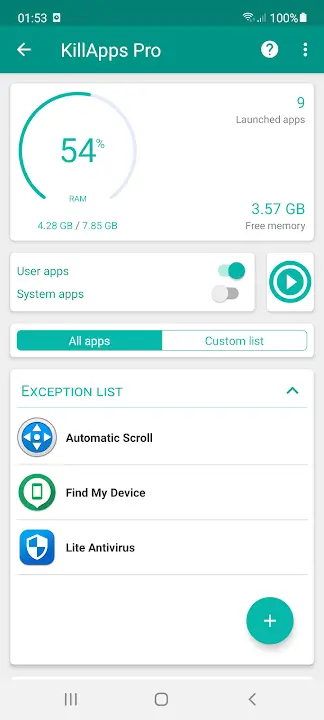
Memory-cleaning capabilities: It is designed to enhance your device's memory-cleaning capabilities, helping it operate in its most efficient state. By eliminating unnecessary background applications, it frees up resources and improves performance.
Efficient task management: In addition to closing applications, it can also close other services and tasks running in the background. This ensures a more thorough cleaning process, removing unnecessary parts that slow down your device and hinder performance.
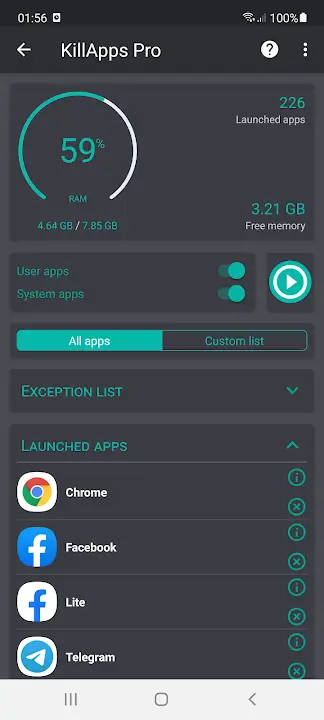
Clipboard monitoring: It allows you to monitor activities in the clipboard, tracking applications and services running in the background and the space they occupy. This feature enables you to identify and eliminate unnecessary parts, making room for more important tasks.
User privacy protection: It respects user privacy and does not collect any personal information. It only requires specific access permissions for memory operations, ensuring the safety of your device. The app also provides recommendations on what to turn off, preventing accidental interference with crucial system tasks.
Close all background apps in one tap
Killapps - Close Running Apps can terminate open background tasks with a single action. This frees up RAM and CPU time so the device can focus on the apps you are actively using. It is useful after gaming sessions or long days of multitasking.
Selective control over what to close
You can choose individual apps to close instead of ending everything. This gives you fine control when you only need to stop a few items that misbehave. Therefore, you keep important tools active while removing what you no longer need.
Performance boost for smoother use
By releasing memory and reducing background load, Killapps - Close Running Apps helps reduce lag during scrolling, switching, and launching apps. In addition, fewer active processes can shorten app load times and help avoid freezes on older devices.
Battery saver through reduced background activity
When unneeded apps stop running, they stop waking the device and using power. As a result, Killapps - Close Running Apps helps extend battery life during the day. This is helpful on trips or busy days when charging is not available.
Supports user apps and certain system apps
Killapps - Close Running Apps can act on user installed apps and, when allowed by the device, on some system components. It also includes RAM monitoring so you can see the impact of closing tasks. Furthermore, it remains light on resources while it works.
Accessibility automation and helpful for physical disabilities
The app uses the Android Accessibility Service to automate closing steps one by one. This avoids manual taps through system screens and can assist users with physical disabilities who find repeated actions difficult. It also keeps the workflow consistent across different apps.
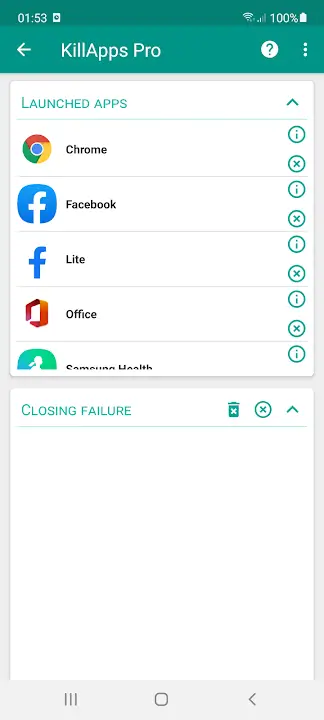
Backs up apps: In addition, it can also help users retrieve information or apps that they have accidentally deleted before.
Saves time: This is partly so we can get the necessary information that was lost and on the other hand, it also helps us save time when we don’t need to re-download the deleted app again.
Uninstall apps: With this app, we can track all the other apps we are using and take reasonable actions such as uninstalling them.
Detailed app info: In addition, it also shows some basic parameters that other apps are using such as its memory or the RAM it will use when starting up.
How do I close open running apps?
Open Killapps - Close Running Apps, grant Accessibility Service, then tap Close All to end background tasks automatically. The tool navigates through system screens and closes apps one by one. You can also review the list and choose specific items if you prefer.
How do I close an app that is still running?
In Killapps - Close Running Apps, locate the app in the running list and select it to close. The Accessibility Service performs the required taps for you, which removes the need to open system settings manually. This helps when a single app keeps working in the background.
Will Killapps - Close Running Apps speed up my phone?
Yes, closing background tasks can free RAM and CPU, which helps reduce lag and improves responsiveness. Killapps - Close Running Apps focuses on this process and keeps its own resource use low. Results vary by device, app load, and how many tasks are running.
KillApps is a very practical app, from a single glance you get a full overview of each app installed on your terminal, as well as information about how much space they're taking up and their installation date, so you can improve your device performance in seconds flat.
Size:10.4MB Version:1.57.9
Requirements:Android Votes:291
Package Name:com.tafayor.killall Signature:37925d09e0dffd744d79701b23ca84a1b8281433
Transform your mobile device into a powerhouse of efficiency with these handpicked essential tools. Whether you need professional-grade photo editing, seamless file organization, smart task management, or real-time weather updates, our curated selection of premium apps delivers unbeatable performance. Streamline your daily routine, automate repetitive tasks, and boost your productivity with intuitive interfaces and powerful features. Designed for both professionals and casual users, these editor-approved applications will revolutionize how you work and play. Don't settle for an ordinary phone - upgrade your digital experience today and unlock your device's full potential!
With the development of mobile hardware and software, many practical tool software have emerged, covering a wide range of aspects and becoming a good helper for everyone in work and life. Today, the editor provides you with a list of useful tool software downloads. These tools are not particularly complex types, and after reading them, everyone can quickly learn how to use them. Proper use can bring great convenience to life and work.
About us | Contact us | Privacy policy| DMCA
Copyright © 2026 Xiaohei All rights reserved.