Router Chef is a mobile tool designed for routers. Users can easily display various WiFi devices and passwords, and freely control the maximum number of connected devices and network speed to meet personalized usage needs. Users can freely control the network signal strength, and it not only displays network usage for different dates but also supports factory reset, allowing users to gain a better understanding of their router's status. The software has a real-time online customer service team, providing feedback on any issues or suggestions users may have, ensuring a worry-free user experience.
Quick Wi-Fi Setup: Change your Wi-Fi name and password in just a few taps—no tech jargon or chasing down manuals required.
Connection Limits: Set how many devices can connect to your network and even cap internet speed for your Wi-Fi—perfect for avoiding sluggish connections or keeping things focused.
Signal & Usage Insights: View how strong your Wi-Fi signal is, check your daily internet usage, or dig into stats from a specific date.
See Who’s Online: Instantly find out which devices are currently tapping into your Wi-Fi. It’s surprisingly satisfying to know who’s lurking on your network.
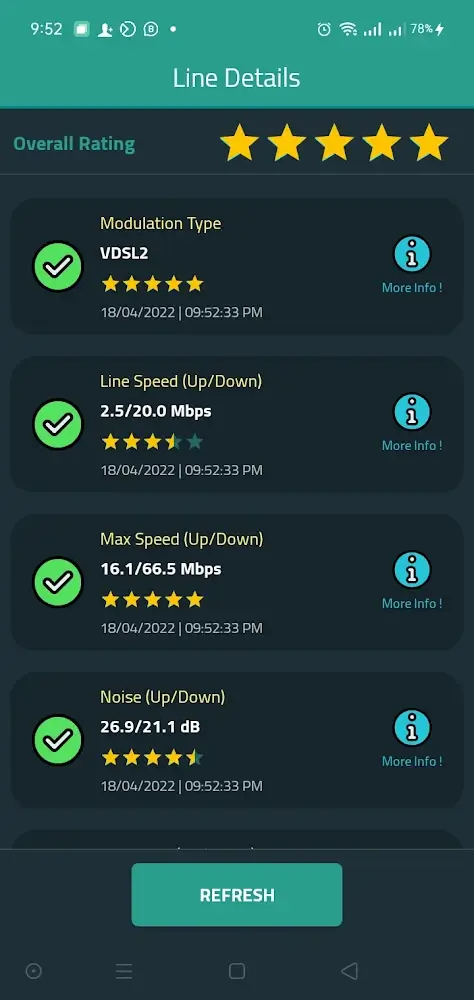
DSL and ISP Tools: Access technical details about your DSL line and easily set up your router again after a factory reset, including configuring things with your ISP account.
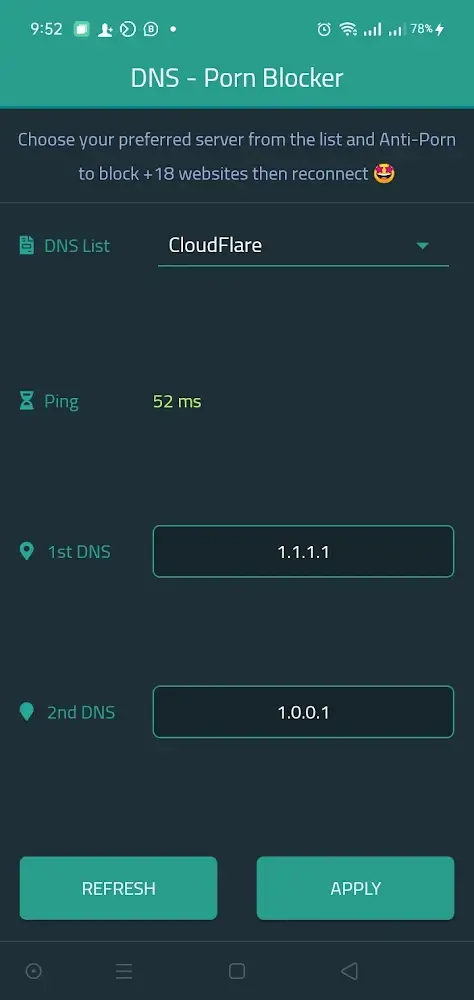
Safety Controls: Quickly switch your DNS settings, including some built-in anti-porn options if you want extra peace of mind for your home network.

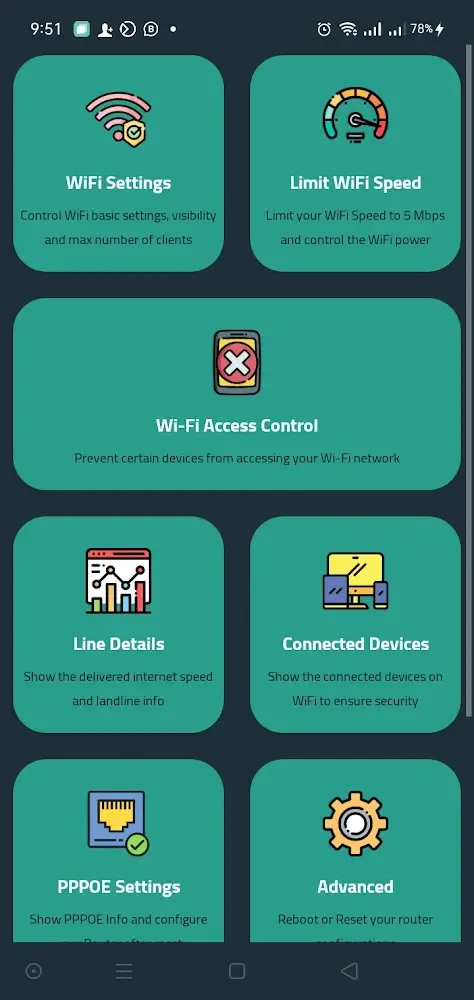
Show router settings: Before starting to use Router Chef, the user needs to provide the application with some important information in order to connect to the router. The requested information includes the router’s IP address, account name, and password. Most of this information is provided by the internet service provider. You just need to enter it to be able to connect to the application immediately. After successful login, the main screen will show some settings related to wifi and router. Basically, you just need to touch the appropriate icons to be able to use the function you want immediately.
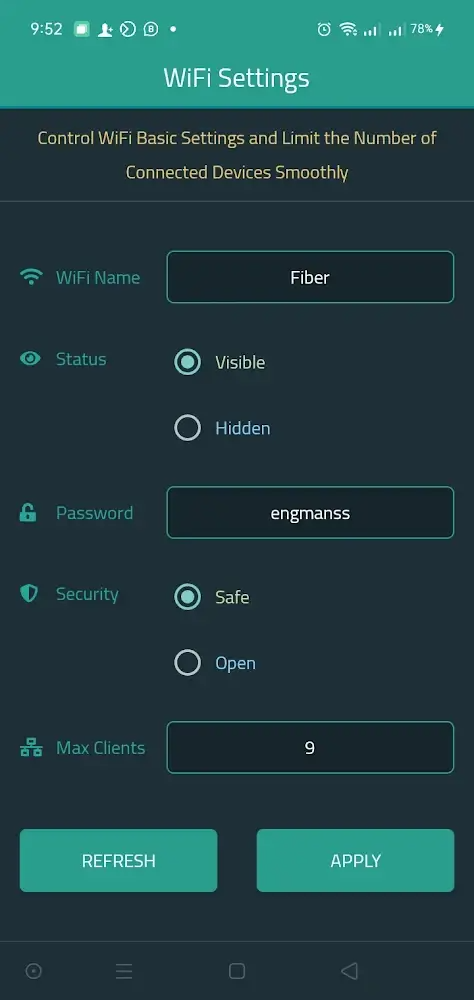
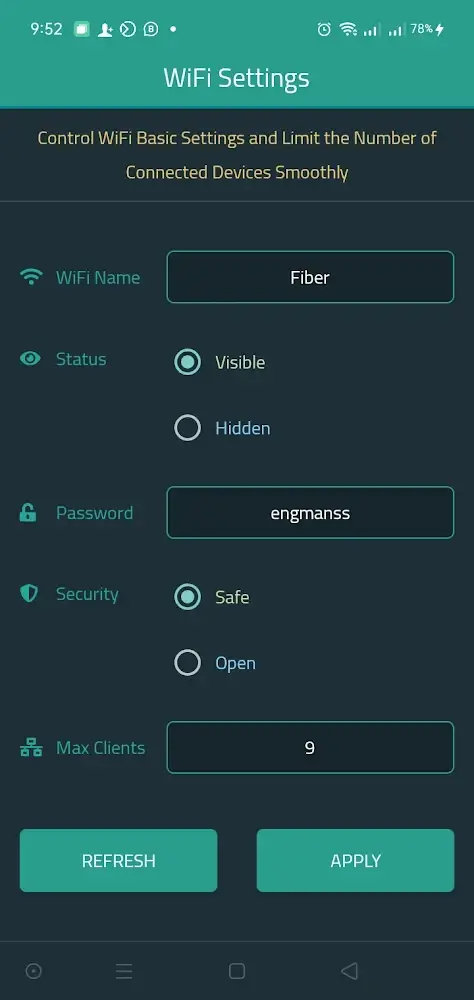
Edit parameters: By clicking on the wifi settings section, users can control some basic settings of the router. Here, you will see changeable categories such as wifi name, active status, password, security, and a maximum number of connected devices. All of the above parameters can be changed according to the needs of the user to provide a better experience.Typically, you can change the name of the wifi to avoid being recognized by others, or limit the access device to always keep the fastest internet connection speed. After completing the changes, you just need to click the Apply button to save all the settings immediately. Overall, the way Router Chef works are relatively simple. With just a few basic steps, you can change most of the parameters for your router.
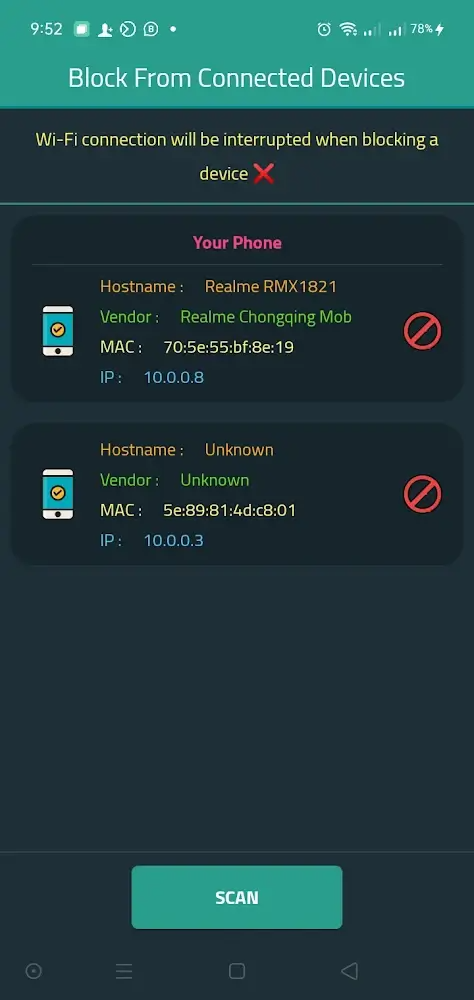
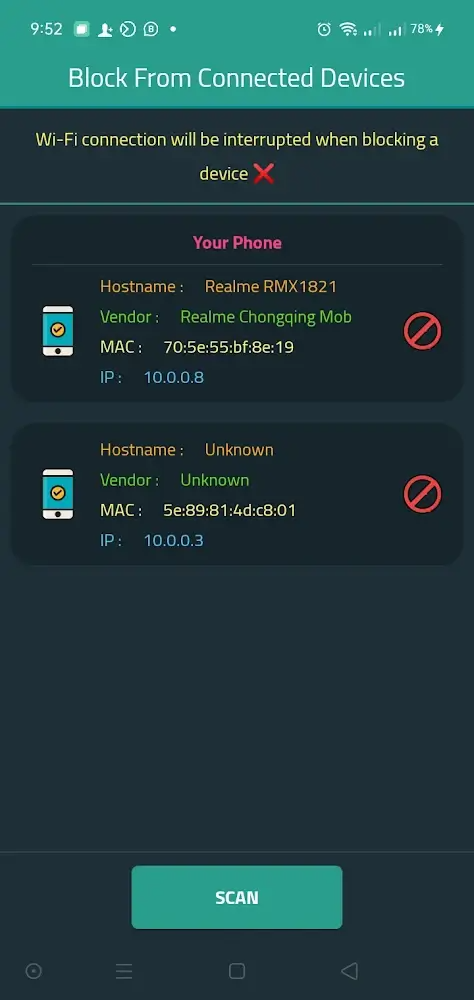
Show important information: Router Chef not only provides intuitive settings but also provides important information regarding router stats. From these parameters, you can understand the information and make more appropriate adjustments. Besides, the devices that have been and are connected to the router are also visually displayed on the screen in real-time. There are three addresses that you should care about to distinguish devices from each other, including Host, Mac, and IP. Each address on each device will have different information. So it will be easier for you to control the devices connected to the router.
The application is more than wonderful and the user interface is very distinguished, but I think that the application needs some stability and speed in executing commands. I also think that there is a problem with the feature of blocking callers because I tried it with a Samsung phone and it did not work Optimally so, I hope to fix the bug, except this is a more than excellent application, keep working.
Splendid prog. To handle the main functions of yr router without loading the router page. Also it gives basic info. About yr data line and empowers u with rhe ability to limit the data speed to preseeve the bandwidth as much as it can be...
it looks really good but for me it needs one more thing which is "parental control" where i switch on & off the internet for the family without the black list.. thanks in advance.
This app is amazing, it provides multiple multiple capabilities that I can do to manage my router in few seconds whatever my touter model is. It helps me a lot to protect my family and manage my data usage throughout the month.
What I like it so much is the idea. Definitely this app will not cover all options in each software of each router; but to make the non-experienced user to do this control feature by his own, this is the wonderful idea.
Can Router Chef improve internet speed?
Yes, optimizing router settings using Router Chef can potentially improve internet speed by reducing network congestion and optimizing channel settings.
Is Router Chef safe to use?
Yes, Router Chef is safe to use. It does not access any sensitive information other than router settings, and it provides recommendations that can enhance router security.
Does Router Chef provide customer support?
Yes, Router Chef users can access customer support through various channels such as email, online chat, and a knowledge base of frequently asked questions.
Can Router Chef be used by beginners?
Router Chef is designed to be user-friendly and can be used by beginners. The step-by-step instructions make it easy for users to apply recommended optimizations.
Does Router Chef work on mobile devices?
Router Chef is primarily designed for desktop use, but there may be mobile applications available for certain platforms to provide basic functionality on smartphones or tablets.
WiFi’s ability to quickly and easily connect various electronic devices to the internet has made it an integral part of modern life. To use WiFi, you must optimize your router settings for the fastest possible wireless connection. On the other hand, sometimes you have trouble managing your router and making the necessary adjustments to your WiFi data. This is also when Router Chef maximizes efficiency when taking full advantage of its powerful features.
Size:12.6MB Version:2.2.15
Requirements:Android Votes:208
Transform your mobile device into a powerhouse of efficiency with these handpicked essential tools. Whether you need professional-grade photo editing, seamless file organization, smart task management, or real-time weather updates, our curated selection of premium apps delivers unbeatable performance. Streamline your daily routine, automate repetitive tasks, and boost your productivity with intuitive interfaces and powerful features. Designed for both professionals and casual users, these editor-approved applications will revolutionize how you work and play. Don't settle for an ordinary phone - upgrade your digital experience today and unlock your device's full potential!
With the development of mobile hardware and software, many practical tool software have emerged, covering a wide range of aspects and becoming a good helper for everyone in work and life. Today, the editor provides you with a list of useful tool software downloads. These tools are not particularly complex types, and after reading them, everyone can quickly learn how to use them. Proper use can bring great convenience to life and work.
About us | Contact us | Privacy policy| DMCA
Copyright © 2026 Xiaohei All rights reserved.