WiFi FTP Server is an outstanding file transfer utility that helps users easily and quickly transfer large files, making file backups easier. The application presents a convenient, lightweight file transfer assistant for a wide range of users. Users can easily enable it through a simple and intuitive interface, experience excellent customizable transfer settings, and enjoy superior encrypted session protection. It supports use in standard WiFi and hotspot modes. The application supports a wide range of file types, making your file transfer work more efficient.
Quick Setup and Use
Connect your phone to a WiFi network and open the application.
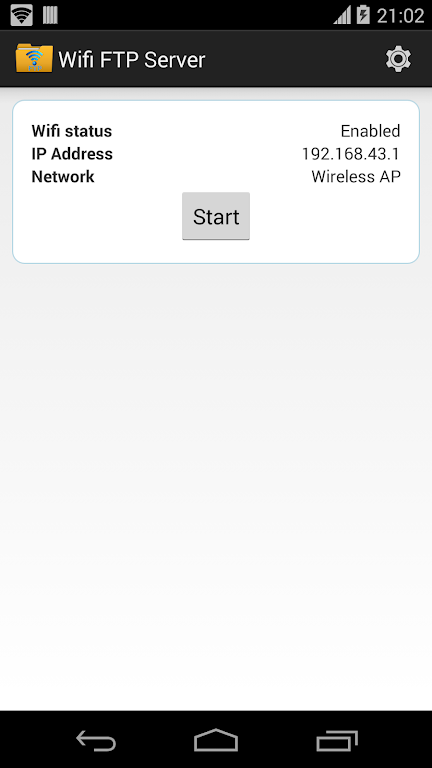
Tap “Start” to run the server.
Enter the server address in an FTP client or Windows File Explorer to transfer files.
Secure Transfer with FTPS
WiFi FTP Server supports encrypted FTP sessions via TLS or SSL. When using FTPS, the server address begins with ftps:// instead of ftp://. SFTP is not supported, so if you require encryption, please use an FTPS-enabled client.
Configurable Access Permissions and Folders
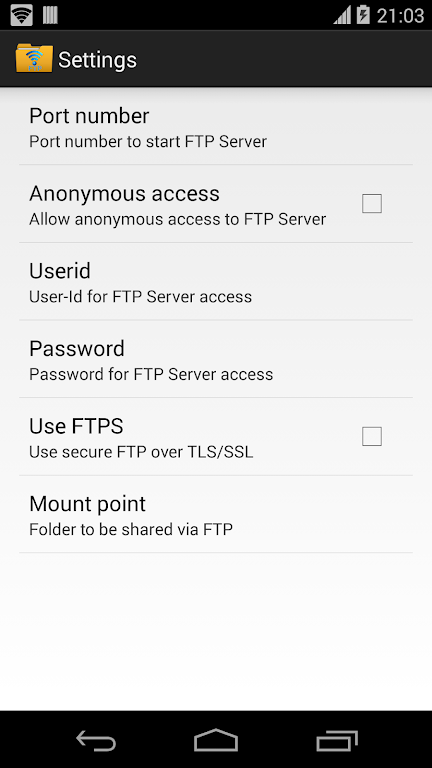
Set a custom port. The default port is 2221. Please use a port greater than 1024, as port 21 cannot be bound on unrooted phones.
Create a username and password. Anonymous access is off by default; it can be enabled in settings.
Select a home folder. On Android 5.0 and later, open Settings, tap Mount Folder, select Custom, and then select External SD Card.
Works on WiFi and Hotspots
You can run the server on a standard WiFi network or hotspot. This is very useful when the router is unavailable but you still need to access local files.
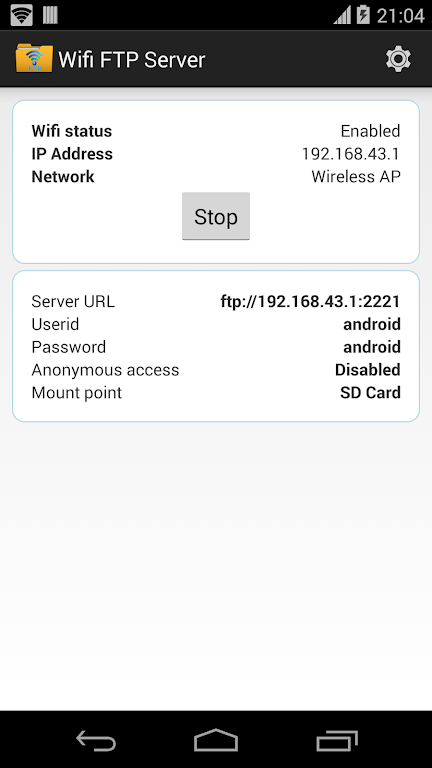
Configure the FTP server using a configurable port number.
Supports TLS/SSL-based FTP (FTPS)
Configurable Anonymous Access
Configurable Home Folder (Mount Point)
Configurable Username/Password
Avoid using USB cables to transfer files; instead, copy/back up files via Wi-Fi.
It works via wireless network and wireless network sharing mode (hotspot mode).
Pros
A free Android utility from Medha Apps that turns your device into a personal FTP server.
It works with standard FTP clients and Windows File Explorer on PCs.
It allows you to share internal storage, external storage, or specific folders for enhanced privacy.
It's very easy to use, even for users with limited technical skills.
It supports TLS/SSL and password protection for a more secure connection.
Wireless transfer speeds feel comparable to wired connections.
The free version has no annoying pop-up ads and offers an affordable pro upgrade option.
Cons
Your phone and computer must be connected to the same Wi-Fi network.
The interface looks rather basic and slightly outdated.
It doesn't seem to work via pure USB network sharing.
The feature set may be slightly insufficient for users seeking advanced file management tools.
This app has made transferring files easier, it's faster than transferring files over wire. With the ability to connect multiple FTP connections for file transfers, things go quickly. I've used this app on many of my devices, and I have never had issues. The app is also not cluttered with ads and is very easy to use. I will gladly pay for the premium version of the app when I can. Thank you for making such an amazing app.
4 Stars, an option to make a static IP would be nice, I use this to sideload apps to my firetv and having to redo the IP everytime isn't fun with a remote.. Otherwise great app works perfectly! Ahhh learn something new everyday and I'm OLD! lol thanks 5 stars! Update:Worked great , thanks Again!
Simple, yet powerful app! With cool customizable features– it's all you need in this free-to-use app! I was able to transfer my files wirelessly, or transfer them to my other devices using my own hotspot. Convenient, simple, and neat app. Here's a tip for you if it doesn't work: make sure you type the address correctly, and/or check if the other device is either connected to the SAME Wifi network or connected to you properly. If you know what you're doing, then we'd be in the same place!
In short, if you need to create an FTP server to transfer and manage files, WiFi FTP Server is a convenient, practical, and simple solution. It's easy to use and has multiple ways to connect to your devices. Just be aware of the limitations mentioned above, and you can use it with confidence. Try it now!
Size:10MB Version:2.4.3
Requirements:Android Votes:464
Package Name:com.medhaapps.wififtpserver Signature:75ed464c42348852dfd136cc53da5202b05d2b45
Utility apps are indispensable in our lives, making our daily routines more convenient. To help you find these apps more easily, this site has created a collection. This collection brings together a series of practical tools covering various aspects of life, work, and education, meeting all your needs. What are you waiting for? Try these apps now and make your life easier!
Transform your mobile device into a powerhouse of efficiency with these handpicked essential tools. Whether you need professional-grade photo editing, seamless file organization, smart task management, or real-time weather updates, our curated selection of premium apps delivers unbeatable performance. Streamline your daily routine, automate repetitive tasks, and boost your productivity with intuitive interfaces and powerful features. Designed for both professionals and casual users, these editor-approved applications will revolutionize how you work and play. Don't settle for an ordinary phone - upgrade your digital experience today and unlock your device's full potential!
With the development of mobile hardware and software, many practical tool software have emerged, covering a wide range of aspects and becoming a good helper for everyone in work and life. Today, the editor provides you with a list of useful tool software downloads. These tools are not particularly complex types, and after reading them, everyone can quickly learn how to use them. Proper use can bring great convenience to life and work.
About us | Contact us | Privacy policy| DMCA
Copyright © 2026 Xiaohei All rights reserved.