Azahar Emulator is an outstanding Nintendo game console emulator utility, providing players with a vast selection of Nintendo games, allowing you to relive the fun of classic action arcade games and enjoy top-quality graphics and performance. The application presents a powerful and easy-to-use game emulator program for a wide range of players, bringing you faithfully recreated classic games and experiences. Players can enjoy numerous excellent customization options to meet their flexible gaming needs. The application offers excellent compatibility, allowing you to explore a vast catalog of video games.
Multiple Configuration Options
Even if you can start playing immediately, you can configure Azahar at any time to optimize its performance on Android devices if you wish. In the configuration tab, you can choose the graphics API to use (default is OpenGLES), change the internal resolution at game startup (default is 400x240), and add texture filters to change the game's visuals. In the control settings, you can also customize the layout of all game buttons on your Android device's screen. You can even use a Bluetooth controller if you prefer.
Extensive Game Catalog
Azahar's compatibility list is not only incredibly comprehensive but also constantly updated. You can view all compatible games on the official website. The list also includes a search box for quickly finding any game you want. All games are displayed in one of the following states: Untested, Menu, Poor, Acceptable, Excellent, or Perfect. These states allow you to quickly determine if a ROM will function correctly. Contributing to the compatibility list is also very easy.
This emulator's primary goal is to replicate the Nintendo 3DS gaming environment, allowing players to enjoy many games originally designed for this handheld console. It prioritizes compatibility and performance, meaning popular 3DS games run with extremely high stability and very low latency. Regular updates help further expand the game library, ensuring new games also run correctly.
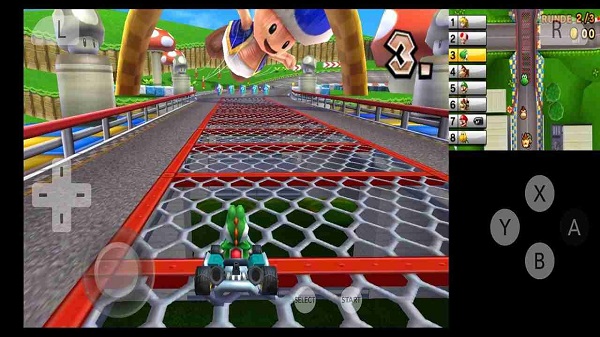
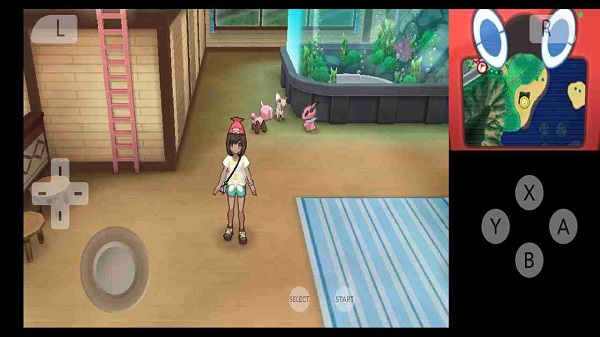
A major highlight of this application is its customizable control system. Users can adjust the screen layout to their preferences or connect an external controller for a more traditional control experience. It also includes convenient save and load functions, allowing players to pause their game progress at any time and resume later without restarting levels or missions.
General (Analog speed limit).
System (Profiles, Clock, 3GX Plugin Loader, and other options).
External and built-in cameras.
Front and rear button controls, circular buttons, C-stick, shortcut keys, etc.
Graphics (Renderer, Stereoscopic display, Cardboard VR, and Utilities).
Screen styles, as well as screen orientation and aspect ratio.
Audio (Input, Output, Volume, etc.).
Debugging.
The best 3DS emulator for Android EVERRRR!!!! It doesn't lag, it's easy to set up, compatible with Bluetooth controller... I have nothing to complain about this app. Thanks to it, I'm able to replay classics from my childhood, and I'm really happy to see that it works perfectly. If you want a good 3DS emulator to play your games without paying ANYTHING, that's the app you need!!
3DS emulation is a bit more difficult than I'd expected, so I'll have to set aside some time to do it- But that is absolutely no fault of this app, and it seems to have extremely handy info built in to help you get started. I would highly, HIGHLY recommend. When I get around to 3DS emulating, I know what I'm using.
Definitely the best 3ds emulator out there. I own a S23 ultra, about to upgrade to a 26 soon, but on the s23, I've had no issues. After tweaking the settings a bit, all my games run very smoothly. I'd definitely recommend this emulator to anyone with a high-end phone. Anyone else using a low-end phone that puts a one-star device here is just an idiot that needs upgrading, like the rest of the world. Keep up the good work.
Want to enjoy the Nintendo 3DS game library on your Android device? Then download Azahar's APK! This powerful emulator lets you experience many classic handheld games, including many 3DS exclusives. Even better, all operations are done through a simple and easy-to-use interface. If you have any questions, there are detailed FAQs on the official website, and many tutorials are available online.
Size:26.4MB Version:2123.3
Requirements:Android Votes:262
Welcome to our collection of game customization tools! These apps help you personalize your gameplay. You can access premium content, enjoy more in-game resources, or opt for an ad-free experience. Apps like Game Guardian and Lucky Patcher allow you to adjust game parameters. Just a heads-up, it's good to be mindful of the game's original terms of service. Feel free to explore and elevate your play, but always use them responsibly.
Meet Game BOX — your all-in-one game hub! Explore action, RPG, strategy, and more. Find games quickly, download fast, and play seamlessly on mobile. Simple, safe, and packed with top-rated titles. Perfect for gamers everywhere.
Utility apps are indispensable in our lives, making our daily routines more convenient. To help you find these apps more easily, this site has created a collection. This collection brings together a series of practical tools covering various aspects of life, work, and education, meeting all your needs. What are you waiting for? Try these apps now and make your life easier!
About us | Contact us | Privacy policy| DMCA
Copyright © 2026 Xiaohei All rights reserved.