Universal Copy is a unique and powerful tool. This application allows users to extract content from sources that prohibit copying, or from text embedded in images, in just a few simple steps. With Universal Copy, you can copy from a variety of sources, extract text from images, and recognize multiple languages. Whether it's a website, a locked document, or even a YouTube comment, say goodbye to traditional pen and paper methods and embrace this professional tool for copying text anytime, anywhere.
Copy text (including images) from the app inside any app (without allowing other apps to detect it)
Copy text and/or text from images in any application on your phone
Extract hashtags and links from any website
Harvest mode: automatically extract all entities that you encounter while you navigate
Select multiple pages/apps to extract texts on them all
Easily copy multiple times an address to multiple destination contacts at once
Copy from many apps
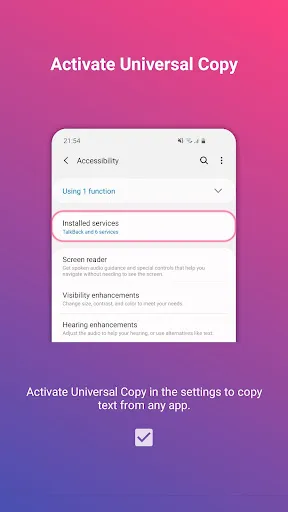
Universal Copy lets you select and copy text from applications that do not normally allow selection. In Normal mode, you trigger the overlay and tap the lines you want to capture. This gives you clean text ready to paste into notes, messages, or documents. It relies on the Android Accessibility service, which you need to enable in settings for it to work.
Extract text from images
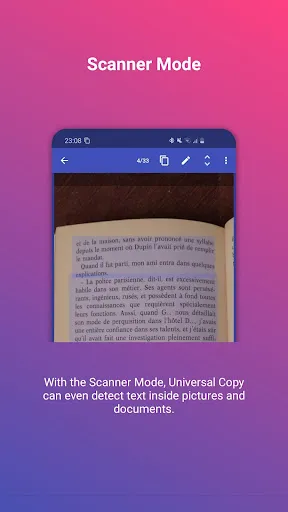
Use Scanner mode to read text inside photos and screenshots with OCR. It supports common character sets including Latin, Chinese, Devanagari, Japanese, and Korean. Results depend on image quality and clarity, so sharper images give better recognition. This is useful for copying text from posters, receipts, or diagrams.
Detect entities and act faster
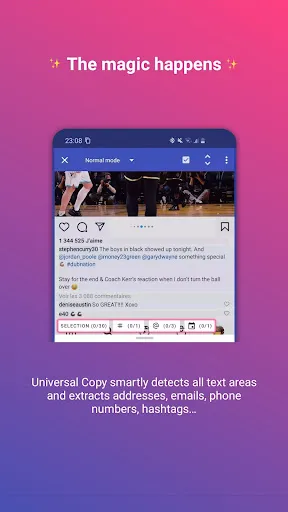
Universal Copy can identify addresses, emails, phone numbers, hashtags, and mentions in selected text. After detection, you can run quick actions in one tap such as translate, locate, or share. This reduces back and forth between apps and keeps your workflow simple.
Collect across screens
When content spans multiple pages, Scroll mode helps you select text from several screens or apps and copy it all at once. For ongoing browsing, Harvest mode captures detected entities as you navigate, so you can review and copy them together later. These options are helpful for research, lists, or bulk collection.
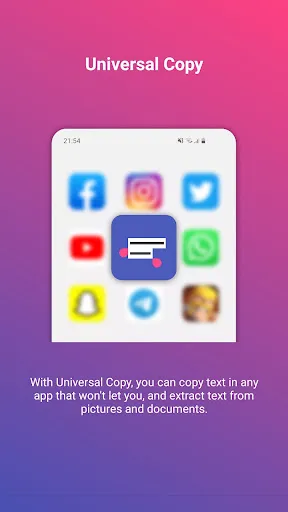
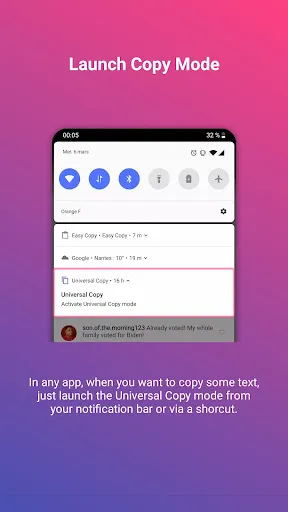
The primary function of Universal Copy is to streamline the text copying process. Users can activate the Universal Copy mode at any time, allowing them to select and copy text with ease. This feature is particularly useful in scenarios where the default long press action is ineffective, such as in certain apps that restrict text selection. With Universal Copy, users simply need to activate the mode, tap on the desired text, and it will be highlighted for copying.
Additionally, the app offers a feature known as OCR Mode, available through the Universal Copy Plus subscription. This mode uses optical character recognition technology to enable users to copy text from images or applications where standard copying is blocked. Currently, OCR Mode supports only Latin characters, allowing for a wider range of copying options in various contexts. Subscribing to Universal Copy Plus not only unlocks this functionality but also supports the developers of the app.
To utilize Universal Copy, users must first download the app and enable the accessibility service within their device settings. This step is crucial as it allows the app to access and recognize text displayed on the screen. Once the service is activated, users can navigate to any app from which they wish to copy text. By pulling down the notification drawer and selecting "Activate Universal Copy mode," the text zones that can be copied will be highlighted in light blue, making it easy for users to identify selectable areas.
v7.1.0
NEW: Scanner Mode now detects QR Codes.
Update to latest Android SDK (37)
v7.0.0
Update to latest Android SDK (36)
Implement Edge to Edge display
Bug fixes
Users are free to enjoy a fresh and eye-catching interface. Universal Copy has high security. They ensure that your information will be protected safely and not stolen by evil forces. The image and sound system of the application is extremely quality. They bring you extremely eye-catching and suitable documents for your needs. The application opens you up to many new and unique copy support features. Users have an extremely interesting and attractive copy space.
Size:35.1MB Version:7.1.0
Requirements:Android Votes:248
Package Name:com.camel.corp.universalcopy Signature:d23e351f4452810b1f14b7f0b988a6a095350515
Utility apps are indispensable in our lives, making our daily routines more convenient. To help you find these apps more easily, this site has created a collection. This collection brings together a series of practical tools covering various aspects of life, work, and education, meeting all your needs. What are you waiting for? Try these apps now and make your life easier!
With the development of mobile hardware and software, many practical tool software have emerged, covering a wide range of aspects and becoming a good helper for everyone in work and life. Today, the editor provides you with a list of useful tool software downloads. These tools are not particularly complex types, and after reading them, everyone can quickly learn how to use them. Proper use can bring great convenience to life and work.
About us | Contact us | Privacy policy| DMCA
Copyright © 2026 Xiaohei All rights reserved.