EasyCut is a fun and engaging video editing application. It offers a clean interface and powerful features, focusing on meeting everyday social video needs and helping users create a variety of interesting content. With EasyCut, you can create fun content using existing media files, delivering a memorable experience for everyone. The application includes tools such as effects, filters, transitions, and templates to help users refine details, add subtitles, and make scene transitions in videos clearer. Furthermore, the application features convenient sharing capabilities, allowing you to directly showcase your editing results whether you choose to immediately publish your video to social networks or share it with friends and family.
Versatile Video Editing: EasyCut allows users to create videos of various lengths, including vlogs, music videos, and short films, with a wide range of editing options available. From cutting and pasting to adjusting quality, users have the tools to customize their videos to their liking.
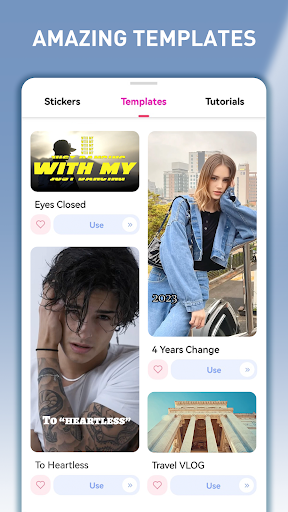
Integrated Tools: With all the necessary tools conveniently located within the app, users can easily access buttons to apply effects, insert text, filters, stickers, and more with just a tap of their finger. The user-friendly interface makes the editing process seamless and efficient.
Library Integration: EasyCut connects directly to your video library, enabling easy access to your content for editing. Users can choose their desired theme and explore the various tools available to enhance their videos, making the editing process a breeze.
Diverse Backgrounds: The app offers a wide selection of backgrounds with themes such as summer, sport, romance, and horror, allowing users to set the tone for their videos. These backgrounds add depth and creativity to the videos, making them more engaging and captivating.
Video Trimmer & Video Cutter
Cut and trim video to any length you need. The best video cutter and free video editor — perfect for TikTok short video editing, Instagram story cutter, and YouTube intro maker. Export in HD quality.
Video Maker with Music — Add Music to Video
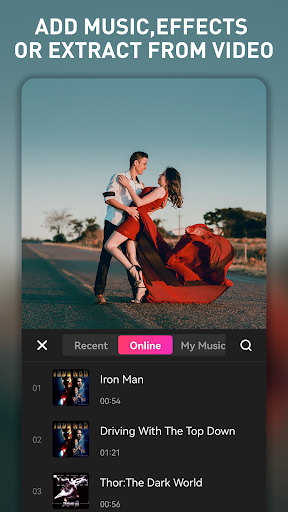
Add music to videos easily! Choose from trending music, add voice-overs, or extract audio from any video. Create music videos, photo video maker with music, birthday video maker with song — all in one video maker app.
Video Merger & Video Joiner
Merge video clips into one video. Combine videos and add audio — a free video joiner and video merger that compresses and combines videos without losing quality.
Video Splitter & Slicer
Split and slice video into separate clips. Edit videos like a pro with this free movie maker and video editor for Android.
Change Video Background
White background for Instagram, black for a cinematic feel, or customize with your own picture. Also works as a video background changer — remove and replace backgrounds easily.
Video Crop & Ratio Change
Crop video to any size. Zoom in/out, rotate, and flip. Create videos for TikTok, YouTube, Instagram, WhatsApp in the perfect ratio. Change video ratio like a video star!
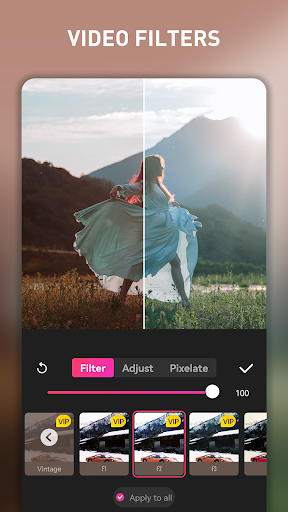
Video Effects, Filters & Transitions
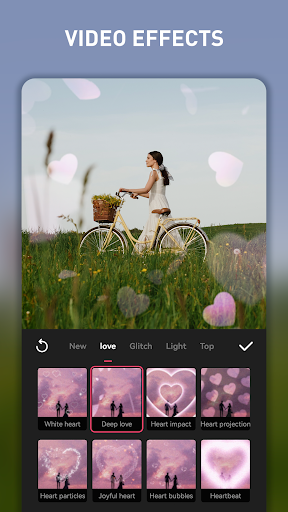
Edit video with cool video effects, movie-style filters, and smooth transitions. Free movie maker and film editor for TikTok, YouTube, Instagram, and WhatsApp.
Slow Motion Video Editor & Speed Control
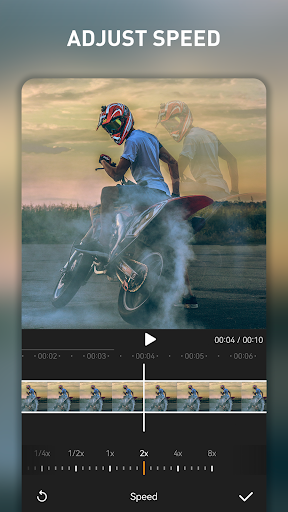
Speed up or slow down your video. The best slow motion video editor — create slow-mo for special moments or speed up for fun effects.
Text, Stickers & Subtitles
Add artistic text, subtitles, emoji, and trending stickers. Make your videos cute, cool, and funny — a must-have TikTok short video editor and Instagram video editor!
Blur Video Editor
Blur video backgrounds or specific areas. Perfect for privacy and cinematic focus effects.
Photo to Video Maker & Movie Maker
Turn photos into stunning videos! Photo video maker with music, photo to video maker, and movie maker — create slideshows with transitions, music, and effects.
Save & Share
Export in original HD quality! Share to YouTube, Instagram, Facebook, WhatsApp, TikTok, and more.
Drag-and-Drop Tools: The system usually allows each person to easily trim, split, and arrange clips according to the purpose. Of course, this is not an easy process but creates satisfaction.
Quick Photo Enhancer: Based on some supporting features, many people often choose to apply countless available edits. Therefore, the operation is often quick but still maintains the aesthetic level.
Fast Collage Maker: Creating some quick collages often helps you make the most of the current image quantity. From there, stories can be told from different perspectives over time.
Experiment with Different Effects: Try out different effects and tools within this app to enhance your videos and make them stand out.
Combine Multiple Effects: Don't be afraid to combine multiple effects and tools to create a unique and engaging video.
Choose Suitable Backgrounds: Select backgrounds and themes that complement the content of your video and enhance its overall appeal.
To conclude, if you're looking for a new video editing app to use for your photos and videos, EasyCut - Video Editor & Maker is a solid choice to consider. It offers plenty of features and includes some that you wouldn't typically find in these types of solutions. If you can live with watermarked clips, this is worth checking out. Recommended.
Size:138.6MB Version:2.0.1.1054
Requirements:Android Votes:429
Package Name:com.video.editor.greattalent Signature:758728995c4a06b2e54cb4dcd31e740344978933
Video Editor is a powerful software tool designed for crafting, refining, and enhancing video content. It enables users to transform raw footage into compelling visual narratives or effective communication platforms. As digital media continues to evolve, video editing has grown in significance - no longer just a professional necessity but also an accessible skill for everyday creators. Modern editing tools now offer intuitive interfaces, AI-powered features, and cross-platform compatibility, making high-quality video production achievable for both experts and casual users alike.
Mobile video editing tools are highly popular, with complete functions and professional tools that provide a strong atmosphere for various materials. Rich video templates can be operated with just one click, saving time and without too high a threshold. So what are the free versions of mobile video editing software? Editing software should have high popularity, but most of them require membership. Next, I recommend several platforms that can be used for free.
About us | Contact us | Privacy policy| DMCA
Copyright © 2026 Xiaohei All rights reserved.