
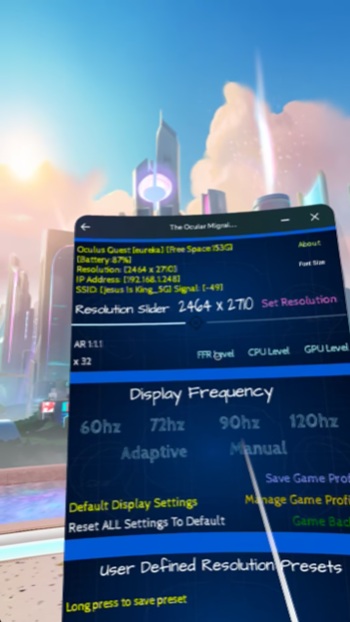
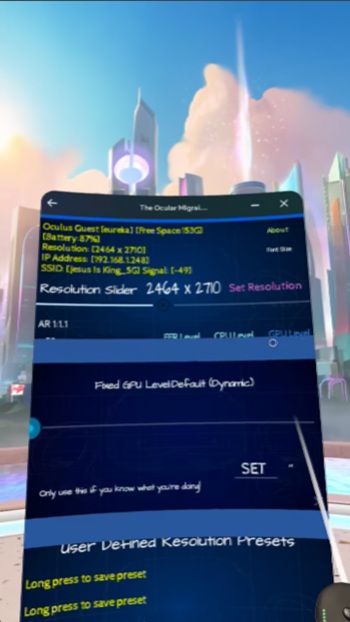
Ocular Migraine This is an application designed specifically for AR headsets. Users can gain deep control over system performance, recording, and application behavior through the interface. It also includes other features such as game backup and restore, adjusting recording resolution, and editing recorded videos on the device. Customizable performance profiles, kiosk mode, access control lists, and application launch configurations allow for advanced control over the headset's behavior in different scenarios, optimizing visual effects and performance.
Change Fixed Foveated Rendering level (0-4), set as static or dynamic.
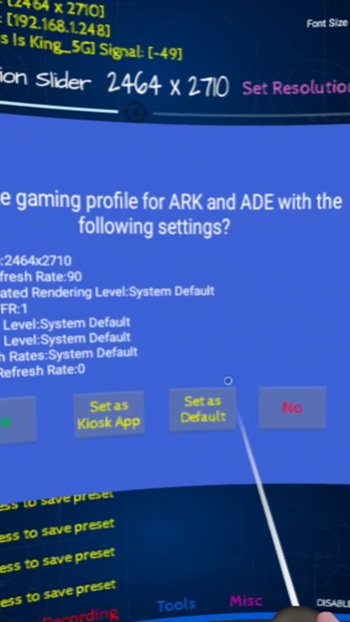
Create detailed custom resolution profiles for games which can be selected to be AUTOMATICALLY applied to that application or game upon launching that application or game (like Quest Games Optimizer does).
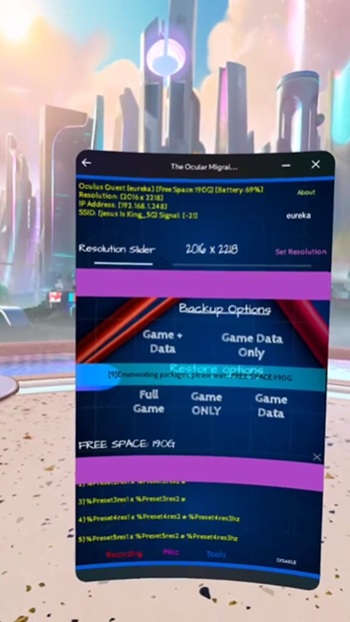
Backing up games, which includes the APK, OBB files if any, and data files and folders located in /sdcard/Android/data/.
Restore game backups after moving them to your PC by using the included bat file in the backup folder.
Restore game backups directly from the headset backup folder.
Modify detailed recording settings such as bitrate, resolution, frame rate, rendering area, recording eye, with the option to save them to a custom recording profile which can be loaded for recording different applications and games.
Invoke recording with STEREO AUDIO on the Quest 2 and Quest 3 (maybe Quest Pro?)!
Video Editing. Because the Quest notoriously has problems with out of sync audio in it's recordings, you can adjust the audio offset and speed/tempo (stretching or compressing the audio) along with the start and end trimming of your video.
Inject 3D metadata into your 3D recorded video making it ready to upload to YouTube.
Set redirect/shortcut apps to launch apps from UNKNOWN SOURCES via the main menu so you don't have to go into the UNKNOWN SOURCES section.
Set Start Up application, for example to launch a third party launcher upon reboot. On my Quest 3 I have my start up app set to Lightning Launcher.
KIOSK MODE: Set an application to be the only application that can be launched and PREVENT the user from EXITING that application. This mode is password protected.
Access Control Lists: Create a black list or a white list. Enabling one list disables the other.
So, what makes this app tick? Let’s break down the standout features, starting with the basics and ramping up to Dev Mode exclusives.
First off, the episode logger is a breeze. Snap a quick note on your visual symptoms—those flashing lights, blind spots, or tunnel vision—and rate the intensity from 1 to 10. It auto-timestamps everything and ties it to your phone’s weather or activity data for smarter insights.
Then there’s the trigger tracker, which uses simple AI to flag patterns. Ate chocolate? Skipped sleep? The app nudges you with gentle reminders to avoid repeat offenders. In Dev Mode, this gets a boost with predictive alerts—it scans your calendar and sends a heads-up like, “Hey, that meeting tomorrow might spike your stress; here’s a breathing exercise.”
Don’t sleep on the community forum either. Connect anonymously with other users sharing tips on everything from blue-light filters to herbal remedies. Dev Mode amps this up with beta voice notes, so you can record episodes hands-free when the aura hits hard.
Other gems include customizable dashboards, integration with wearables like your Fitbit for heart rate correlations, and a soothing guided relaxation library with audio tracks tailored for migraine relief. Oh, and the Dev Mode APK throws in experimental AR overlays—scan your environment to detect glare sources, which is oddly therapeutic.
All in all, these features turn a reactive tool into a proactive sidekick, making “ocular migraine management app” searches lead straight to this one.
Pros:
Intuitive interface—feels like chatting with a friend, not filling out a doctor’s form.
Dev Mode’s experimental features keep things fresh and innovative.
Free core version; Dev Mode is donation-based, no paywalls.
Strong privacy focus with end-to-end encryption.
Cons:
Side-loading means no auto-updates from Play Store—easy to forget.
Dev Mode can be buggy (that’s the point of testing), so occasional crashes during new feature trials.
Limited to Android; iOS folks are stuck with the web version for now.
What is Ocular Migraine and how does it affect vision?
Ocular Migraine causes temporary vision disturbances, often in one eye, sometimes with or without a headache.
How does Ocular Migraine APK help users?
It lets users log visual episodes, record triggers, and track patterns to discuss with a healthcare provider.
Is Ocular Migraine APK a medical diagnostic tool?
No, it’s a tracking app. It helps monitor symptoms but doesn’t replace professional evaluation.
Who should use Ocular Migraine APK?
Anyone who experiences recurring eye-related migraines or visual auras and wants to track them safely.
There you have it—the full scoop on snagging the Ocular Migraine APK (Dev Mode) download for Android. Whether it’s helping you dodge that next visual storm or just giving you data to chat about at your next check-up, this app’s a quiet hero in the fight against ocular migraines. I’ve cut my episode guesswork in half since switching to Dev Mode, and I bet you will too. Got questions? Drop a comment below or hit the forums. Here’s to clearer days ahead—cheers!
Size:35.3MB Version:1.0
Requirements:Android Votes:412
Utility apps are indispensable in our lives, making our daily routines more convenient. To help you find these apps more easily, this site has created a collection. This collection brings together a series of practical tools covering various aspects of life, work, and education, meeting all your needs. What are you waiting for? Try these apps now and make your life easier!
Transform your mobile device into a powerhouse of efficiency with these handpicked essential tools. Whether you need professional-grade photo editing, seamless file organization, smart task management, or real-time weather updates, our curated selection of premium apps delivers unbeatable performance. Streamline your daily routine, automate repetitive tasks, and boost your productivity with intuitive interfaces and powerful features. Designed for both professionals and casual users, these editor-approved applications will revolutionize how you work and play. Don't settle for an ordinary phone - upgrade your digital experience today and unlock your device's full potential!
About us | Contact us | Privacy policy| DMCA
Copyright © 2026 Xiaohei All rights reserved.


























