
PodsBattery This is an Android app that allows users to check the battery level and status of Bluetooth earbuds. Once paired with your device, a pop-up window will automatically display the battery level of each earbud and the charging case. In addition to these basic functions, it integrates several advanced features designed to provide a more convenient user experience. It also supports some compatible earbud recognition functions. Another major advantage is its clean interface; all functions are clearly presented, and operation is convenient, requiring minimal user setup. This app is definitely a reliable choice.
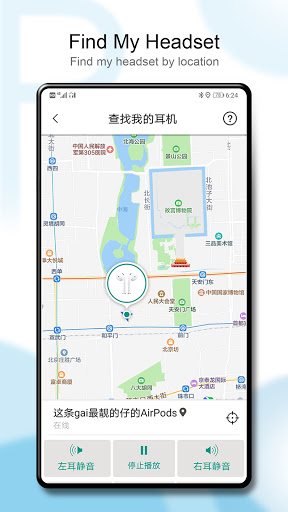
Find My Headphones:
Play sound to quickly locate lost headphones.
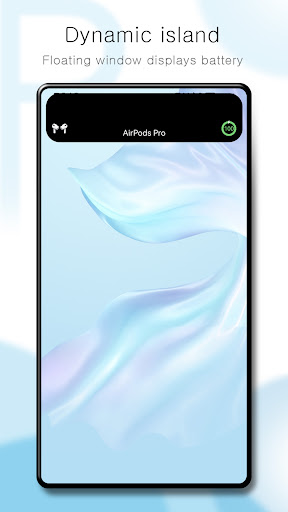
Dynamic Island:
Recreating the iOS interaction experience for a more dynamic status display.
In-Ear Detection:
Automatic pause or resume playback, smarter and more convenient.
Touch Controls:
Customize your AirPods touch actions.
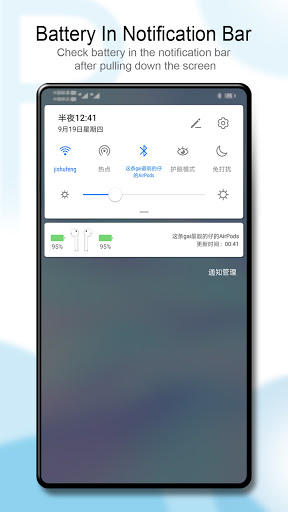
Display Bluetooth headphone battery level
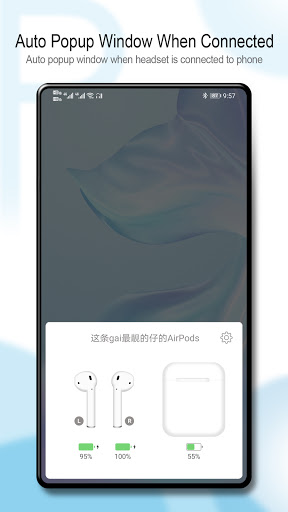
A prominent feature of PodsBattery is the ability to display the battery level of Bluetooth headphones as soon as you connect the device. The application will display a pop-up window detailing the remaining battery level in each ear and the charging case. In addition, users can monitor the battery directly in the notification bar, quick control panel or via the pre-installed widget on the home screen.
This design allows you to control battery status without needing to go into the settings menu or Bluetooth. This is very handy if you frequently use wireless headphones, as it allows you to quickly check status before going out or using for a long period of time. The application has a fast response speed, operates stably and is suitable for many popular Android phone models today.
Supports a variety of AirPods and Beats headphones
PodsBattery is designed to be compatible with many modern Bluetooth headphones. The application fully supports AirPods versions such as AirPods 1, 2, 3, AirPods Pro, as well as newer models such as AirPods Pro 2 or USB-C version. In addition, many Beats headphone models such as Solo³, Studio³ or Powerbeats Pro can also connect and display the exact battery level on the application.
This broad compatibility represents a great win for Android users, as most of Apple’s wireless headphones don’t show full battery data on Android devices by default, you can now check the battery for any headphone device seamlessly without even having to use your iPhone. This solution is a versatile method for users who use many different headphone lines, especially for users who love Android, but also love Apple or Beats headphones.
Advanced features integration
Not only stopping at the battery display function, PodsBattery also integrates a number of advanced features to help users have a more convenient experience. For example, you can use the feature to find headphones if you accidentally lose them nearby. The application will support playing sound from the headphones to help you locate them more easily. In addition, the ear recognition feature is also supported with some compatible headphone models.
When you put on the headphones, the application can automatically play music; when you take them off, the music will pause. In particular, PodsBattery also has a “Dynamic Island” interface option, simulating the floating display effect like on the iPhone. These features are not required, but will be very useful for users who want to personalize the headphone experience in a smarter and more modern way.
Easy-to-use interface
Another big advantage of PodsBattery lies in the simplicity of the interface design. All important functions are clearly displayed, easy to operate and do not require users to install too many steps. The application has a free version but still provides all the necessary features such as battery pop-up display, widget utility and quick connection support.
The interface is optimized to suit many users, from the elderly to those who are less tech-savvy. When connecting headphones, you do not need to open the application manually, because all information is displayed immediately on the screen or control panel. This saves time and helps you control the battery more proactively. For those who are looking for a simple, lightweight tool, but bring clear efficiency in monitoring Bluetooth headset battery, PodsBattery is a reliable choice.
Why is the PodsBattery not supported on my device?
The reason could be an outdated version of Android, incompatible technical requirements, for example, if you have a device with ARM7 architecture and are trying to install an app with ARM8 or x86 architecture
Why does the PodsBattery crash or not respond?
This could be due to an outdated version of the PodsBattery ,a full cache, lack of RAM, or a system conflict. Try updating the app, clearing the cache, or restarting the device
How much space does the PodsBattery take up?
PodsBattery takes up about 17.31 MB (18,154,742 bytes) of memory
works and pops up pretty fast but the ads are a little much but for free it's expected for real overall def good to see My airpods battery on both phones
The app works perfectly well and it's for intended purpose, the only issue I seem to be having is with the AutoPop feature, when on it does the animation and all but from time to time it still pops up in other apps when the headphones are in use.
Not bad. Took me a while to work out how the battery level report works. It shows 5% as a default as far as I can tell. But then reports the battery level when headphones removed and does mute the phones. All in all, it works well. But maybe needs a little bit more tweaking of the status screen maybe.
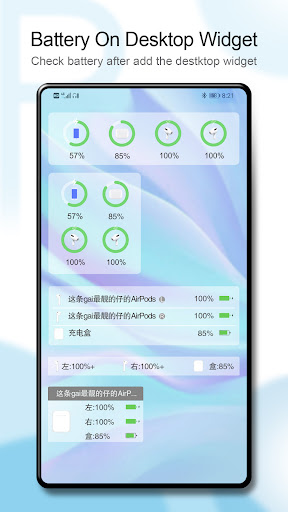
PodsBattery is a free, powerful, and simple to use Android app that enables you to easily check the battery level of your Bluetooth headsets.In addition to providing a battery level display, this app can also help you to troubleshoot problems with your Bluetooth headset. It detects in-ear and on-device headphones and provides you with an option to view the device's battery level and status in the pop-up window.
Size:15.6MB Version:G1.27.4
Requirements:Android Votes:62
Utility apps are indispensable in our lives, making our daily routines more convenient. To help you find these apps more easily, this site has created a collection. This collection brings together a series of practical tools covering various aspects of life, work, and education, meeting all your needs. What are you waiting for? Try these apps now and make your life easier!
Transform your mobile device into a powerhouse of efficiency with these handpicked essential tools. Whether you need professional-grade photo editing, seamless file organization, smart task management, or real-time weather updates, our curated selection of premium apps delivers unbeatable performance. Streamline your daily routine, automate repetitive tasks, and boost your productivity with intuitive interfaces and powerful features. Designed for both professionals and casual users, these editor-approved applications will revolutionize how you work and play. Don't settle for an ordinary phone - upgrade your digital experience today and unlock your device's full potential!
With the development of mobile hardware and software, many practical tool software have emerged, covering a wide range of aspects and becoming a good helper for everyone in work and life. Today, the editor provides you with a list of useful tool software downloads. These tools are not particularly complex types, and after reading them, everyone can quickly learn how to use them. Proper use can bring great convenience to life and work.
About us | Contact us | Privacy policy| DMCA
Copyright © 2026 Xiaohei All rights reserved.


























