KeepVid is a video downloader software that can automatically parse and download links from various media software or websites. It allows you to freely choose the resolution, has a built-in browser for quickly opening links, and rapidly determines if the content to be downloaded matches the link. This version also optimizes download speed, supports multi-file conversion, and features a simple, quick, and easy-to-use interface. It supports multiple platforms, includes a built-in tutorial, and allows you to customize the save path. It's a multi-functional download software; if you need this, try it out!
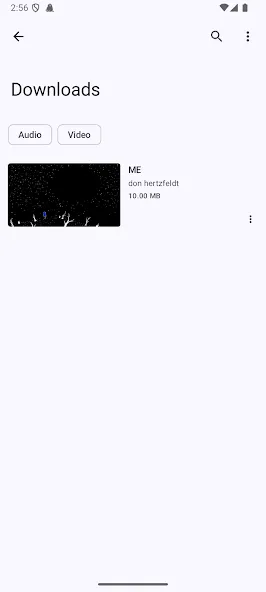
Download videos from different portals, including YouTube, Facebook, Instagram, SoundCloud, Dailymotion, Vimeo, and Twitter.
Download music from streaming portals like SoundCloud or rip music from videos with 320 kbps quality.
Download files in batches or complete playlists.
Optimized for the fastest file download speed.
Support for HD video in 2K, 4K, HD, and UHD quality.
Integrated web browser to access each portal directly from the interface.
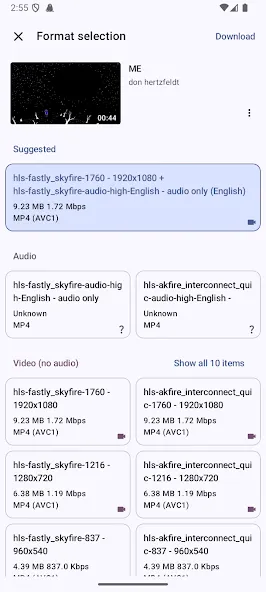
After finding the video to download, simply click the arrow and choose the desired quality to launch the download.
Design with a good visual finish that makes it intuitive and pleasing to the eye.
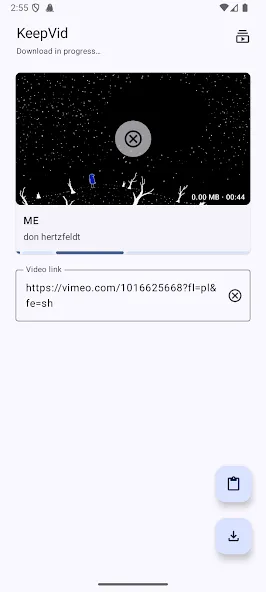
Easy Video Downloading: Simply copy the video URL and hit the download button.
Platform Support: Compatible with Twitter, Facebook, Instagram, and VK.
Download Tutorials: Access short tutorials for each social network to understand the downloading process.
Custom Download Directory: Adjust where your videos are saved on your device.
WiFi Mode: Option to disable downloads while on mobile data, protecting your data plan.
Pros:
Fast and easy video download process.
Supports multiple social media platforms.
User-friendly interface with straightforward tutorials.
Customizable download saving preferences.
WiFi restriction to conserve data usage.
Cons:
Does not support YouTube video downloads.
Lacks advanced features that may be available in full versions.
To download a video, the only thing you need to do is copy the video's URL and click the download button. In fact, you can simply click a button on one of the available social networks to watch a brief introduction on how to download videos.
From the options menu, you can change the directory where downloaded videos are stored. You can also turn off video downloads when not connected to a Wi-Fi network, which is a great option for those who don't trust their mobile data usage.
KeepVid is a one-stop-shop for keeping, maintaining, editing, and organizing video and audio from all across the Internet. If you’re worried about content being taken down, or if you simply want to download media to your local files for later viewing, KeepVid is an easy answer. Saving videos is just a download button away, with available sites including YouTube, Facebook, Vimeo, and Dailymotion.
Size:10.28MB Version:3.1.3.0
Requirements:Android Votes:398
Package Name:com.downloader.keepviddownloader Signature:636b06e929d80585e23aec54c85d8d69
With the advancement of technology, downloading videos on Android devices is no longer time-consuming. The Android universe is now infested with hundreds of apps for video download in Android that can download HD videos from a slew of video-sharing and streaming sites like YouTube with the swipe of a finger. However, the majority of these apps may contain adware and other unwanted software! As a result, if you’re looking for a good list of the best free Video Downloader Apps for Android. That is completely safe; this is the place to be!
Media player with multimedia capabilities is one of the important features in today’s smartphones. Most of the video content is consumed on smart devices and viewers continue their tasks like sending emails, surfing apps keeping the video playback on through Picture-in-Picture mode. Playing audio/video on an Android app has become a basic function with android video players becoming more and more customizable. Some of the best video players for Android offer multi format support, easy customizations, hardware acceleration, subtitle support and much more. In this blog, we have compared the best video player for Android based on speed, battery consumption, streaming capabilities, resource usage and more.
Streaming software allows you to broadcast your content live across the internet. It processes the raw feed that comes from your camera and converts it into a digital format that is suitable for internet streaming, in real-time. In 2024, 41% of internet users have already watched at least one live stream in their lifetime. And 27.6% of them are expected to watch at least one live broadcast every week. Hence, it is needless to say that the live streaming market is seeing a massive boom. As the market is growing, the number of live streaming software is also increasing. And it is becoming extremely difficult to choose one. In this guide, we will tell you what are the parameters to decide the best live streaming software, like what features they should have and what factors you need to consider. And finally, we will tell you about the top 10 live-streaming software that our experts have handpicked for you! So, let’s get started.
About us | Contact us | Privacy policy| DMCA
Copyright © 2026 Xiaohei All rights reserved.