RMC ACR is an app for recording phone calls. It can automatically record both incoming and outgoing calls and is compatible with multiple formats, supporting various format conversions. If your device has a memory card, the recordings will be saved directly to that card. Backups can be created for timely repair in case of problems. A PIN code can be set, enabling various customization options and file management features. If you frequently experience business losses due to unrecorded calls, this app's functionality is worth considering.
Record incoming and outgoing calls in automatic or manual mode.
The app records conversations in the ‘RecordMyCall’ file on the memory card.
It is compatible with a range of audio formats: mp3, amr, mp4, 3pg and wav.
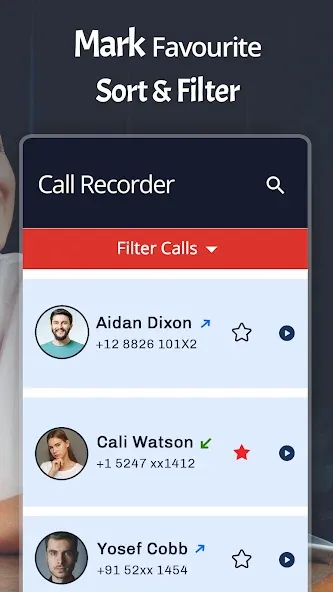
You can add a filter in order to record only incoming or only outgoing calls or calls from only known or only unknown numbers.
You can add a file name before making the recording.
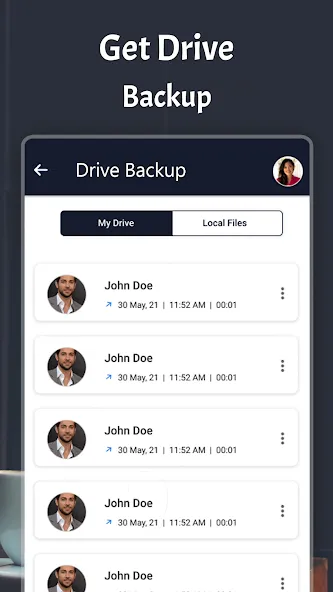
You can make backup copies and restore them if there is a problem.
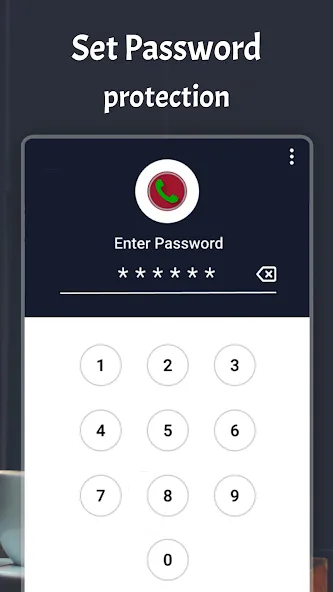
Users can add a PIN to the app by creating an access passcode.
Recordings can be automatically saved to Dropbox or Google Drive.
AndriodRead Phone Status: Detect incoming + outgoing call
AndriodRecord Audio: Record call
AndriodRead Contacts: Filtering contact (which recorded or not) + Renaming file based on contact name
AndriodRead / Write Storage: Store recording files on USB storage or SD-card
AndriodGoogle Account: Upload recordings to Google Drive for backup
AndriodInternet Connection: Upload recordings to Google Drive + Dropbox for backup
AndriodBluetooth: Different action if phone connected to Bluetooth
AndriodPrevent From Sleeping: Prevent fail recording for long call
AndriodChange Audio Setting: Turn on loudspeaker by option
In a nutshell, RMC ACR is a recording app for saving incoming and outgoing phone calls. It can automatically record all calls, or you can toggle the manual record button to start the function as needed. You can choose from MP3, AMR, MP4, 3GP, or WAV formats for files. You can even adjust various audio parameters such as volume gain, bitrate, and many others.
Once your recordings are saved, the app offers file management settings. You get standard ones like file renaming and filtering options, as well as sorting them into two categories: Unsorted or Important. There's even a backup and restore feature to make it easier to retain your data when switching devices. Alternatively, you can upload everything to cloud storage services, Dropbox and Google Drive.
What's more, you can set a 4-digit passcode for safety and security, as well as the option to hide the app on your phone so no one else will see or open it. One caveat that you need to be aware of, though, is that this app can only work with phone calls via speakerphone as it uses your device's built-in microphone to capture sound.
Pros
Supports both incoming and outgoing calls
Various customization and file management options
Backup and restore features
Cloud storage integration
Cons
Only works via speakerphone calls
RMC ACR is a free utility application designed specifically for mobile devices, allowing users to effortlessly record and store their phone conversations. It supports both incoming and outgoing calls and features a manual record button for easy activation. The application is particularly useful for those who require a record of their conversations for purposes such as security or documentation.
Size:7.76MB Version:6.85
Requirements:Android Votes:115
Package Name:com.record.my.call Signature:c8385e697f0405447253e4ef7b2c2538
Let's make one thing clear: unfortunately, there's no one best texting app. Unless you absolutely require one or two specific features or are a real stickler for security, the best text message app will be the one that the people you want to text also use. Depending on where you are in the world, that can be iMessage, WhatsApp, Viber, Telegram, LINE, or even SMS. But if, for whatever reason, you do have a choice of which messaging app you can use—or you can convince your friends and family to make the switch—these are the six best texting apps to choose from. (Though, if I could rule the world using benevolent AIs, I'd make everyone use Signal.)
Keep in touch effortlessly with the world’s best free messaging and calling apps. Whether you're chatting with friends, video calling family, or coordinating with colleagues, these apps offer seamless communication-no subscriptions needed. Enjoy crystal-clear HD video calls, fun stickers, group chats, and reliable messaging across devices. Perfect for work collaboration, sharing special moments, or staying close to loved ones while traveling. Download today and experience premium connectivity without spending a penny!
Mobile chat software is one of the essential mobile applications on people's phones. Chat software can connect people who are far apart, allowing you to communicate with friends anytime and anywhere. The software can also support various ways such as text, voice, video, etc. Now, the editor brings you a special topic on mobile chat software. You can choose the software you need and install it for free on your phone. If you need it, come and choose the software you need!
About us | Contact us | Privacy policy| DMCA
Copyright © 2026 Xiaohei All rights reserved.