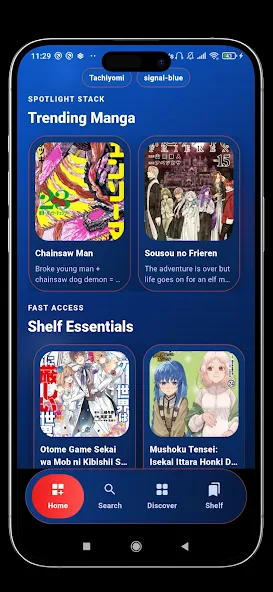
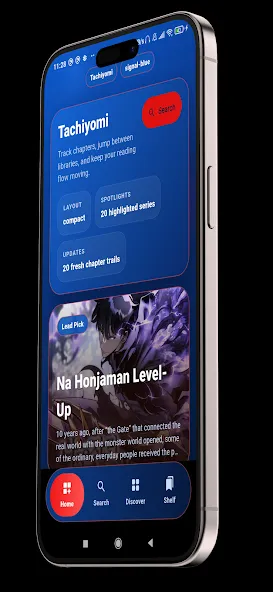
Tachiyomi is an app focused on manga lovers. It boasts a massive manga library, meticulously categorized. A built-in advanced search function allows users to quickly find their favorite manga. Users can also bookmark their favorite manga for later reading, with a reading history tracker. Chapter loading is quick. If a manga is unavailable, the app provides personalized recommendations based on the user's reading interests. The app's user-friendly interface makes it easy to use and manage your manga history and library.
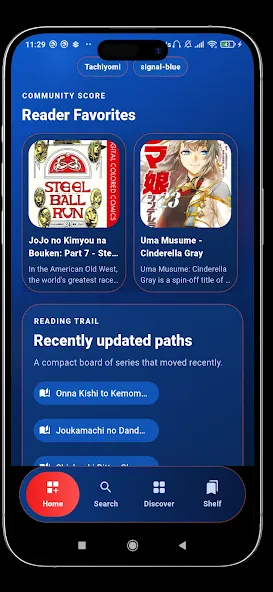
Huge Manga Library
Discover thousands of manga, comics, manhwa, webtoon, and graphic novels across multiple genres.
Advanced Search
Quickly find series by title, genre, popularity, or latest updates.
Bookmark Favorites
Save your favorite manga and continue reading anytime.
Reading History
Keep track of recently opened manga chapters.
Fast Chapter Loading
Enjoy a smooth and responsive manga reader experience.
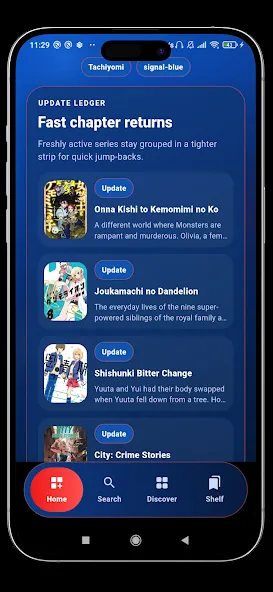
Personalized Recommendations
Discover new stories based on your reading interests.
Trending Manga
Browse the most popular and trending manga collections.
Latest Chapter Updates
Stay informed about newly added manga chapters.
User-Friendly Interface
Simple navigation designed for comfortable reading.
Organized Manga Collection
Manage your manga library with ease.
Can I backup my reading progress in Tachiyomi App?
Yes, you can create full backups of your library and settings inside the app. The application allows you to save backup files to local storage easily. Furthermore, restoring your data on a new device takes only a few seconds.
How do I categorize my library titles?
You can create custom categories inside the library settings menu. After creating categories, simply long-press any title and assign it to your desired folder. This keeps your reading list organized and easy to navigate.
Does Tachiyomi App support automatic chapter updates?
Yes, the application includes a built-in library update scheduler. You can configure the update frequency to daily, weekly, or custom time intervals. Consequently, your favorite series update quietly in the background.
Can I change reading directions for individual series?
Yes, you can set global or per-series reading orientation preferences. For example, you can read manga right-to-left and webtoons in vertical scroll mode. The app saves your settings for each title automatically.
Optimize Screen Margins: Enable automatic page cropping in reader settings. This removes blank white margins to maximize image size.
Create Regular Backups: Set up scheduled local backups inside Tachiyomi App. Consequently, your reading history and library data stay completely secure.
Organize Custom Categories: Group your titles using custom category tags. For instance, separating active reads from completed series saves time.
Save Battery Power: Switch to OLED dark mode during night reading sessions. As a result, your screen consumes far less battery.
Automate Chapter Checks: Schedule background updates inside Tachiyomi App settings. Therefore, new chapters load before you open the application.
Conserve Device Storage: Turn on the auto-delete feature for read chapters. In other words, read content clears automatically to free up memory.
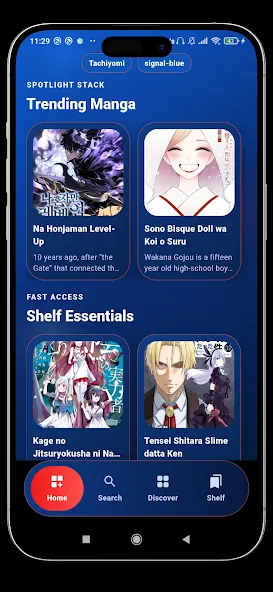
In conclusion, Tachiyomi App provides a clean, flexible, and responsive reading platform for comic lovers. Its broad customization features allow every reader to personalize their interface completely. Moreover, offline downloads and automatic tracking sync make reading convenient anywhere.
Size:21.66MB Version:0.15.3
Requirements:Android Votes:420
Package Name:eu.kanade.tachiyomi Signature:b90ad90279a69569eaf4b2ff372f8208
If you're a comic book fan looking for a new way to read your favorite titles on a smartphone or tablet, or if you simply want to check out the hype behind the hottest technological advance to happen to four-color funnies in a very long time, you have a lot of choices when it comes to selecting a digital comics app. In fact, there are more digital comic book apps in the Google Play marketplace than there have been Jean Grey deaths (and resurrections). Digital comic book apps let you read both classic and contemporary comics. Some digital comic book apps feature integrated stores, while others are stand-alone readers that let you enjoy DRM-free comic files. A few are publisher-exclusive apps for fans of a particular comic book house. In short, there are numerous ways to read comics on an Android tablet or smartphone-you just need to find the app (or apps) that works best for you.
If you love comics and want unlimited access to thrilling stories on your Android device, you're in the right place! We’ve handpicked the top free comic apps that offer a vast collection of genres-from action-packed superhero sagas and Japanese manga to indie graphic novels and webcomics. Enjoy high-quality artwork, seamless reading experiences, and regular updates-all without spending a dime. Whether you're a casual reader or a die-hard fan, these apps bring endless entertainment to your fingertips. Start your comic adventure today by downloading these must-have apps!
Struggling to find a great place to read comics? Many fans face issues like limited selections or annoying paywalls-but it doesn't have to be that way! To make your reading experience smoother, I've put together a curated list of the best comic apps, all packed with free, high-quality content and easy-to-use features. Whether you're into manga, webtoons, or classic comics, these apps have you covered. Check them out and dive into endless entertainment hassle-free!
About us | Contact us | Privacy policy| DMCA
Copyright © 2026 Xiaohei All rights reserved.