Notification Toggle is a status bar and notification tool designed for mobile devices, offering quick toggles for settings such as Wi-Fi, mobile data, Bluetooth, and silent mode. Users can easily switch between these states with a single tap, helping to conserve battery life and data usage. The app also supports smartwatches, enabling remote controls—such as turning on the flashlight or locking the phone—and offers extensive customization options. Users can personalize the status bar's color and size and change icon packs, providing greater flexibility. Additionally, a built-in FAQ feature helps resolve potential issues, ensuring a worry-free user experience.
Quick Access Toggles: Whether you want to flip on WiFi, turn off Bluetooth, or just silence your phone in a flash, all the essential switches are a tap away in your status bar.
App Shortcuts: Got an app you open constantly? Create a shortcut, and launch it straight from your notification shade—no more digging.
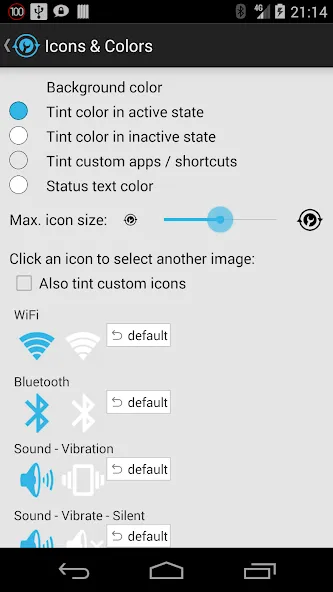
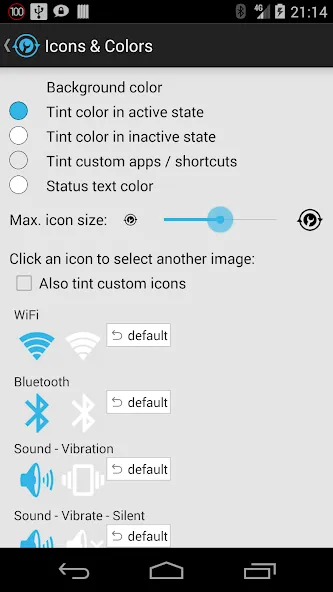
Customization Options: Change up the look! Pick custom icons and colors for your toggles, or grab new ones from the app’s icon downloader—give your phone some personality.
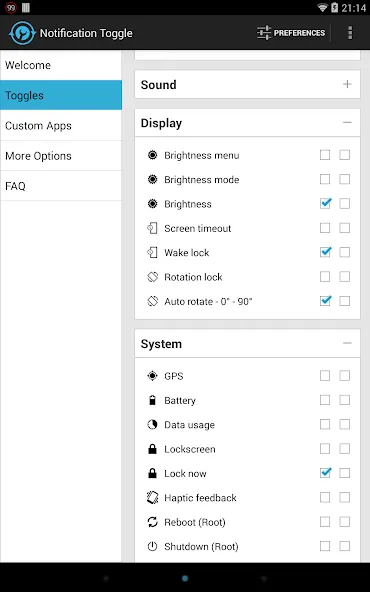
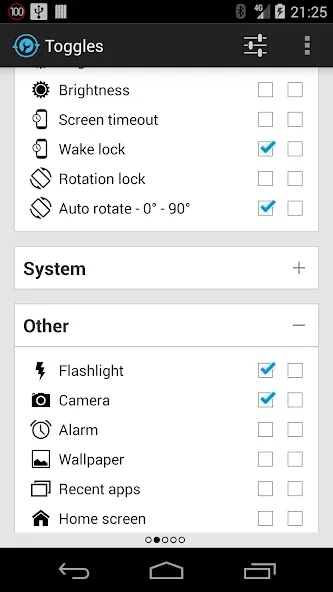
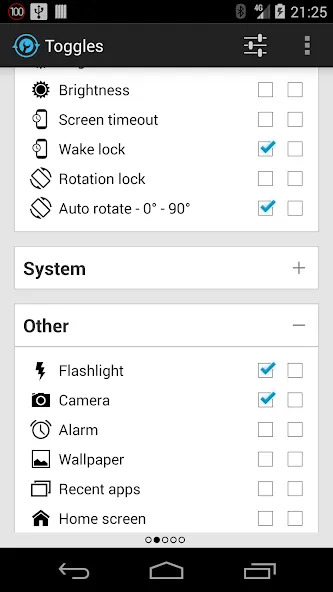
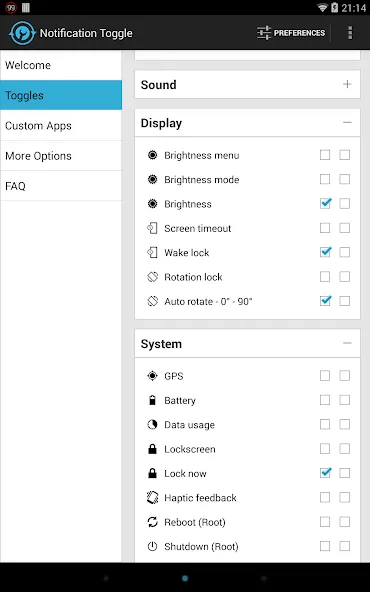
Easy Settings Management: Dive into the app’s settings to pick exactly which toggles and shortcuts show up—nobody uses every toggle, so you can keep things clutter-free.
Android Wear Integration: Control your phone’s settings using your smartwatch. Say the magic words (“Start Notification Toggle”) and silence your phone or turn on the flashlight, right from your wrist.
Handy Extras: Beyond the basics, you can control screen brightness, rotation, mobile data, airplane mode, NFC, flashlight, and even media playback controls. There’s wake lock, screen timeout, and battery info too—comprehensive doesn’t even start to cover it.
Notification Toggle also allows users to create shortcuts to their favorite apps, which can be added to the notification bar. This feature requires an in-app purchase but significantly enhances accessibility to frequently used applications.
Root access is required for some advanced features, such as toggling shutdown and reboot options. Users should be aware that not all toggles will function on every device, and certain settings may lead directly to the Android settings menu if they cannot be changed through the app.
Security is a consideration with Notification Toggle. The app requires various permissions to function correctly, including network state access for toggling WiFi tethering, Bluetooth administrative privileges, and the ability to manage USB connections. These permissions are necessary for the effective operation of the app's features.
Additionally, users should exclude Notification Toggle from task-killers to ensure its functionalities remain active. The app is designed to operate seamlessly in the background, providing easy access to toggles without interruptions.
PRO: V good app, I've been using it for many years. Does what it's supposed to, shortcuts in the notification menu for quick access. Customizable bkg color & short text under icons for ease of use. I would pay for new featues. CON: Recent update restricted the usage of only 10 icons, before you could add more just the icons were getting smaller, to fit. Doesnt load all shortcuts (eg: YouTube Search) on v14 and they are not prefixed by app name to be easy to know the belonging app.
Quick and easy access to my most used settings and apps. Still a huge fan many years later. I use it so much it seems like a standard Android feature. Some toggles don't always show the correct status, but the developer has provided an explanation for this in the FAQ. Update: the shortcut feature doesn't work on my Moto G8+ running Android 10, and it hasn't been updated since 2019. I sure hope it hasn't been abandoned.
One of the most useful apps, such a time saver with all the shortcut options it offers, I love it. One small issue I'm experiencing since I started using Android 7.0. The notification does not stay on top even when I set the priority to 5, it always gets pushed down by new notifications.
Thank you so much for this. I love my new phone but...there was no mute at all and no easy access for the common Bluetooth, mobile data and GPS that I use when I leave the house - and now there is! Previously had an ... So going back for the past almost 7 years I rated this Amazing, Fantastic!!! BUT NOW.. APRIL 2021 had some issues after Android updates but j4velin contacted me which was nice. Not sure what happened but it's working again.
ACCESS_NETWORK_STATE - toggle wifi tethering
ACCESS_SUPERUSER - direct GPS toggle on rooted devices
BILLING - for in-app billing
BLUETOOTH_ADMIN & BLUETOOTH - toggle Bluetooth
CALL_PHONE - direct call contacts from notification
CAMERA & FLASHLIGHT - turn on camera flashlight
CHANGE_NETWORK_STATE - toggle mobile data on some devices
CHANGE_WIFI_STATE & ACCESS_WIFI_STATE - toggle WiFi
EXPAND_STATUS_BAR - to close the status bar on ICS devices
MANAGE_USB - toggle usb tethering
NFC - toggle NFC
READ_EXTERNAL_STORAGE - to load custom icons
RECEIVE_BOOT_COMPLETED - place the notifications after boot
VIBRATE - for haptic feedback option
WAKE_LOCK - for the wake lock toggle
WRITE_EXTERNAL_STORAGE - to save shortcut icons like contact pictures
WRITE_SECURE_SETTINGS - GPS toggling on rooted pre-4.3 devices
WRITE_SETTINGS - to toggle various stuff like rotation & screen brigthness
WRITE_SYNC_SETTINGS - toggle sync
Notification Toggle earns its place through selection and specificity, particularly its screen timeout control, direct settings links, and configurable shade layout. Device restrictions prevent every toggle from behaving consistently, but users willing to work around Android's limits get a focused alternative to a fixed Quick Settings panel.
Size:2.83MB Version:3.8.9
Requirements:Android 4.0+ Votes:559
Package Name:de.j4velin.notificationToggle Signature:667f9180c015d2c23277720a35737d87
Utility apps are indispensable in our lives, making our daily routines more convenient. To help you find these apps more easily, this site has created a collection. This collection brings together a series of practical tools covering various aspects of life, work, and education, meeting all your needs. What are you waiting for? Try these apps now and make your life easier!
With the development of mobile hardware and software, many practical tool software have emerged, covering a wide range of aspects and becoming a good helper for everyone in work and life. Today, the editor provides you with a list of useful tool software downloads. These tools are not particularly complex types, and after reading them, everyone can quickly learn how to use them. Proper use can bring great convenience to life and work.
About us | Contact us | Privacy policy| DMCA
Copyright © 2026 Xiaohei All rights reserved.