Hik-Connect is a smart home application that allows users to remotely control home panels and cameras, view live feeds and playback, and communicate with others via the cameras—all to help ensure home security. The app also sends alerts to the user’s device if an unidentified person is detected by a camera. Furthermore, users can share video feeds with others, enabling family members to check on the home at any time. The application’s security is robust; it protects video content and account information, and supports fingerprint and password authentication, giving users peace of mind while using the service.
The app works with Hikvision DVRs, NVRs, and IP cameras that support Cloud P2P. Once connected, each camera can display a live feed, while recorded footage remains available for reviewing earlier activity. PTZ support lets you change a compatible camera’s viewing angle remotely, which is far more useful than simply checking a fixed image.
This is aimed squarely at homes and businesses already using Hikvision equipment. It has little relevance outside that ecosystem, but owners with several compatible devices get one place to monitor and manage them.
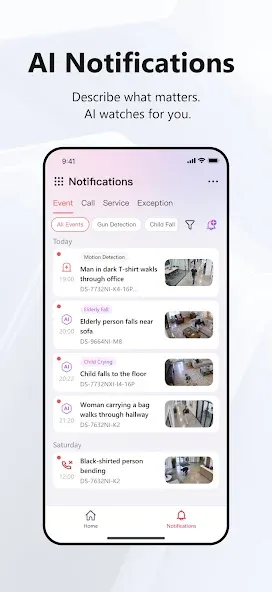
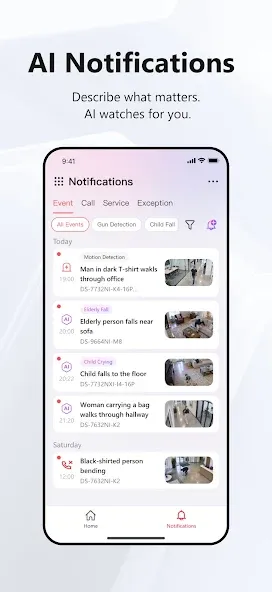
Hik-Connect does more than show video. It can arm a security control panel, handle two-way intercom conversations, and answer supported doorbells or video intercom devices. Alerts can include pictures and video when an alarm activates, helping users judge an event without immediately opening every camera feed. Notifications may also be configured around events such as motion detection or camera tampering.
The catch is volume. The app can send too many notifications, turning potentially useful warnings into background noise. Anyone using several cameras will need to spend time adjusting alerts rather than accepting every event.
1. Two-Factor Authentication
2. Video Intercom: Compatible with KD8005, KD8003 Door Stations; Compatible with Alexa Speaker
3. Door Open Widget
4. Fisheye camera: Preferred fisheye expansion view automatically remembered
5. PTRZ control
6. NVR arm/disarm
7. Red & Blue Alarm for Cameras
8. Verify with mobile number when deleting account
I am in shock reading all of these negative reviews but I think I know why. People simply don’t know what they’re doing. Nest cameras are no comparison to Hikvision. If your speed is not fast enough then you can’t stream high resolution. There’s a reason why you setup dual streams. My Hikvision NVR and cameras have never once crashed on me. I thought I had a problem with my Hik-Connect cloud account disappearing randomly from my phone but that was user error. My wife was logging into her phone with my account instead of me sharing. I’ve setup my cameras using the device connection and I get almost an instant connection every time. I’ve spent many hours reading and playing with all my settings, adjusting bandwidth and fine tuning the camera settings and I love my system. If you don’t know how to properly set things up then the commercial Nest system is more for you. No comparison with all the functionality and saving to your own Hikvision NVR to Nest’s cloud storage which you constantly keep paying for and again gives you no functionality.
I have a hikvision 4k nvr and also have installed many systems for customers. They are a solid product and the app is legit if you understand it. Most the negative reviews are from people that don’t understand the technology and just want to open the app on their device and it work perfect. A couple issues with that....1. Quality high speed internet that is connected to the camera system(dvr/nvr) is a huge issue on most the complaints. 2. Good cellular or Wi-Fi connected to the device with what you’re trying to view the cameras dvr/nvr on.3. All dvr/nvr units have certain tech specs regarding max users max bandwidth(not local internet BUT bandwidth between the nvr/dvr and the cameras) that IS STATED AND AVAILABLE on the systems box instructions and online for your particular unit model and all models. 4. Ive never had a issue with quality from the cameras that is outside the specs to the dvr/nvr if you are accessing from the dvr/nvr unit itself via hdmi or whatever video cable you use, everyone that complains seems to be all from remote access devices and probably don’t even know how to physically access their dvr/nvr4. Stop giving bad reviews because you don’t understand the technology.
I couldn’t get the app to activate my camera, tried with web browser and changed it to DHCP and lost it. Fortunately the windows app found it and told me the new IP address so I could reserve it on my router. Once activated & registered the app found it no problem. Excellent video quality and very fast connection. Couple of suggestions: 1. Make it so I can scale the time bar in playback. Two fingers to pinch it so I can have precise control over the time. 2. My device is dual camera unit with 180° FOV. When viewing full screen the image is stretched. If I adjust the zoom to unstretched, I have black bar at top and bottom (letterbox). Thing is when I zoom in, the black bars stay there and cover about ½ the screen. Would be much better if can zoom into the letterbox to fill the whole screen with video.
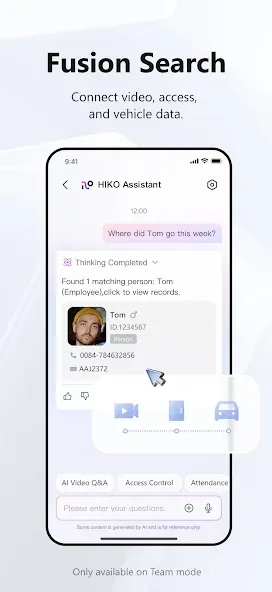
What are the differences among Hik-Connect, HikCentral Professional, and Hik-Partner Pro?
Hik-Connect is a VSaaS platform for unified security management. It frees enterprise users from local servers and helps centralize management for multiple sites on the cloud.HikCentral Professional is mainly used for medium and large projects in private network or in LAN.Hik-Partner is a Partner Console to help system integrators or installers manage services by acquiring trial services, purchasing extended services, etc., for Hik-Connect users.
Do I need to manually map the ports on the router?
No, you don't.
Which devices can be added and managed in Hik-Connect?
You can view the Device Compatibility List in the Help Center when you log into Hik-Connect.
Can third-party devices be added and managed in Hik-Connect?
No. Third-party devices cannot be added and managed in Hik-Connect.Currently, Hik-Connect only supports Hikvision and HiLook devices.
How many devices can be added and managed in Hik-Connect?
There is no limit to the number of devices that can be managed by Hik-Connect.
How to add devices to Hik-Connect?
Confirm that the register status is online for the device.Log into the Hik-Connect Portal and go to Resource Management.Enter the device serial No. and device verification code to add the device.
In conclusion, Hik-Connect is a good remote control app that you can use for your home with the many camera types it supports. It's intuitive to operate and even supports PTZ operation straight from your device. It does lack some options that its contemporaries offer, though. Nevertheless, it still gets a solid recommendation and is worth checking out.
Size:258.07MB Version:6.12.681.0708
Requirements:Android Votes:528
Package Name:com.hikvision.hikconnect Signature:47fe6b35de0c8d7512a14a3b4e4d8a39
Transform your mobile device into a powerhouse of efficiency with these handpicked essential tools. Whether you need professional-grade photo editing, seamless file organization, smart task management, or real-time weather updates, our curated selection of premium apps delivers unbeatable performance. Streamline your daily routine, automate repetitive tasks, and boost your productivity with intuitive interfaces and powerful features. Designed for both professionals and casual users, these editor-approved applications will revolutionize how you work and play. Don't settle for an ordinary phone - upgrade your digital experience today and unlock your device's full potential!
With the development of mobile hardware and software, many practical tool software have emerged, covering a wide range of aspects and becoming a good helper for everyone in work and life. Today, the editor provides you with a list of useful tool software downloads. These tools are not particularly complex types, and after reading them, everyone can quickly learn how to use them. Proper use can bring great convenience to life and work.
About us | Contact us | Privacy policy| DMCA
Copyright © 2026 Xiaohei All rights reserved.