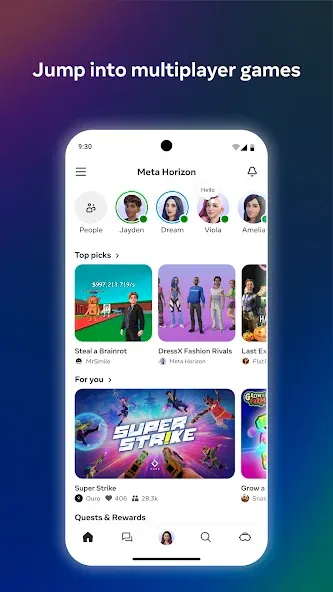
Meta Horizon is a social gaming application for Android that features an expansive community. Within this space, players can connect with a wide range of fellow gamers, invite them into their private rooms, and enjoy various mini-games together. The platform supports voice chat, allowing for real-time interaction with other players. Users can also customize their virtual avatars—adjusting outfits, hairstyles, and expressions—and personalize their profile avatars to their liking. The app offers a diverse library of games and supports connectivity with various hardware, including VR headsets.
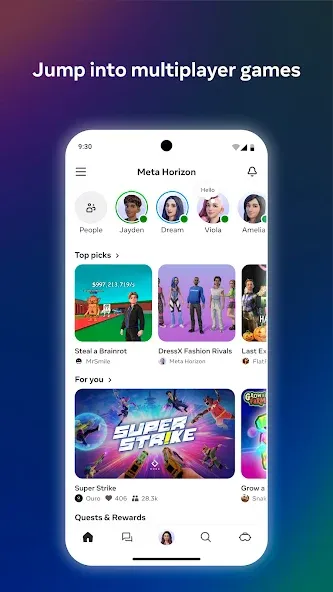
Find a game, then bring a group along
The primary utility of this app is enabling players to select multiplayer games without needing to put on a headset first. Currently, the app features hundreds of free-to-play multiplayer titles, which can be enjoyed solo or with friends. This variety is significant, as the requirements for team composition and time commitment are relatively consistent across different genres, such as quick-fire puzzle games and cooperative adventures.
Social tools are integrated directly into the gaming experience rather than existing as an external add-on. You can invite existing friends, meet new people, join live game sessions, and chat while you play. Quests, rewards, and leaderboards provide players with objectives that extend beyond individual game sessions, giving returning users specific goals to pursue. Rated for teens on the Android platform, the app includes features for monitoring user interactions, underscoring that social functionality is a core component of the experience—not merely an optional feature.
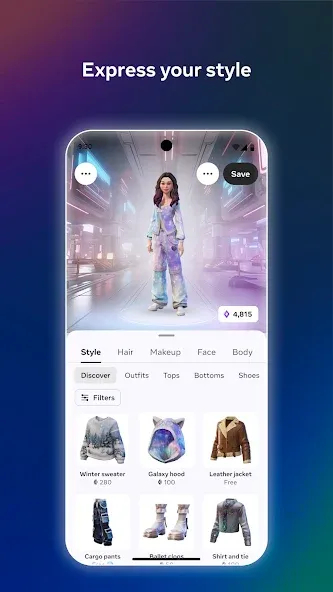
Customize your avatar via your phone
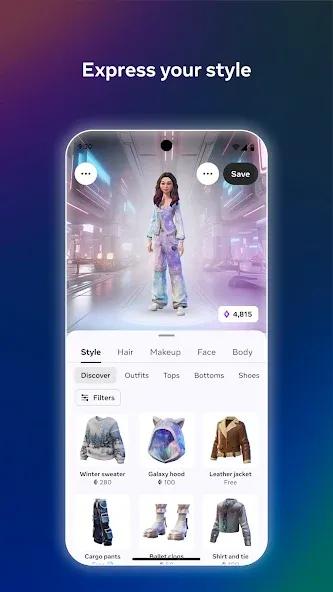
Meta Horizon positions its avatar system as a mobile-exclusive feature. The Android app listing highlights customization options such as outfits, hairstyles, and expressions, while official technical documentation mentions a dedicated "Avatar" tab, allowing users to make adjustments directly from their phones. This ensures that a user’s profile is deeply intertwined with the games and social spaces, rather than being tucked away as an isolated setting in a separate device menu.
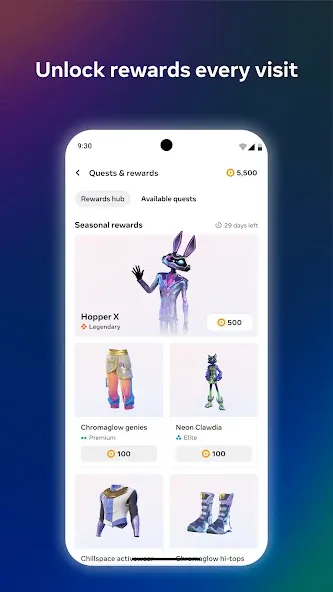
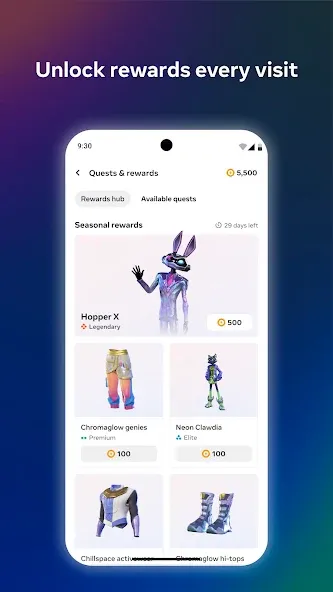
This same philosophy extends to the quest system. According to official materials, players can explore various virtual worlds through the app and complete quests to unlock new avatar styles, items, and expressions. Customization features are closely tied to a player’s activity on the platform, going well beyond the simple selection of static images. While specific options may evolve with future updates, the current experience places equal emphasis on personal style and the sharing of gaming moments.
Photos, Videos, and a Mobile-First Approach
The app allows you to share photos and videos—including spatial media and cloud-based content—with friends. For those who capture highlights within supported virtual experiences, the app offers a seamless path from recording to sharing, eliminating the need to manage every clip as an individual file. Furthermore, players can revisit or share these highlights at any time—even when they aren’t actively playing—ensuring the app remains useful beyond the gameplay itself.
Explore Community Worlds
Meta Horizon offers a diverse array of worlds spanning genres such as adventure, action, role-playing, strategy, and puzzles. You can dive into worlds crafted by creators and switch between them whenever you’re in the mood for something new. Titles like Super Strike!, Shovel Showdown!, Profit or Perish, Super Boxing Gym, and Pizza Kitchen each feature their own unique rules and aesthetic. With such a wide variety, it’s easy to find something that fits the time you have available.
Live Events and Entertainment
You can watch live concerts, comedy shows, sporting events, and movies directly within the app. Events are presented in a clear, organized list, making it easy to see what’s happening now or coming up soon. Many of these events take place within virtual worlds—simply select an event card to jump right in. In most cases, no separate ticket is required, making the process incredibly convenient.
Cross-Device Access and Creation Tools
Meta Horizon is available on iOS, Android, Meta Quest, Mac, and PC, allowing your account to span multiple devices. You can pair your phone with a Meta Quest headset to complete the setup and continue your exploration wherever you go. Creators can build virtual worlds and explore monetization options via the Creator Center. Additionally, parents can use the Family Center to enable supervision tools and manage the experience for younger users.

This is a fantastic app, packed with genuinely fun games tailored to your personal tastes—it’s got just about everything you could want. Horizon+ offers great value; it allows you to experience games before committing to a purchase, helping you decide whether a title is truly worth buying. This has saved me a significant amount of money, ensuring I only purchase games I genuinely enjoy while avoiding spending on ones that don’t suit my tastes.
The app is generally quite good, but you may run into issues when trying to interact with the bottom area of your phone screen. The navigation bar buttons can obstruct the app interface, making certain actions impossible to perform. For instance, I received friend requests from scam accounts, but because the navigation bar buttons were in the way, I couldn't delete them.
It’s a lot of fun to use, and you can chat with friends. There’s plenty to explore, even when you’re offline or using the VR headset. You can choose between VR mode and non-VR mode. You can call your friends or send them messages while offline. You can also share content and use screen-sharing features. In short, there is so much to enjoy within Meta Horizon.
Meta Horizon is packed with features that make this popular VR headset even more entertaining; it’s an excellent companion app for anyone who owns a Meta Horizon VR device.
Size:86.39MB Version:398.1.0.41.225
Requirements:Android Price:Free
Package Name:com.oculus.twilight Signature:ef890fe6853f713b10d15e0035fbc9da

Nowadays, various social media apps are constantly being launched, enriching people's ways of making friends in their daily lives. People can meet people from all over the world online without leaving their homes. At the same time, the software adopts real name authentication, allowing everyone to make safe friends. This collection integrates numerous popular social media apps. Interested friends, come and download it now!
What are the types of social apps? This question is very important for social media influencers. After all, a social app can continuously provide new ways to make friends and maintain old social networks. These social apps meet the needs of young people for making friends, providing diverse functions such as online voice chat, text chat, typing chat, sending pictures, and sending files. Provides a private chat space, and the chat content is also very stable.
There are many useful social networking apps, each with its own advantages. Social networking apps not only allow us to stay in real-time with family and friends, but also help some single people meet their destined ones on social networking apps. What are the useful social media apps for everyone to list next? Choosing a social app that you are more familiar with and downloading it to your phone can make life more enjoyable.
About us | Contact us | Privacy policy| DMCA
Copyright © 2026 Xiaohei All rights reserved.