Snes9x EX+ is a game modifier software that loads the game's process and hooks its resources to modify and cheat. It supports peripheral connection control devices such as Bluetooth HID, allowing users to turn any Android device into a game console. It also features a built-in virtual keyboard, enabling players to simulate real peripheral joystick operation, making it a decent game joystick simulation software.
Core platform support: Linux (X server required), Android (using NDK), and iOS 3.1+
Fully event-driven architecture, using C++11 lambda expressions as callback functions
Nanosecond-level precision timers
Thread primitives
OpenGL context management
GPU-accelerated rendering (supports OpenGL and OpenGL ES backends)
Optimized support for writing video textures to every frame
PCM audio playback
IO and file system support, including access to ZIP, RAR, and 7Z compressed files
Input processing, including multi-touch and multi-device support
PNG image loading
TrueType font rendering
Basic GUI toolkit, supporting controls such as lists and alerts
Internal drivers for Wiimote, iControlPad, and Zeemote on platforms supporting Bluetooth backends
Supports .smc and .sfc file formats, with optional ZIP, RAR, or 7Z compression
Uses .cht File supports cheat code format
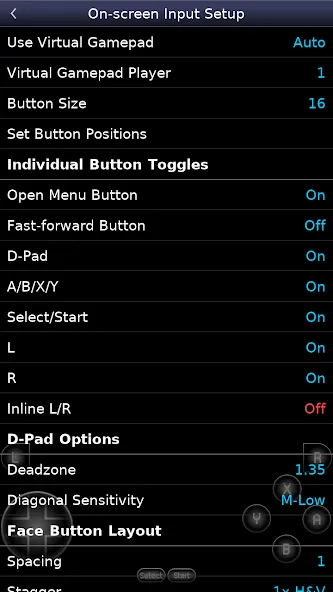
Configurable screen controls
Bluetooth/USB gamepad and keyboard support compatible with any HID device recognized by the operating system, such as Xbox and PS4 controllers
Pros
Snes9x EX+ is the best place to turn your Android device into an SNES game console, allowing you to play any locally stored ROM on your device.
Cons
Snes9x EX+ has no flaws. If you want to emulate Super Nintendo games, this is the app for you.
1. Load the Game
First, place your game ROM file in a folder on your phone. Note that it must be in ZIP compressed format; regular NES files cannot be read directly.
Open the app. The main interface is a menu bar. Click the first option, "Load," then select the directory of the game program and click the ZIP compressed file to run the game.
2. Virtual Keyboard Settings
This refers to the emulator gamepad buttons on your phone screen. Enter the virtual keyboard settings and click on button layout settings to adjust the position of some buttons. After setting it up, you can adjust other parameters such as button width and other parameters. You can hide or turn off unrelated button positions and adjust button brightness.
3. Game Settings
Click on Settings in the main interface to enter. Here you can adjust game video parameters and emulator speed-up/downshifting functions. For the highest game performance, set the process priority to the highest.
4. Emulator System Settings
In the video settings, you can adjust the game's visual quality, such as screen size and video filters. Selecting a linear filter will simulate the effect of an old-fashioned television.
5. Using Cheat Codes
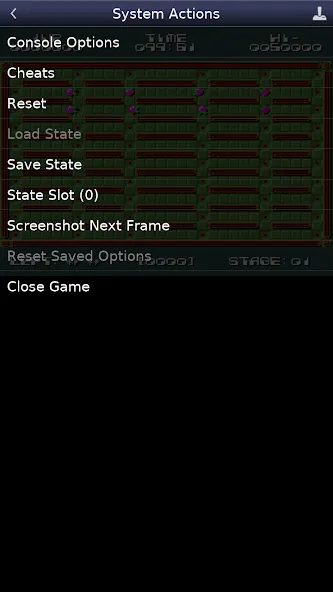
First, run the game. After starting, pause the game and press the back button on your phone. A prompt will appear asking if you want to exit; click "No" to return to the menu, or click the menu in the upper left corner to return to the main menu.
Then you'll see the "Cheat" button is activated. Click it to enter and select "Add/Edit".
Snes9X EX+ is an advanced open-source Nintendo emulator. Essentially, you can place games on your internal storage or SD card and browse them within the app to start playing. ROMs can be in .smc or .sfc format, or packaged in a .zip file. We recommend using a device with a 1GHz or higher GHz processor for emulated gaming. It runs very smoothly, and those interested are welcome to download and try it.
Size:1.62MB Version:1.5.85
Requirements:Android Votes:205
Package Name:com.explusalpha.Snes9xPlus Signature:6811d50eaed7b63db525068956178834
As the old saying goes, "Variety is the spice of life" - our world brims with endless possibilities, and every individual walks their own distinctive path. While you may be accustomed to your daily routine, gaming offers a portal to countless alternate realities. Within these digital realms, you can rewrite your story, assume extraordinary roles, and explore lives beyond imagination. Why not embrace this opportunity to experience a completely different narrative? The next chapter of your adventure awaits.
The world is vast, filled with countless experiences, emotions, and events, yet our time is limited, making it impossible to personally go through every aspect of life. However, through simulation, we have the opportunity to step into different roles, explore diverse scenarios, and immerse ourselves in experiences that might otherwise remain beyond our reach. While it may not completely replace real-life encounters, it allows us to gain valuable insights, broaden our perspectives, and satisfy our curiosity about the unknown. So why wait? Let’s dive into a new world of possibilities and start an unforgettable journey!
Boom! A sudden explosion shatters the silence, and that’s definitely not a good sign. When such a dangerous situation arises, staying alert and cautious is our top priority. We must be vigilant, avoiding anything that could trigger another blast. But if an explosion is inevitable, the key is to minimize the damage, take swift action, and ensure safety. Preparation is crucial-whether it’s having the right protective measures in place or knowing how to respond in an emergency. Stay sharp, stay safe, and be ready to handle whatever comes next!
About us | Contact us | Privacy policy| DMCA
Copyright © 2026 Xiaohei All rights reserved.