2ndLine aims to connect friends and family around the world. Users can communicate with their friends anytime via text and video, enjoying a smooth calling experience without worrying about high call costs, making it easy to strengthen relationships. 2ndLine also supports bulk sending; simply select the relevant files, pictures, and videos to quickly send them to your friends, and even edit messages according to your preferences. 2ndLine will continue to update and launch more new social features, so stay tuned!
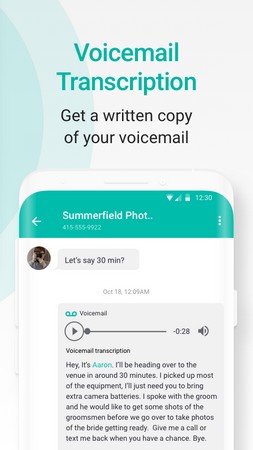
Voicemail Transcriptions: The application introduces the convenience of voicemail transcriptions, enhancing the usability of voice messages through the virtual number. Functioning virtually without the need for physical hardware, the voicemail transcription feature mirrors real-world accuracy.
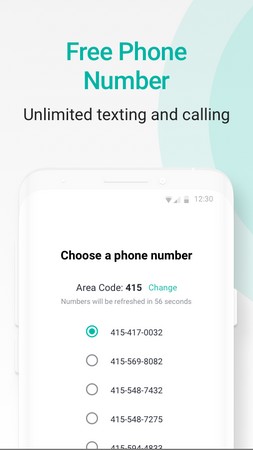
Create a new communication channel: Right from the start, you’ll be guided by 2ndLine to select a new contact. This is the second phone number with the US and Canadian codes. This phone number allows you to easily contact any other phone numbers for these two countries. No time limit, no high fees for calls. Note that this number may be sorted by different area codes. So, right from the time of selection, users should choose the right area code that they want. A list of unused phone numbers will appear. Make unlimited calls and texts.
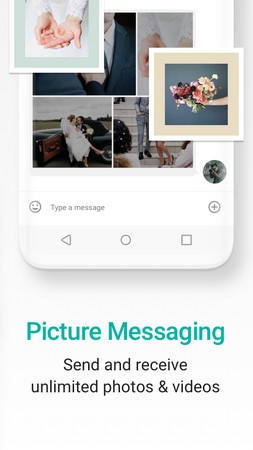
Advanced messaging function: Many users appreciate this feature of 2ndLine because it is much more convenient than other messaging applications. For example, you can send images in bulk, without needing to send them one at a time. You can even edit it, and insert text to create a card. Sending voice messages has also become more convenient than ever. Because besides regular voice messages, the application automatically adds subtitle text for it. When the recipient can’t hear the voice chat but still knows the content you want to convey to them.
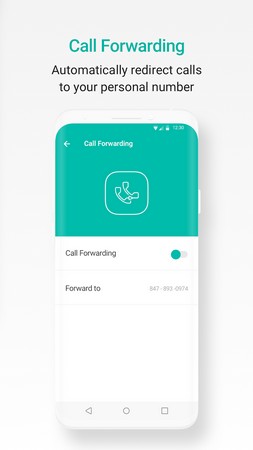
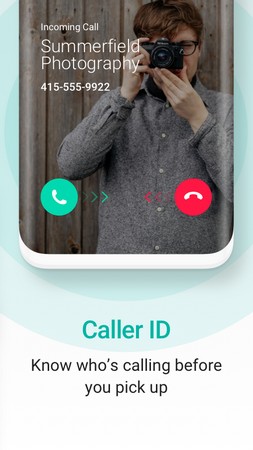
Reduce spam calls: 2ndLine helps you prevent being bothered by spam calls, and scam calls. By identifying the caller’s ID, the application detects the identity of the caller. Even if you haven’t saved this person’s name to your contact list, it still shows the most basic information. Knowing this information helps users make decisions about whether to listen or not. You can even divert your calls. Take the simple example of transferring a call to a professional colleague to advise a customer.
High security: The app also makes sure that your calls and messages are encrypted, which prevents all the data to be hacked. The users can set a Passcode for opening the app by which you can stop others to access the app on your mobile phone.
Quality services: 2ndLine app gives you a better quality service that includes calling and messaging. Also, it has a feature of impersonating the users’ phone number, which provides them with access to do multiple things.
Voicemail transcription: The most beneficial feature of 2ndLine Premium Apk is Voice transcription, with which users can transcribe the voicemails directly from the app interface.The best thing is that use and closes this feature anytime without any in-app restrictions.
Login screen bypass: The 2ndLine also gives you the feature of logging in without using any credentials. So, it means that you can access all its features without creating an account within the application.Now, you don’t need to submit your email address on their database that eventually helps you to keep away from spammy emails.
Premium features unlocked: There are lots of amazing features available in the premium subscription of this app. But unfortunately, we have to spend real money purchasing the 2ndLine subscription that can spoil our budget.To help you out from this problem, I shared 2ndLine MOD Apk in which the premium subscription is unlocked for the lifetime.
Free second phone number from the US or Canada on one device
Free calls and texts within the United States and Canada over WiFi or mobile data
Reasonably priced international calling using account credit
Works on Android phones and tablets, turning tablets into calling devices
Rich messaging features, including emojis, stickers, GIFs, pictures, voice messages, and group chats
Voicemail with transcription, call forwarding, and configurable caller ID
Passcodes, password protection, and Google SmartLock support for added privacy
Custom ringtones and backgrounds, with per-contact personalization
Unified inbox and Quick Reply pop-up for faster responses
Free tier without trial limits, credit-earning tasks, or forced upgrades
Service limited to users in the United States and Canada
Ads in the free version can interfere with answering calls
Reports of missed or absent text notifications
Occasional login errors and account freezes for alleged terms-of-use violations
Risk of losing the number if the account is closed or frozen
Customer support handled mainly by email, with reports of slow responses
Requires a stable WiFi or mobile data connection for all calls and texts
Looking for a separate phone number without the hassle of another phone?
The 2ndLine App is your solution! It's a mobile app that gives you an extra phone number right on your smartphone. Forget carrying two phones or switching SIM cards. With 2ndLine, you can:Make and receive calls: Use your new number for business, personal, or anonymous use.Send and receive texts: Stay connected with separate conversations without juggling devices.No extra hardware needed: Works seamlessly on your existing phone, no SIM card required.
Can I Use My 2ndLine Number Like My Real Phone Number?
Yes, you can use your 2ndLine number like your regular phone number, with a few differences:
It's a virtual number: Unlike traditional SIM-based numbers, 2ndLine provides numbers through VoIP technology. It uses your internet connection instead of cellular networks.
Most calls and texts work the same: You can make and receive calls, send and receive texts, and even manage voicemails just like your regular number.
Some limitations exist: Certain institutions, like banks or social media platforms, might not accept virtual numbers for verification purposes due to their own policies.Overall, 2ndLine offers a great way to have a separate number for personal or professional use while enjoying most of the functionalities of a traditional phone number. Just be aware of potential limitations with specific institutions.
Does 2ndLine App need a WIFI or data connection?
Yes, the 2ndLine app requires an internet connection to function.
It uses VoIP technology, meaning it transmits calls and texts over the internet instead of traditional phone lines. So, you'll need either:
Wi-Fi: For an optimal experience with stable sound quality and lower data usage.
Mobile or Internet data: Connects you anywhere, but be mindful of data charges depending on your plan.Here's the benefit: No need for separate phone lines or SIM cards! Just activate your 2ndLine number and stay connected through your existing internet connection.
How Do I Cancel My 2ndLine Subscription?
To assist you with canceling your 2ndLine iOS subscription, please follow the steps outlined below:
1. Open the Settings app on your iOS device.
2. Tap on your name at the top of the Settings menu to access your Apple ID settings.
3. Next, select "Subscriptions" from the list of options. This will display a list of all active subscriptions associated with your Apple ID.
4. Locate your 2ndLine subscription from the list and tap on it to view the subscription details.
5. Within the subscription details, you should see an option to "Cancel Subscription." Tap on this option to initiate the cancellation process.
6. Follow any additional prompts or instructions provided by Apple to confirm the cancellation of your subscription.
Please note that upon cancellation, your subscription will remain active until the end of the current billing cycle. You will continue to have access to the premium features of 2ndLine until the subscription period expires.
2ndLine is a mobile phone application that provides users with a secondary phone number for the US and Canada. It offers a comprehensive set of features designed to meet the needs of mobile professionals, freelancers, and entrepreneurs. With 2ndLine, you can make calls and send messages from a separate number on your existing devices, using either Wi-Fi or your cellular network, to anyone in the US and Canada.
Size:71.1MB Version:25.46.1.0
Requirements:Android Votes:469
Today, I would like to recommend several adult social chat apps that have a large user base. You can find friends from all over the world, open the same city to meet strangers nearby, interact and chat with them, and become friends. They provide various chat functions and can communicate through text, voice, video and other means. If you want to meet more opposite sex friends, download them now.
What are the types of social apps? This question is very important for social media influencers. After all, a social app can continuously provide new ways to make friends and maintain old social networks. These social apps meet the needs of young people for making friends, providing diverse functions such as online voice chat, text chat, typing chat, sending pictures, and sending files. Provides a private chat space, and the chat content is also very stable.
Nowadays, almost everyone is using social networking sites and apps, and is addicted to them, unable to extricate themselves. Among all the social networking sites and apps in the world, which one is the most popular? I believe everyone is now accustomed to using social media to expand their circle of friends! Mobile social app software has become an essential application for us today, making communication between people more important and convenient.
About us | Contact us | Privacy policy| DMCA
Copyright © 2026 Xiaohei All rights reserved.