Health Connect is an excellent health and fitness hub. It offers a powerful solution that seamlessly synchronizes data from your health, fitness, and wellness apps onto a single platform, making it easy to manage all your information. With Health Connect, you can effortlessly share data across various apps, allowing for more convenient tracking and a better understanding of your overall health. Additionally, the app features robust privacy protections, giving you full control over the information shared with each app so you can safeguard your privacy at all times.
Get more from your favorite apps. Whether you're focused on activity or sleep, nutrition or vitals, sharing data between your apps can help you better understand your health. Health Connect gives you simple controls, so you only share the data you want to.
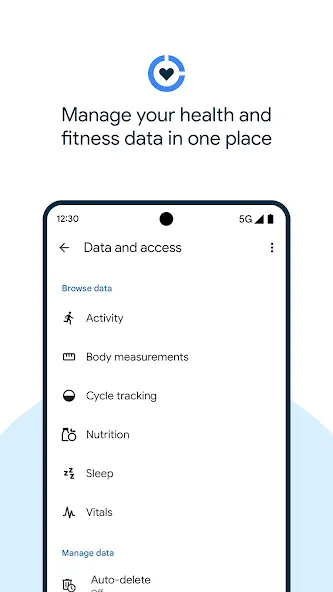
Keep your health and fitness data in one place. Health Connect stores the health and fitness data from your apps in one place, offline and on your device, so you can easily manage the data from your different apps.
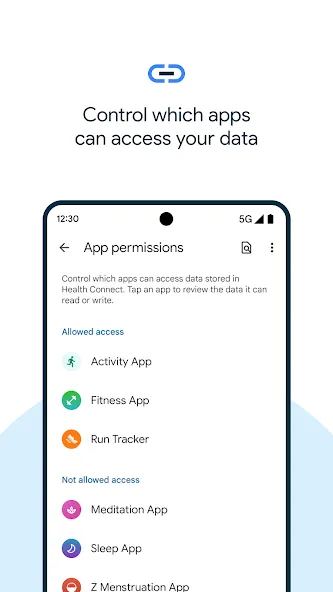
Update privacy settings in a few taps. Before a new app can access your data, you can review and choose what you want to share. If you change your mind, or want to see which apps recently accessed your data, find it all in Health Connect.
Central hub for your health data
Health Connect consolidates health and fitness information from different apps into a single repository on your device. Data stays offline by default, which helps you keep sensitive records in your hands. As you connect more apps over time, the hub becomes a simple place to see where your activity and wellbeing information lives. This setup reduces app switching and gives you a clearer picture of your daily patterns.
Granular permissions and recent access
You set permissions by app and by data type, so each connection only gets what you approve. Health Connect shows clear prompts before an app can read or write anything, and you can review requests in detail. A recent access view highlights which apps used your data and when. If a connection no longer makes sense, you can revoke access in a few taps.
Cross app insights with controlled read and write
Health Connect enables compatible apps to build insights across activity, sleep, nutrition, and vitals using only the data you allow. When you consent, an app can read or write specific categories to keep your records aligned without duplicating entries. With this approach, connected apps can keep data updated quietly in the background, while you remain in control of what moves between them. Over time, this helps reduce gaps and mismatches in your daily tracking.
Broad data type support
Health Connect supports common records such as steps, heart rate, and sleep sessions. It also accommodates workout routes from GPS, mindfulness minutes, and skin temperature when provided by your apps or devices. As more apps adopt Health Connect, a wider range of health data becomes available in one place. This breadth helps you avoid silos and view related information together.
Medical records browsing where available
When supported on your device, Health Connect can display basic medical records built on the FHIR format. You can manage permissions for this section much like other data, and choose which apps can access those records. Availability may vary by region, provider, and app support, and the interface focuses on core medical details for easy review. This positions Health Connect as a single health data layer on Android that respects your choices.
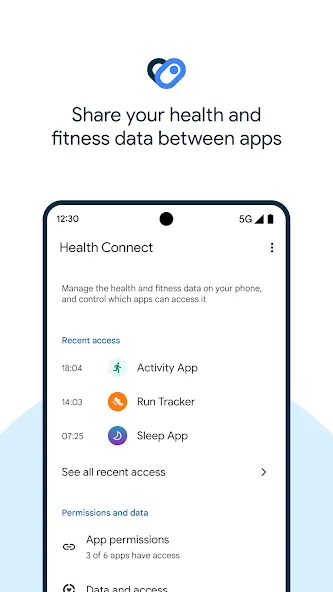
This will help you find all the data related to your health in one place.
The main screen in Health Connect is where you can select the permissions and apps that you want to link to the tool.
Privacy is essential when collecting data, so you'll always have control over the authorizations you allow.
As a result, Google will ask you about the security provided each time you add a new app.
Once you start linking the different health apps installed on your smartphone, Health Connect will be able to organize data related to your health and physical activity.
Your steps throughout the day, stress levels, blood pressure or heart rate are just some of the parameters that the tool will monitor.
Is Health Connect compatible with all health and fitness apps?
Health Connect is continuously adding partner apps to expand its compatibility. Check the app for the most up-to-date list of supported apps.
How does Health Connect protect my privacy?
Health Connect ensures your privacy by giving you complete control over which data is shared with each app. You can review and adjust these settings at any time.
Can I access my data offline with Health Connect?
Yes, all your health and fitness data is stored offline on your device, allowing you to manage and view it even without an internet connection.
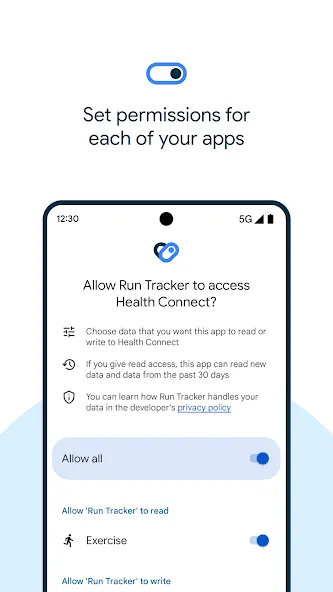
Your steps throughout the day, stress levels, blood pressure or heart rate are just some of the parameters that the tool will monitor. Downloading Health Connect for Android means you can efficiently organize all the health data stored on your smartphone through different health apps. In addition to this, the app allows you to access any saved data, even when offline.
Size:7.32MB Version:2026.07.09.00.re
Requirements:Android Votes:433
Package Name:com.google.android.apps.healthdata Signature:0922f85f679ea6537858ca12759d3629
Fit Apps offers smart health tools that help you track exercise, nutrition, and daily activity. Easy to use and works across devices. Reach your fitness goals with motivation and clarity.
As 2023 comes to a close, you (like many of us) are probably in the “new year new me” planning phase. When it comes to writing resolutions, along with winning the lottery, ramping up on fitness is a top priority for most. That being said, overhauling your fitness regimen that doesn’t work in favor of a new one can be costly. Fortunately for you, we’ve put together a roundup of the best free fitness apps to try in 2024. See which free fitness apps made our “nice” list for 2024.
Our premium collection of fitness apps combines advanced technology with expert-designed programs to empower your health and wellness transformation. Each application in our suite offers a unique, science-backed approach to fitness - from personalized workout plans and nutrition tracking to mindfulness exercises and progress analytics. Whether you're aiming to build strength, improve endurance, or enhance overall wellbeing, our intuitive platforms provide the smart tools, real-time feedback, and motivational support you need to exceed your goals. Discover your perfect fitness companion and unlock a healthier, stronger version of yourself starting today.
About us | Contact us | Privacy policy| DMCA
Copyright © 2026 Xiaohei All rights reserved.