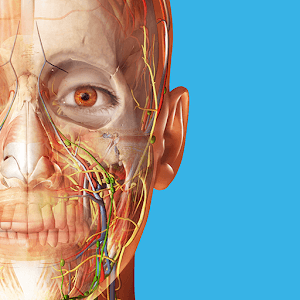
Human Anatomy Atlas is a human anatomy model software designed specifically for medical students. Utilizing cutting-edge technology and models, it creates highly detailed human anatomy models. Users can swipe the screen and zoom in or out to view different parts of the model, including organs, blood vessels, fascia, and more, meeting their learning needs. The software also provides users with more knowledge about the human body and video tutorials to help them further solidify their learning. Human Anatomy Atlas will continue to be updated, releasing even more detailed human anatomy models in the future—stay tuned!
This will become a miniature world of organs and structures formed by a man from the inside. You will be amazed by the highly sharp graphics and attention to detail in the parts. That’s why Human Anatomy Atlas 2021 can compete with many other similar applications. Once you’ve set foot in here, it will be hard to put your foot down and look for another app to explore how human body communication looks and works.
Not stopping there, we also bring you a lot of useful information on the sidelines. Precisely, a textbook has been drafted by leading experts and masters of the greats in the medical field. Its content revolves around the definitions of parts and operates from general to specific. They will become the best and brightest references instead of a bit dry textbook.
Users will experience extremely interesting and useful hands-on and observations in an amazing 3D lab. Appearing on your screen are the internal organs of the human body, but not just one place, but you can view many different parts simultaneously to compare and compare in the easiest way possible. We took this idea from a practical need to resemble a genuine lab initiative.
Human AnatomyAtlas 2021 gives users anatomical models, Overall male, and female. With it, you will be able to see the full body of the human body but with a different view when the visceral shields are removed. Not only that, the muscle activities or incisions made in different positions are also reproduced realistically and vividly. Here, you will admire macro to micro models that we fully own.

Different tools suit different users' styles and goals: Content Search and Anatomy Search work well for users who know exactly what they’re looking for the Content Search feature in Human Anatomy Atlas is a great tool for users who want to look up a particular structure. If you know the name of the structure you’re looking for and how to spell it, you can tap the search bar icon in the lower left corner of the screen and type it into the search box. The search results screen shows individual structures, system and region views, animations, and quizzes for you to choose from.Anatomy Search is similar to Content Search, but it’s accessed from within a view and its primary function is to add specific structures to the view you’re already looking at. If you know which structure you’d like to add to a view, tap or click the magnifying glass icon and type its name. It’s usually a good idea to type as few words as possible (for example, “piriformis” would be more efficient than “piriformis muscle”). You can also filter your Anatomy Search results by system—all you need to do is click on the icons corresponding to the systems you want to include in your search.When creating a view, use "big" tools like the Systems Tray, and then "finer" tools like Hide, Fade, and Dissect.
After going over the basics, Chris explored a few techniques for creating custom views. There are many different ways to start creating a view in Human Anatomy Atlas—generally, users begin by choosing a region or system view from the main menu and customizing from there: Once you’ve chosen the premade view you’d like to start with, the first customization step we’d recommend is to use the Systems Tray tool to add or remove large groups of structures quickly. The Systems Tray lets you take a broad-stroke approach, adding or taking out all the structures in an entire system. But did you know that you can also use the Systems Tray to add or remove all the structures in a particular system from a particular region of the body? By using the “region” button at the top of the Systems Tray, you can focus on whatever body region you’re interested in. This will allow you to do things like show or hide all the muscles in the right arm, or the arteries in the pelvis.The Hide, Fade, and Dissect tools can help you “fine tune” your view once you’ve decided on the region(s) and system(s) you want to show. You can Hide or Fade a structure from the info box after you’ve selected it. You can use the Dissect tool to immediately remove structures as you select them (there’s no need to “slice”).
Use the Radius Blast tool to build up anatomy layer by layer instead of just dissecting: One of the great things about Human Anatomy Atlas (and one of the features it offers that physical dissection doesn’t) is that you don’t always have to “drill down” and dissect. You can use the Radius Blast tool and the Anatomical Hierarchy/“Breadcrumb Trail” to build up anatomy layer by layer! The Radius Blast tool is located in the info box, right next to the name of the selected structure. Tapping or clicking on it will gradually add structures (from the same system and other systems) around the structure that is highlighted on the model. This is a great way to show innervation and blood supply to muscles.

Is Human Anatomy Atlas available for mobile devices?
Yes, Human Anatomy Atlas is available as a mobile app for iOS and Android devices. It can be downloaded from the App Store or Google Play.
How much does Human Anatomy Atlas cost?
The price of Human Anatomy Atlas varies depending on the version and platform. The desktop version starts at $24.99, while the mobile app costs $24.99 for iOS and $19.99 for Android.
Can I use Human Anatomy Atlas offline?
Yes, Human Anatomy Atlas can be used offline once it has been downloaded onto your device.
Is Human Anatomy Atlas regularly updated?
Yes, Human Anatomy Atlas is regularly updated with new anatomical structures, features, and improvements.
What languages is Human Anatomy Atlas available in?
Human Anatomy Atlas is currently available in English, French, German, Italian, Japanese, Simplified Chinese, Spanish, and Traditional Chinese.
Can I access Human Anatomy Atlas on multiple devices?
If you purchase the desktop version of Human Anatomy Atlas, you can use it on up to two devices. If you purchase the mobile app, you can use it on multiple devices as long as you are signed in with the same account.
Explore the complexities of the human body with Human Anatomy Atlas, an authoritative and comprehensive resource meticulously crafted to provide an in-depth understanding of human anatomy. This app boasts a vast collection of over 500 vibrant and detailed illustrations, guiding you through each region of the human body with precision and clarity. It incorporates a wide array of images, including radiographs, CT images, angiograms, and MR images, which enrich your grasp of living anatomy as seen in clinical practice.
Size:1.3GB Version:2026.005.009
Requirements:Android Votes:577


As 2023 comes to a close, you (like many of us) are probably in the “new year new me” planning phase. When it comes to writing resolutions, along with winning the lottery, ramping up on fitness is a top priority for most. That being said, overhauling your fitness regimen that doesn’t work in favor of a new one can be costly. Fortunately for you, we’ve put together a roundup of the best free fitness apps to try in 2024. See which free fitness apps made our “nice” list for 2024.
Sports competitions have been an integral part of human history for centuries, showcasing skill, endurance, and the spirit of competition. Each sport offers its own unique thrills-whether it's the speed and agility of soccer, the strategic depth of basketball, or the sheer power of weightlifting. While experiencing these activities in real life is exhilarating, stepping into the world of virtual sports can be just as exciting. Games allow you to immerse yourself in different sports, refine your techniques, and enjoy the thrill of victory-all from the comfort of your own space. Why not dive into the action and experience the joy of sports in a whole new way?
Discover a handpicked selection of premium fitness apps designed to optimize every part of your workout regimen. Whether your focus is strength training, cardio, flexibility, or recovery, these cutting-edge apps provide tailored solutions to meet your needs. Featuring smart AI-driven plans, real-time performance tracking, and expert-led workouts, they help you train smarter and stay accountable. Interactive challenges, community support, and progress insights keep motivation high, while seamless integration with wearables ensures precision. Transform your fitness routine with professional-grade guidance-accessible anytime, anywhere-and make every workout count toward your goals.
About us | Contact us | Privacy policy| DMCA
Copyright © 2026 Xiaohei All rights reserved.