2ndLine – Second Phone Number is a powerful communication tool. This app offers an additional communication feature, allowing users to easily set it up for specific calls and texts, eliminating the risk of spam messages and harassing calls. With 2ndLine – Second Phone Number, you can use your mobile data or Wi-Fi connection to provide an extra route for your phone, without paying for a data plan, only for network connectivity. Furthermore, it pops up notifications for quick message replies, and the inboxes of both numbers are merged, eliminating the need to search for emails in two different locations.

Pick a local US area code
2ndLine lets you choose an area code from many US metro regions and assigns a matching local number. This helps you appear local to clients or friends in a specific city, which can improve call pickup rates. Since the service runs over Wi‑Fi or mobile data, you do not need a second SIM or a new phone plan.
Unlimited talk and text in the US and Canada
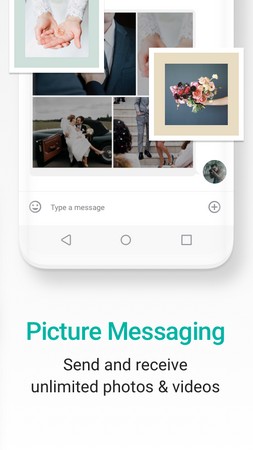
You can place voice calls and send messages across the US and Canada at no additional in app cost. Picture and video messages are supported, so you can share more than just text when needed. This setup is useful if you want to keep regular conversations on a dedicated line while keeping your main number private.
Affordable international calling
2ndLine supports calls to more than 230 countries with rates that start under one cent per minute. You can review destination rates before you call, which helps you control costs. This approach is practical for users who only need occasional international minutes without committing to a separate calling plan.
Use it across devices and as your default dialer
2ndLine works on both phone and tablet, so you can text and call from whichever device is handy. You can also set it as your default dialer to place calls from your contacts more directly, with your call history kept in one place. This creates a consistent workflow without switching between multiple apps for everyday calls.
Privacy controls and helpful extras
Keep business and personal numbers distinct to reduce unwanted contact on your main line. Caller ID, customizable tones, backgrounds, and Quick Reply help you identify and handle calls quickly. A home screen widget offers quick access, and the experience is supported by in app ads with an option to remove ads through a paid subscription.
Unlimited Texting and Calling
There are no limitations on the calling and text messages you can do with the number you get from this app. All calls made to the USA and Canada numbers are free, while there is a small charge for international calls. Not only this, but you can also send emojis, stickers, and media files using this app. So, it works just like every other communication app like WeChat, WhatsApp, Telegram, etc.
Customizable Voicemail
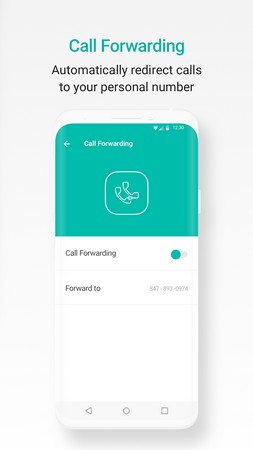
You also get a voicemail feature, just like the cherry on the cake. Users are able to send and receive a voicemail on the go. If you want, you can also enable the “call forwarding” feature that allows you to forward the calls to another from your 2ndLine number. This feature comes in handy when you want to use it for verification purposes.
Very Easy To Use
The interface of this app is very clean, and all the options are available right on the home screen. You will have to verify your identity by using your own mobile number and email and once done, the app will grant you a virtual mobile to use. The support is quick, too, so you can also connect with them if you are having issues with the app.
Protection From Spammers
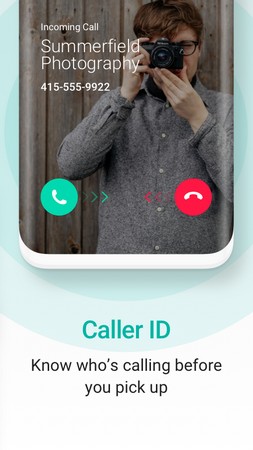
Don’t worry about getting your number detected as it is being used from 2ndLine because you can enable the caller ID protection feature. It adds a layer of privacy, and you can use it to verify your mobile number on a bunch of services. You can also set a custom ringtone and background for every contact you have on the 2ndLine app.
100% Free & Safe
There are no charges either to download or use this app, so don’t worry about anything while using it. Remember that it comes with in-app purchases, so you might have to shell out some money to use those premium services. Also, we have tested this APK file on our own devices, and it is working pretty fine.
Utilize Multiple Numbers: Take advantage of the multiple phone numbers feature by assigning different numbers to different purposes. You can have one number for business calls and another for personal calls, ensuring that your professional and personal lives remain separate and organized.
Customize Your Experience: 2ndLine offers a range of customization options, including customizable text-tones, ringtones, vibrations, and backgrounds. Personalize your messaging app to make it reflect your style and personality.
Stay Organized with Quick Reply: When replying to messages, use the Quick Reply feature to respond easily and quickly. This allows you to keep conversations flowing without wasting time searching for the right conversation or contact.
Pros
Free calls and texts for the US and Canada
Customizable tones and backgrounds
No need for your contacts to have the app
No billing on your phone’s plan
Cons
Only available for a few countries
Has frequent login issues

All in all, 2ndLine - Second Phone Number is a great alternative to getting another SIM card—and is a perfect option for those whose devices don’t support an extra slot for such. While it’s not available worldwide and can often encounter login errors, the app offers enough interesting features to warrant trying out its premium version.
Size:156.48MB Version:26.20.0.8
Requirements:Android Votes:140
Package Name:com.enflick.android.tn2ndLine Signature:43fdbaf10fe55b7f0435d77451692567a08f2c88
Keep in touch effortlessly with the world’s best free messaging and calling apps. Whether you're chatting with friends, video calling family, or coordinating with colleagues, these apps offer seamless communication-no subscriptions needed. Enjoy crystal-clear HD video calls, fun stickers, group chats, and reliable messaging across devices. Perfect for work collaboration, sharing special moments, or staying close to loved ones while traveling. Download today and experience premium connectivity without spending a penny!
In today's internet age, various chat apps have been launched, which have many advantages. They can chat and interact with family and friends who are thousands of miles away in real time, facilitate communication with colleagues at work, and also play a significant role in dating. What are the good chat apps. Today, we will give a brief introduction to these useful chat apps one by one.
The most popular social media platforms are those that offer diverse ways for users to connect, share, and interact globally. These platforms often combine features like photo and video sharing, text posts, and live streaming, catering to both casual users and content creators. They are widely used for personal networking, business promotion, entertainment, and staying informed about current trends. Many of these platforms incorporate algorithms to deliver personalized content and support features like direct messaging, group discussions, and short-form video creation. Their popularity is also driven by their ability to foster communities, enable influencer collaborations, and provide tools for advertising and brand engagement.
About us | Contact us | Privacy policy| DMCA
Copyright © 2026 Xiaohei All rights reserved.