DigiLocker is a file management application that provides users with excellent file management features, allowing them to quickly organize messy files. Files can be uploaded to the app's cloud drive, and the algorithm automatically sorts them by type. Users can quickly edit documents online, publish them to others, and enjoy fast operation, a simple interface, and numerous functions. For example, when a government agency publishes documents, they can be synchronized to every user in real time. It supports multiple file types and has multiple file protection mechanisms. Try it now!
User Experience
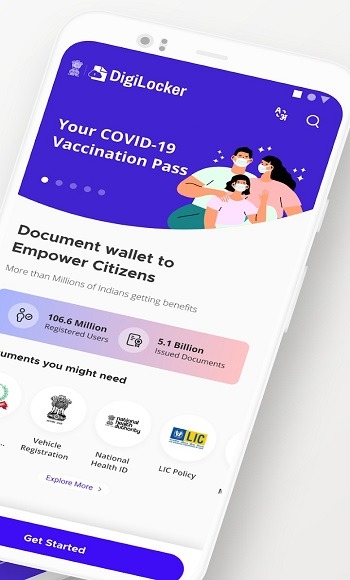
The interface is clean, with intuitive navigation that guides users through uploading, retrieving, and sharing documents. Recent updates have improved speed and usability, but some users may face occasional delays during peak usage. There is built-in integration with file sharing and QR code features, permitting fast, document verification and distribution to third parties—including employers, schools, and government offices.
Integration and Compatibility
DigiLocker interfaces with a wide range of government services, including eGovernance portals, educational boards, municipal corporations, and public utilities. The app is also accessible via web browsers, ensuring cross-platform consistency. For developers and businesses, API support enables further integration into third-party workflows, although this is mainly relevant to institutional users.
Performance and Reliability
DigiLocker generally performs well, loading documents quickly and accurately. However, users occasionally report server downtime or technical glitches during high-traffic periods, especially around exam results or government deadlines. Most routine activities—such as document downloads and uploads—work reliably.
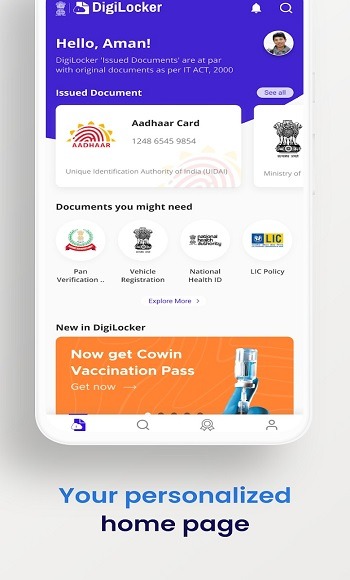
One of the best apps from functional, accuracy and most importantly aesthetically designed UI. I use it mostly from browser but the app is equally good. API integrations with works like magic. For example I was able to pull my docs like my school college mark sheets, my driving license, pan card, etc in few seconds just by providing one or two details. Both idea and execution behind the app is spot on. I actually stumbled on this as the zerodha account needed a digital Aadhar for which digilocker is used. I would again like to re-emphasise that this is not a just a storage drive as most people would mistaken. I hope they integrate with housing ,stamp duty registration database so I can pull and keep my property documents securely. Congratulations to the team behind this !!
Hello! The app is fantastic and works wonders but there is a slight loophole in the app. The thing is that I have got my name changed legally after 12th grade and the same has been verified with the dept. of publications and published in the gazette of India Part-IV. My name has also been updated in the aadhaar card with gazette being the supporting document. The gazette notification will always be the name change supporting document which will be provided along with my marksheet wherever needed. But I don't see any such provision in the application. As there is a name difference in my aadhaar card and marksheet, I am unable to pull my class 10th & 12th marksheets. Please look into the matter and address the problem for me and others who got their name legally changed.
This is one of the best government services available, but needs some improvements in the app. You can provide a link or a shareable user ID which can be attached to any government application as the proof of identity and for other certificates. Especially for students while applying for various exams, simply putting a link instead of scanning and uploading various documents signatures and photos will save a lot of time and energy. An option to link the old certificates(10th, degree etc.,) under ‘Issued Documents’ will also help. I’m unable link my DL, I guess it’s because my initial on DL is in short form whereas in Aadhar it’s in full form please correct this glitch.
What is DigiLocker?
DigiLocker is a digital platform developed by the Government of India that allows users to store, manage, and share documents securely on their mobile devices.
How do I use DigiLocker to store my documents?
You can upload your documents to DigiLocker after linking it to your Aadhaar card. The platform supports a variety of document types and ensures they are encrypted for security.
Is DigiLocker secure?
Yes, DigiLocker uses AES encryption to protect your documents. It also employs Aadhaar-based authentication for secure access, ensuring that only authorized users can view their documents.
Can I access government-issued documents through DigiLocker?
Yes, DigiLocker integrates with various government departments, allowing you to access documents like driving licenses, voter IDs, and other official records directly from the app.
Who can benefit from using DigiLocker?
DigiLocker is useful for students, professionals, and anyone who needs easy and secure access to their important documents. It is especially beneficial for those interacting with government services and institutions.
Pros
Official government endorsement and widespread acceptance
High-level security and data privacy
Convenient access to digitally signed, legally valid documents
Integration with numerous public agencies and educational institutions
User-friendly interface and document sharing options
Cons
Occasional technical outages during peak periods
Requires Aadhaar or mobile verification for setup
DigiLocker is a secure and innovative mobile app to store and access your important documents, such as driver's licenses, passports or certificates, in digital form. With DigiLocker, you can have all your relevant documents always with you, without having to carry actual papers. This app has been in collaboration with the Indian government and offers you a reliable and secure storage for your documents.
Size:72.86MB Version:9.4.2
Requirements:Android Votes:521
Package Name:com.digilocker.android Signature:8ebab164972d4db01ba815184efc3c61
Discover our File Management Apps hub! Here, you can explore essential tools like Google Drive for cloud storage, Dropbox for simple file sharing, and File Commander for managing files directly on your device. Easily organize and access your files across your phone, or tablet. Our platform is designed to help you quickly find reliable apps to streamline your digital file management.
File Manager offers both graphical and command-line interfaces, allowing users to efficiently organize and control files and directories on their phone. With a file manager, users can perform a wide range of tasks, including creating, renaming, moving, copying, and deleting files and folders. Additionally, it enables users to view file properties, access content, and modify file permissions as needed. Advanced features may also include cloud storage integration, file compression, and secure encryption, enhancing file accessibility and management on mobile devices.
About us | Contact us | Privacy policy| DMCA
Copyright © 2026 Xiaohei All rights reserved.