Tubular is a video management tool that integrates with major media platforms. The application is ad-free and supports background autoplay. It supports parsing different audio formats and qualities. The user interface is simple and intuitive, allowing users to quickly get started. The application can automatically skip ads, eliminating the need for annoying advertisements. It also has a small memory footprint and is highly efficient. It's an open-source application with completely transparent functionality, making it trustworthy. You can use it to search for mainstream media.
Free and unlimited video and audio playback from different streaming platforms.
It integrates five multimedia content platforms: YouTube, SoundCloud, media.ccc.de, FramaTube, and Bandcamp.
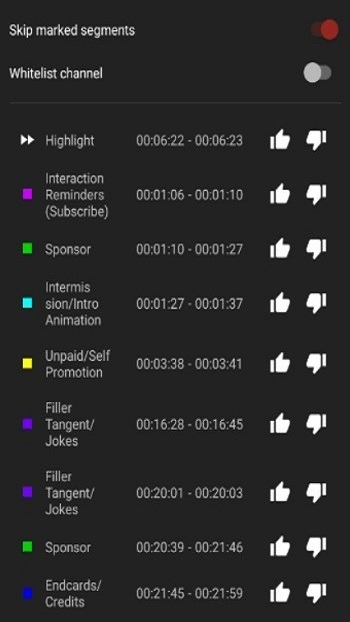
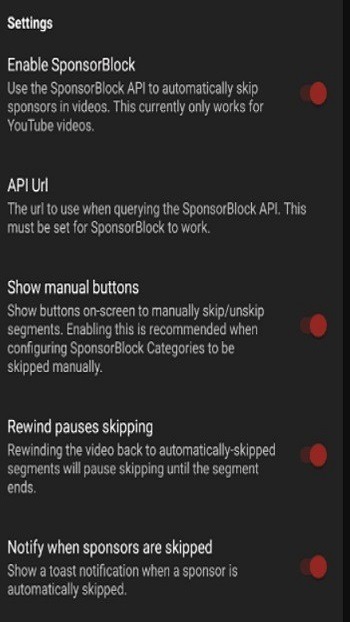
No ads or sponsored content thanks to SponsorBlock.
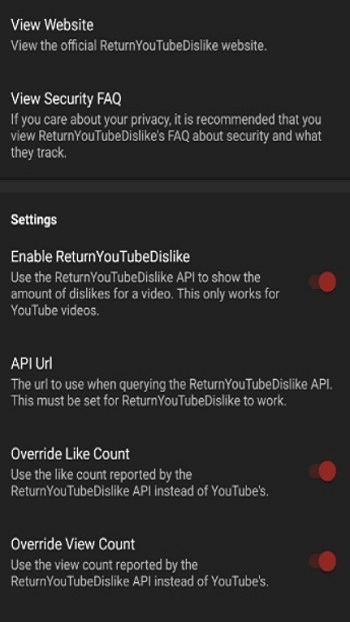
It implements ReturnYouTubeDislike to let you see the number of “dislikes” on YouTube videos.
It is a NewPipe fork with stability improvements and new features.
Background playback function.
Function to download videos and audio in different formats and qualities.
Minimal and customizable interface with intuitive design and advanced options.
Open-source app under constant development.
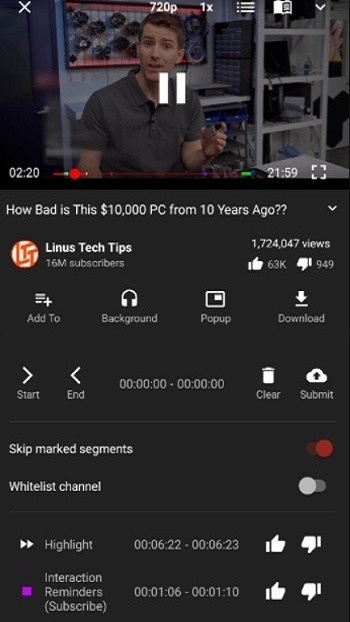
Automatic Segment Skipping: With this app, you won’t have to watch any annoying ads anymore. The app will automatically skip all ads for you. The app providing a satisfying and engaging viewing experience.
Community Driven Markers: The app will quickly mark all interesting videos. You’ll quickly access valuable and You will be able to enjoy engaging content without spending too much time searching.
Smoother Viewing Flow: With this app, you’ll enjoy the smoothest and most seamless viewing experience. You’ll fully enjoy your favorite content without any distractions or interruptions. It leaving you extremely satisfied. The app delighted every time you watch.
Tubular is efficient in terms of performance. Because it doesn't rely on Google libraries, it runs smoothly on devices with limited processing power. Its interface is simple, clear, and completely ad-free, making for distraction-free navigation.
One of its greatest advantages is its accessibility. Being free and open source, anyone can use it, study it, or even modify its code. This transparency builds trust and ensures that the developer community can contribute improvements.
What is the goal of the project?
YouTube has an extremely invasive privacy policy which relies on using user data in unethical ways. You give them a lot of data - ranging from ideas, music taste, content, political opinions, and much more than you think.
By using LibreTube, you can freely watch and listen to content without the fear of prying eyes watching everything you are doing. Apart from that the Piped proxies can bypass geo restrictions, therefore LibreTube can be used in countries where YouTube is blocked.
Is it possible to log in with a Google account?
Google accounts are not supported and never will be, however importing subscriptions from YouTube is possible.
Explore the FAQ to learn more about the process of importing subscriptions.
How can I import my subscriptions from YouTube?
1. Go to Google's Takeout Page.
2. Select only YouTube and YouTube Music.
3. Choose only Subscriptions Under the All data included section.
4. Create Export and Download the zip.
5. Extract the zip and locate the subscriptions.csv file.
6. Open LibreTube and navigate to Settings > Backup & restore > Import subscriptions.
7. Select the subscriptions.csv (may be named in the language of your YT account instead) file.
So, what are you waiting for? Stop wasting time with interruptions and outdated interfaces. Download Tubular APK now and step into a world of pure, unadulterated entertainment. With its blend of powerful utility and user-centric design, it is the only media application you will ever need to stay delighted every time you watch. Enjoy the smoothest viewing flow, discover the best content, and join a community dedicated to superior video quality.
Size:10.48MB Version:0.28.4
Requirements:Android Votes:596
Package Name:org.polymorphicshade.tubular Signature:95963737332ac96c424265d3f8c8e27c
Transform your smartphone into a powerful editing studio with the best video editing apps for Android! Whether you're a content creator, social media enthusiast, or just looking to polish personal videos, these apps offer professional-grade tools right at your fingertips. Enjoy intuitive interfaces, advanced features like multi-track editing and filters, and seamless exporting options - all optimized for mobile devices. Download now and start creating stunning videos anytime, anywhere!
Video Editor is a powerful software tool designed for crafting, refining, and enhancing video content. It enables users to transform raw footage into compelling visual narratives or effective communication platforms. As digital media continues to evolve, video editing has grown in significance - no longer just a professional necessity but also an accessible skill for everyday creators. Modern editing tools now offer intuitive interfaces, AI-powered features, and cross-platform compatibility, making high-quality video production achievable for both experts and casual users alike.
Video Player is a software application or hardware device designed to decode and display digital video content. Modern video players are highly versatile, capable of handling both locally stored files and real-time streaming media from online platforms. Over time, technological advancements have transformed video players from basic format-specific tools into sophisticated systems supporting a wide range of codecs, resolutions, and playback features. Today’s players offer enhanced functionality such as subtitle synchronization, playback customization, and adaptive streaming, ensuring a seamless and user-friendly viewing experience across various devices.
About us | Contact us | Privacy policy| DMCA
Copyright © 2026 Xiaohei All rights reserved.