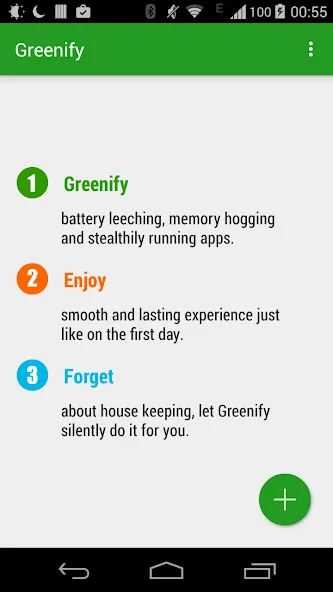
Greenify Donate is a utility for Android devices designed to manage background processes, giving users centralized control over their phones and optimizing performance for other applications. It enables features such as quick screen-off and dynamic hibernation; once the phone is set down, it immediately enters power-saving mode to extend battery life. The app automatically disables account synchronization tasks and scans for suspicious app behavior, providing detailed reports. It offers powerful control capabilities for Android devices while remaining lightweight and easy to use.
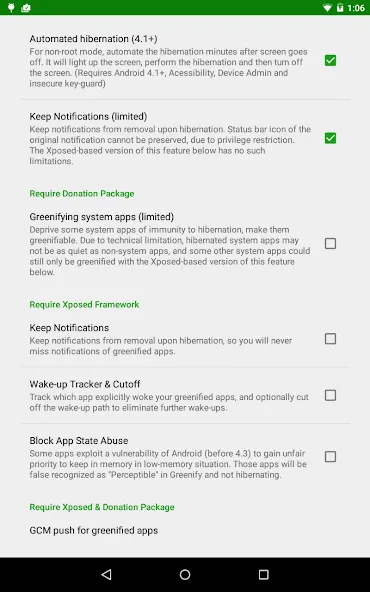
Perform quick screen-off and automated hibernation
And for better app performance, Android users can choose to enable the quick-screen-off and automated hibernation option, which will allow them to comfortably work with Greenify Donate. With these enabled, you can have the battery properly conserved, immediately after you use the phone and put it down. Thus, giving users better on screen time and boosting their experiences.
Control the account sync of apps
Also, sometimes, certain applications can perform their account sync tasks too frequently. This will drastically reduce the battery and performance of your devices, due to the consistent background tasks. Hence, Greenify Donate will choose to minimize the sync process and only enable it when needed.
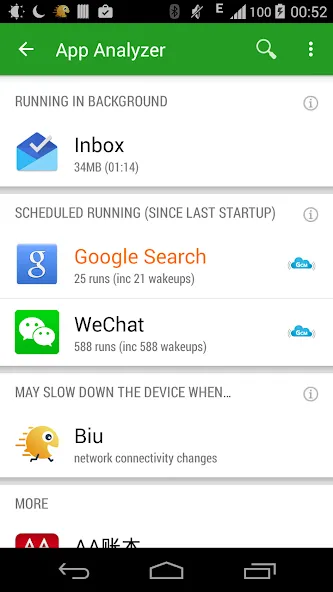
Check on app details and their behaviors
More importantly, Greenify Donate will allow Android users to check on certain app details and allow them to supervise their apps in the very details. This also shows suspicious app behaviors that you might want to put a stop to. Now, you can get an in-depth report on how apps behave on your devices. Thus, allowing you to make the most of Greenify Donate’s managing features.
Schedule your hibernation and battery saving operation
For those of you who are interested, you can also choose to customize the hibernation and battery saving operation on the system, which will provide better uses of the mobile app. Feel free to set your own schedule for optimizing the device’s performances and battery. This will make sure that your important apps aren’t touched while you’re needing them.
Pros
Strong background control
Lightweight performance impact
Helpful advanced options
Cons
Some learning curve
Not fully automated
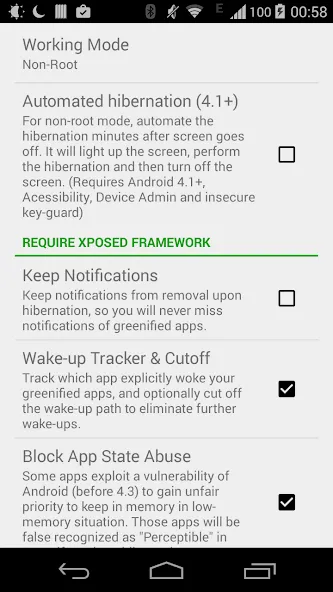
Lift mode (requires Xposed)
Permit (most) framework applications to be greenified in Greenify Donate
Permit GCM push message to wake slept applications (requires Xposed)
Keep Notifications after Hibernation
Wake-up Tracker (requires Xposed)
Square App State Abuse. (requires Xposed)
I love Greenify Donate. Works fine for me on my rooted Android 12 Pixel 3 XL. I removed it for a bit but my battery wouldn't survive the night. With Greenify Donate, things work great. Given that the app hasn't been updated in years, it may or may not work on your phone ... but on LineageOS, it seems to do just fine (just don't use aggressive doze). Shame there isn't a more modern version as everyone says Android has it built-in now but I haven't found that to be true.
Loved Greenify Donate so much, I was more than happy to purchase the Donation Package which allows Greenifying system apps. Though I thought that this feature should have been included in the app as standard, and instead the donation package could offer other extras like customized widgets and different UI themes (such as dark mode).Loved Greenify Donate so much, I was more than happy to purchase the Donation Package which allows Greenifying system apps. Though I thought that this feature should have been included in the app as standard, and instead the donation package could offer other extras like customized widgets and different UI themes (such as dark mode).
I installed xposed & just followed the instruction. Then, hibernated most of my social apps, last thing I know, My phone is browsing & processing fast. Drastically fast.What about Greenify Donate that other hibernating apps can't offer, is it capability to comprehensively detach an apps that wokeup while opening other apps. SUPERB!! Thanks DEV for bringing such wonderful app. 1 of the 1st & Brightest hibernating app that i found, been using it for years, maintaining my cp's performance & durability.
Greenify Donate provides a focused, efficient, and lightweight method to manage background activity, ideal for users who want smoother performance without complex system tuning. It benefits those juggling productivity apps, utilities, and other constantly active tools by offering better control and helping reduce unnecessary processes that drain device responsiveness.
Size:3.61MB Version:3.0build2
Requirements:Android 4.1+ Votes:204
Package Name:com.oasisfeng.greenify Signature:4992613de296cd953a2c0e7cbe6b6d2e
Utility apps are indispensable in our lives, making our daily routines more convenient. To help you find these apps more easily, this site has created a collection. This collection brings together a series of practical tools covering various aspects of life, work, and education, meeting all your needs. What are you waiting for? Try these apps now and make your life easier!
Transform your mobile device into a powerhouse of efficiency with these handpicked essential tools. Whether you need professional-grade photo editing, seamless file organization, smart task management, or real-time weather updates, our curated selection of premium apps delivers unbeatable performance. Streamline your daily routine, automate repetitive tasks, and boost your productivity with intuitive interfaces and powerful features. Designed for both professionals and casual users, these editor-approved applications will revolutionize how you work and play. Don't settle for an ordinary phone - upgrade your digital experience today and unlock your device's full potential!
With the development of mobile hardware and software, many practical tool software have emerged, covering a wide range of aspects and becoming a good helper for everyone in work and life. Today, the editor provides you with a list of useful tool software downloads. These tools are not particularly complex types, and after reading them, everyone can quickly learn how to use them. Proper use can bring great convenience to life and work.
About us | Contact us | Privacy policy| DMCA
Copyright © 2026 Xiaohei All rights reserved.