Expense Manager is designed to help users manage and track their income and expenses, thereby fostering healthy financial habits over time. The app tracks spending in real-time, categorizes and analyzes transactions, and generates charts that provide a comprehensive overview of weekly, monthly, and yearly spending patterns. As usage continues, the app generates budget analyses for the upcoming month based on past spending, further encouraging responsible financial behavior. All data is automatically synced to the cloud, allowing users to log in from different devices and seamlessly access their records. Security is also a priority; the app protects account information in real-time and requires neither registration nor an internet connection, ensuring a worry-free user experience.
Transactions Built for Detailed Recordkeeping: Income and expenses can be assigned to multiple accounts, categories, subcategories, payment methods, payees, tags, and statuses. Split transactions let one purchase contain several categories and amounts, while receipt photos provide supporting records. The app also covers credit cards, recurring entries, debts, tax tracking, and mileage. It can even parse supported bank and credit card SMS messages into records.This depth suits people who track several accounts or want more detail than a basic household budget app provides. Custom labels are especially useful when the default categories do not match how you organize money. Anyone seeking only a daily spending total may find much of this unnecessary, but diligent record keepers have plenty to work with.
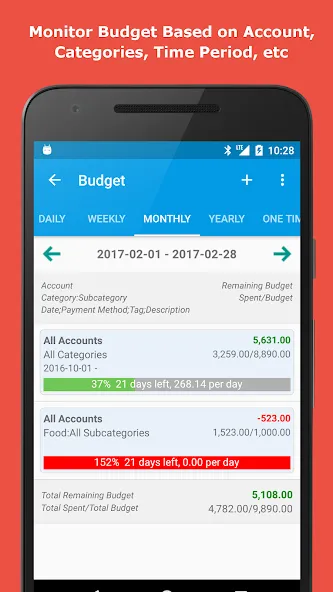
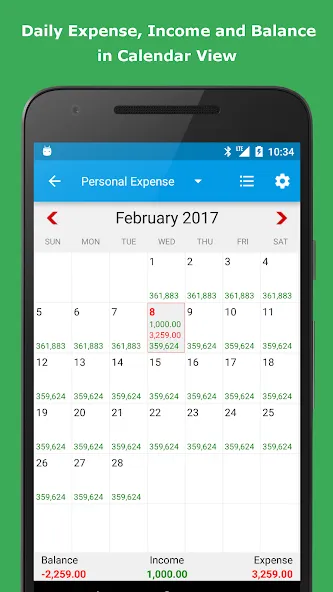
Budgets, Bills, and Calendar Forecasts: Budgets can run on daily, weekly, monthly, or yearly cycles, with progress bars and matching summaries. Bills may be arranged by category or time period, scheduled as recurring payments, and paired with payment alerts. A calendar view combines income and expense records, while calendar forecasting shows how planned spending affects the budget ahead.The checkbook side is unusually extensive for a phone app. Expense Manager can write, print, and email checks, and it includes tools for credit card payoff calculations, loans, interest, tips, and currency conversion. A shopping list and notes are also included, though these extras are less central than the transaction and budgeting tools.
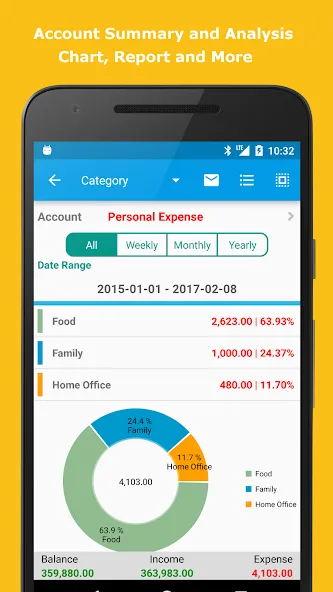
Reports That Do More Than Draw a Pie Chart: Search filters cover categories, payees, payment methods, descriptions, tags, dates, and other record fields. Reports can be produced in HTML, CSV, Excel, and PDF formats, with charts grouped by many of the same criteria. That makes the app useful not only for checking this month's total, but also for examining spending patterns or moving records into another workflow.A network connection to a PC provides a larger view of all accounts through a browser. From there, users can add or edit records, change settings, review charts, and manage backups. Android devices can also synchronize through Dropbox, while automatic backups support Dropbox, Google Drive, and SD card storage.
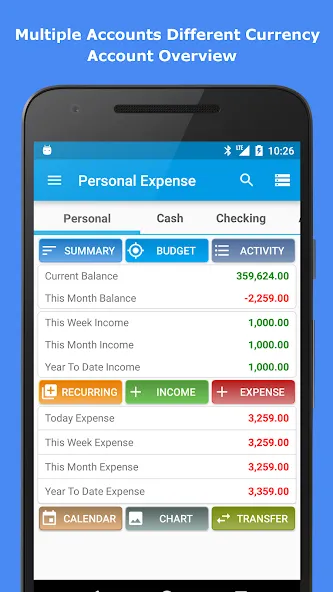
Best spend tracking ever!! been using since 2017! Using transfer for credit card and bank account. There's base currency if you have different currency accounts and it'll show the current equivalent. You can download or edit the transactions with simple browser link. Free tier has ads but it's not intrusive.. Simple and effective!!
I am using the app nearly10 years. Its really very easy to use. All types of reports r available in xl and other forms. Can be stored in dropbox , google drive and mem card also. More utilities also available. U can use this for all huge transactions. Accounts people can do more. Above all its free. I tried many apps bef but they don't have even sub categories. Also no backups and reports. Believe me this app is REAL EXPENSE MANAGER other apps r toys only.
I recently discovered an issue after adding a credit card tab. When I attempt to enter an amount of Rs 1000, it displays as Rs 95602. I tried deleting the tab and creating a new one, but the problem persisted. I also changed the card's name, yet the issue remained. Furthermore, when I reduced the amount to Rs 100, it then showed as Rs 9560. can u guide pls. rest all is awesome. thank you for free version. i always recommend strongly in my circle.
The app is amazing and has all the features needed for budget control. I definitely recommend it for anyone willing to control their finance. HOWEVER, dear developers, please add a function to create buttons on main screen for everyday payments (like bus fare). Copy function isn't the way for it as it does not change the payment's time and date. Thank you for such an amazing app, good luck in development!
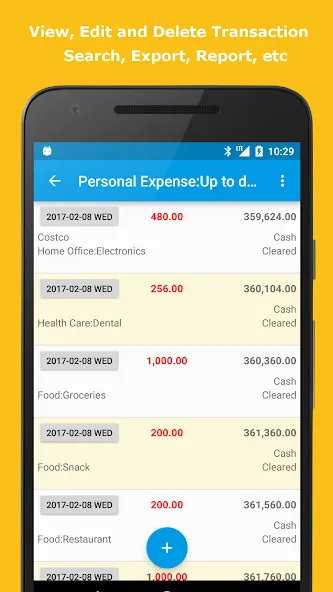
How do I quickly add an expense or income in the Expense Manager App?
It takes less than 10 seconds to add a new transaction. You have to click the ‘Income’ or ‘Expense’ button, input the amount, pick the category, choose the method of payment, and you are done!
Can I add notes, date and time to my transactions?
Yes. Every transaction includes a range of information such as custom notes and precise time and date stamps. This feature will be most helpful to freelancers and business owners, who require documentation for taxes and reimbursements.
How do I select or create custom categories while adding an expense?
As you add transactions, you can select pre-existing categories or you can create custom categories and sub-categories of your own. You can even allocate icons and color-coding to make things more organized visually.
What payment modes are available in the Expense Manager App?
The app supports all major payment modes including Cash, UPI, Credit Card, Debit Card, Bank Transfer, Digital Wallets, and more. You can even create custom payment modes according to your needs.
Is there an option to edit or delete a transaction after adding it?
Yes. You can edit or delete any transaction anytime. All changes are instantly reflected in your balances, reports, and charts, maintaining complete accuracy in your income and expense tracker.
Expense Manager provides you with a fast, easy way for your to keep track of all of your monetary movements. You can create different categories and assign your income and expenses to any one of them with just one gesture. In fact, one of the best things about Expense Manager's interface is that you can access any of the information you need with just one gesture.
Size:16.88MB Version:3.11.6
Requirements:Android 2.3+ Votes:178
Package Name:com.expensemanager Signature:3da41e778d80d344419b72fa0d2c2a1c
Money may not be everything, but it is undeniably crucial in life. This well-known saying resonates deeply with many, often striking a chord because of its painful truth. The reality is, in order to achieve our dreams and aspirations, financial stability often becomes a necessity. Whether it's pursuing a passion, starting a business, or simply living comfortably, money plays a pivotal role in making these goals attainable. So, what's the solution? The only path forward is to dedicate ourselves to hard work and earn the money needed to fulfill our dreams. Through perseverance, determination, and effort, we can overcome financial obstacles and pave the way toward a brighter future.
Digital currency exchanges, commonly referred to as cryptocurrency exchanges, are online platforms that enable users to buy, sell, and trade digital assets. These exchanges support transactions between different cryptocurrencies (e.g., Bitcoin for Ethereum) as well as conversions between cryptocurrencies and traditional fiat currencies like the US Dollar (USD), Euro (EUR), or Chinese Yuan (CNY). Beyond facilitating trades, these platforms play a crucial role in bridging the gap between conventional financial systems and the emerging decentralized digital economy. They provide essential services such as liquidity, price discovery, and secure transaction processing, making them a cornerstone of the modern crypto ecosystem.
About us | Contact us | Privacy policy| DMCA
Copyright © 2026 Xiaohei All rights reserved.