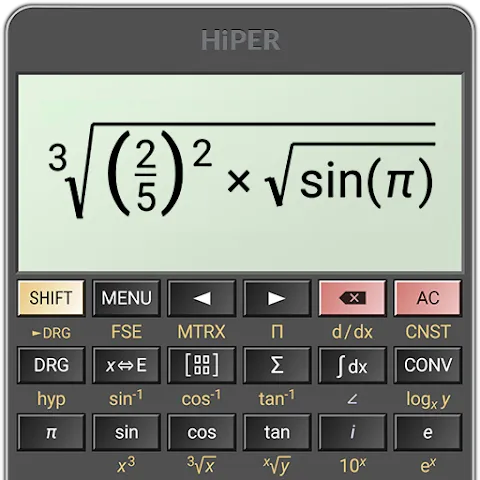
HiPER Scientific Calculator is a powerful tool for Android that offers a wealth of features suitable for both academic study and professional work, delivering a unique user experience. With the HiPER Scientific Calculator, users can perform high-precision calculations, recognize repeating decimals, and process fractions. Additionally, you can personalize your user experience through themes, with features covering arithmetic, fractions, variable symbolic operations, derivatives, integrals, and more. With its versatile layouts and extensive customization options, it is both user-friendly and perfectly adaptable to a wide variety of devices.
High accuracy, with numbers up to 100 digits and nine digit exponents.
Graphs and calculation details.
Periodic numbers and transformation into fractions.
Possibility to write complete expressions in a simple way.
Binary, octal and hexadecimal system.
Fractions.
Pre-designed and customized variables.
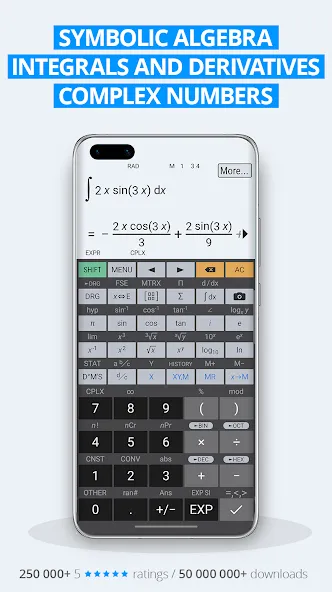
Calculation of derivatives and integrals.
History of operations.
Unit conversion.
Constants.
Complex numbers.
Logical operations.
Basic arithmetic operations.
Powers, raines and logarithms.
The free edition covers arithmetic, fractions, trigonometry, operator priority, memory operations, degrees-minutes-seconds conversion, and fixed-point, scientific, or engineering notation. It also retains a results history. These tools suit math students, scientists, and engineers; anyone seeking only basic sums may find the button-heavy interface unnecessarily dense.
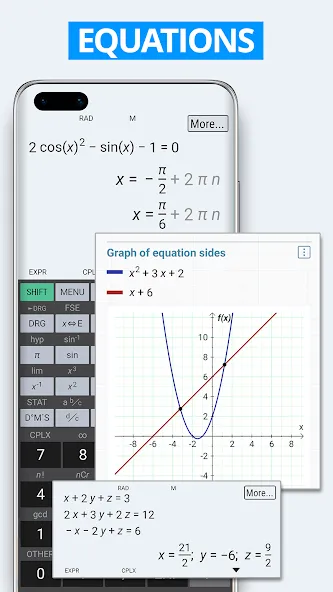
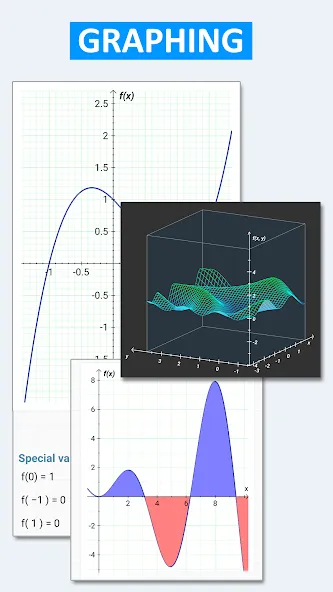
The wider toolkit reaches equations, matrices and vectors, statistics, regression, complex numbers, series, limits, derivatives, integrals, and 3D graphs. More than 90 physical constants, conversion among 250 units, multiple numeral systems, and Reverse Polish notation add practical depth. Variables and symbolic computation, however, require Pro.
Pocket, compact, and expanded layouts adapt the keypad to small devices, phones, and tablets. Tablets can use a multiline display that exposes calculation history, while themes and separator settings provide useful visual flexibility. Some users may miss key reassignment, since a frequently used constant can still require a trip into a menu even after being favorited.
Pros
Performs advanced calculations
Scientific and engineering display formats
Built-in help and excellent customer support
Free to use and ad-free
Cons
No support for factorial of float numbers
User interface is a bit cluttered
Can be difficult to understand
Quick tour
New button setting: Style of key titles (Casio style or Sharp style)
New display setting: One cursor position in a placeholder
Functions working with matrix elements
New language: Turkish
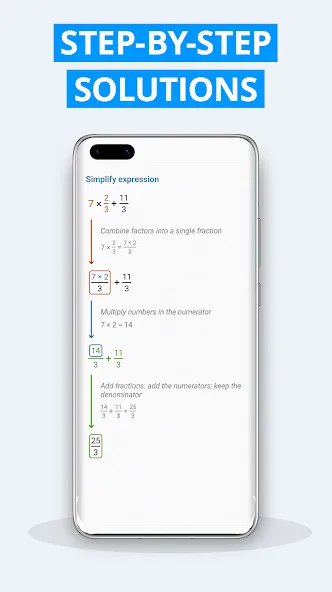
HiPER Scientific Calculator stands out as a robust tool for anyone requiring precise and complex calculations. Its diverse functionalities, intuitive design, and extensive customization options make it a reliable choice for a wide range of users. The app's emphasis on clarity and usability ensures that it can serve as a valuable resource in both academic and professional settings.
Size:29.94MB Version:12.0.8
Requirements:Android 6.0+ Votes:257
Package Name:cz.hipercalc Signature:daf6fea9088872d076fedc80f3c3b6c6
Utility apps are indispensable in our lives, making our daily routines more convenient. To help you find these apps more easily, this site has created a collection. This collection brings together a series of practical tools covering various aspects of life, work, and education, meeting all your needs. What are you waiting for? Try these apps now and make your life easier!
With the development of mobile hardware and software, many practical tool software have emerged, covering a wide range of aspects and becoming a good helper for everyone in work and life. Today, the editor provides you with a list of useful tool software downloads. These tools are not particularly complex types, and after reading them, everyone can quickly learn how to use them. Proper use can bring great convenience to life and work.
About us | Contact us | Privacy policy| DMCA
Copyright © 2026 Xiaohei All rights reserved.