AudioRelay is an audio streaming application that brings PC-quality sound to your mobile devices. It allows you to share audio from your device to other devices or computers. You can also receive audio from various sources via Wi-Fi or USB connections, all while maintaining low latency—an essential feature for video playback. The software employs advanced compression technology to minimize data usage during transmission. Additionally, it offers remote control capabilities, enabling you to adjust settings such as volume and playback speed on connected devices. With support for multiple languages, the software ensures that all its features are accessible to users worldwide.
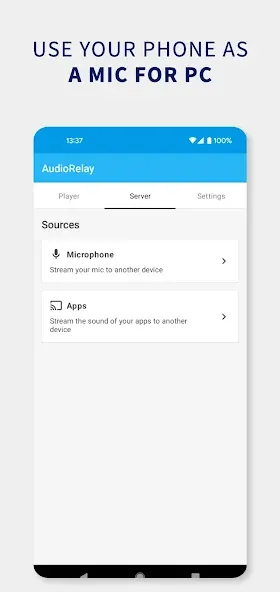
Professional Wireless Microphone: AudioRelay turns your Android device into a PC microphone. It’s the best way to talk to teammates on Discord and Zoom at the PC when your gaming headset is not available.
Ultra-Low Latency Technology: AudioRelay was created for speed. A USB tethering option is available for a fast connection.
Multi-Device Connectivity: With AudioRelay you can connect numerous Android devices to a single PC, so you can create a multi-room audio system, a multi-headphone connected audio system, and a multi-room wired setup.
Android-to-PC Streaming: Android 10 users and above have the option to flip the switch and send their phone audio to their PC. This helps Android users have better control over their media from a single point.
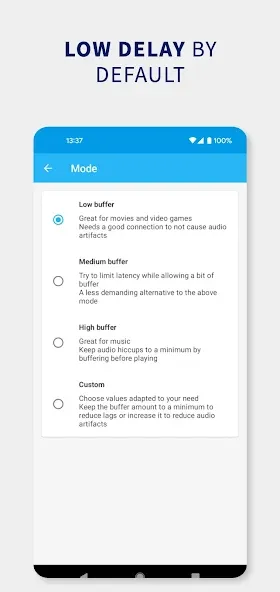
Easy Setup & Customization: You are provided full control on the interface to adjust bit rate, audio quality, and buffer sizes based on your internet speeds so you can optimize the app to be completely lag free.
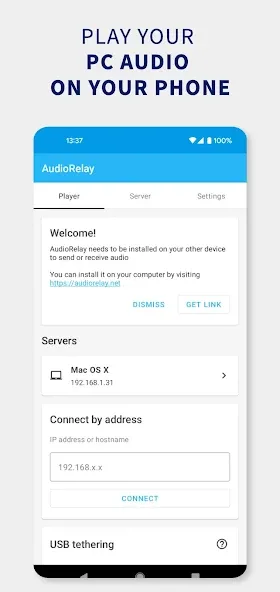
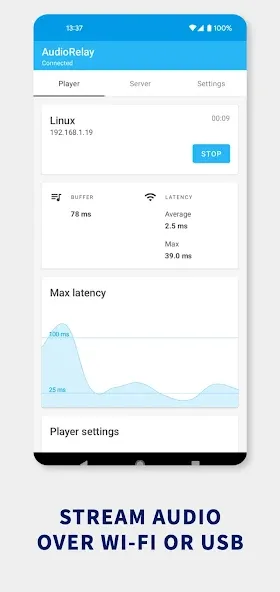
Real‑time PC audio to your phone: AudioRelay lets you stream any PC audio to your Android phone over Wi‑Fi or via USB. The connection is designed for low delay, so music, movies, and games feel responsive. You select the source on the desktop app, then listen on your phone as if it were a wireless speaker. This makes the AudioRelay app useful when your computer speakers are broken or you want sound in another room.
Route phone audio back to the computer or another Android: AudioRelay supports routing your phone’s audio back to the PC for recording or monitoring. You can also share audio to another Android device, which helps in basic monitoring or quick listening setups. This routing option is helpful when testing a source, tracking a recording, or sharing audio in a nearby space. It keeps the workflow simple while avoiding extra cables.
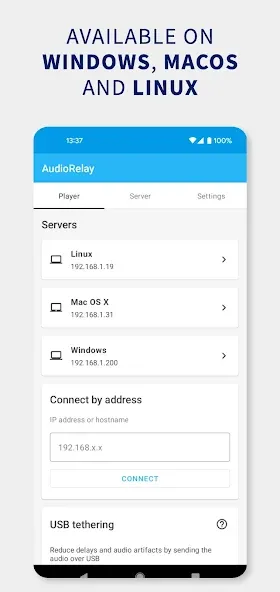
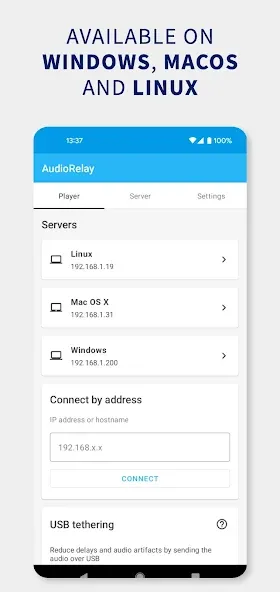
Quick setup with desktop companion and stable connections: AudioRelay pairs with a desktop app that works across Windows, macOS, and Linux. You connect over Wi‑Fi for convenience or use USB tethering to cut down on lag and dropouts. USB is the better choice when you need tighter timing, such as gaming or live monitoring. As a result, users can use AudioRelay for PC and Android in a straightforward way.
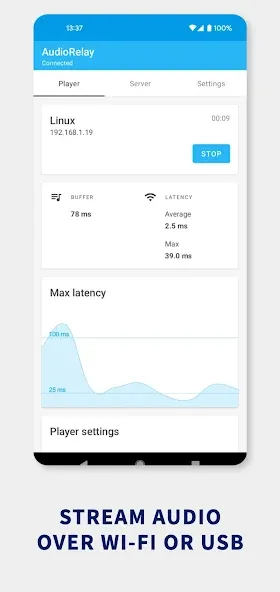
Automatically search for servers.
Added Arabic and Norwegian translations (thanks to the contributors at https://translations.audiorelay.net).
Updated the Premium screen to make it easier to switch to Lifetime.
Fixed a memory leak occurring when enabling Noise suppression. It caused a crash when running after a while.
Fixed a crash occurring when streaming uncompressed data on a connection getting a lot of packet loss.
Fixed a crash that happened after changing the device's name.
How to improve audio quality?
To reduce latency, AudioRelay sends the audio data on your device's "fast path". But on some devices, this results in a quality loss. (Confirmed on Xiaomi phones)
To fix this, try the AudioTrack output in the Android app settings. Note that this could increase the audio latency.
Inside the Android app, go to settings
Audio output
Select AudioTrack
Uncheck low latency
Otherwise, check that Windows is emitting the sound to a format of at least 48kHz
Type sound settings in the Windows search bar
Device properties
Click on Additional properties at the bottom
Advanced
Change the default format
Why is the volume so low?
The audio's volume received by AudioRelay can sometimes be tied to the volume of your PC.Try to increase the volume in Windows before muting your PC.
Why is there a lot of latency when listening through a Bluetooth device?
Unfortunately, audio played over Bluetooth is inherently going to have latency. You can observe the delay of your headset by playing with a soundboard app, or using this one.If you don't notice any latency when using YouTube, it's because videos apps can compensate for the lag by synchronizing both the image and the audio. You can still notice the audio delay by pausing and resuming a video.
Is your audio sent anywhere?
The server only sends your audio data on your network to your connected devices. It's not sent anywhere else.
AudioRelay can give a second life to any old Android device you have lying around your home. All you have to do is install the app, connect the device to your PC using a USB cable, and just like that, you'll have a fully functional microphone or new speaker. It's that easy.
Size:12.96MB Version:0.26.1
Requirements:Android Votes:532
Package Name:com.azefsw.audioconnect Signature:d47b11b189b6b35c4ac42e6199706899
In today's digital era, music enthusiasts seek platforms that provide vast music libraries, high-quality audio, and seamless accessibility-all without subscription fees. Our curated selection of free music streaming apps delivers the perfect blend of variety, performance, and convenience, ensuring every listener finds their ideal soundtrack. Whether you're exploring new genres or enjoying timeless classics, these apps offer an unbeatable listening experience at no cost.
Music Player is a tool designed to play audio files, available as both software applications and dedicated hardware devices. It can be installed on electronic devices like smartphones, tablets, and computers, allowing users to stream or play locally stored music in various formats. Additionally, standalone hardware devices, such as MP3 players and digital audio players, are specifically built for high-quality music playback. Many modern music players support advanced features like equalizers, playlists, offline playback, and streaming service integration, enhancing the overall listening experience.
The emergence of various digital music platforms provides people with a massive music library covering a wide range of music genres, such as pop, classical dj、 You can find your favorite songs and singers on the platform, such as electronic music, and enjoy high-quality music. Today we bring you the ranking list of music listening software. Listening to music is a very unique enjoyment that relieves stress and relaxes the body and mind. Professional recommendations to make people's lives more enjoyable, today we recommend several popular software for you.
About us | Contact us | Privacy policy| DMCA
Copyright © 2026 Xiaohei All rights reserved.