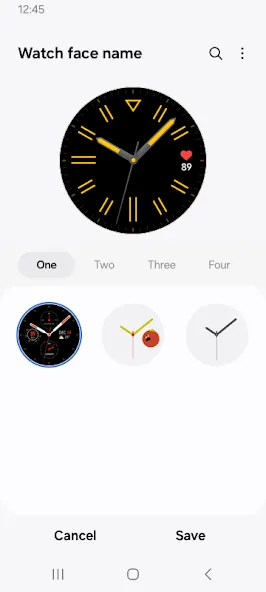
Galaxy Wearable is a management tool for Samsung wearable devices on the Android platform. It allows you to manage the daily functions of your watch, customize watch faces and themes, and pair multiple wearable devices. The app also includes features to help you locate a lost device—enabling you to quickly pinpoint its whereabouts—and provides direct access to customer support should you need further assistance. Additionally, the app supports the management of your audio devices. Information such as notifications, text messages, and fitness/activity data is synced in real time between your wearable and the app.
Simple Pairing and Device Management
Galaxy Wearable guides you through the Bluetooth pairing process for your Samsung Galaxy Watch, Galaxy Buds, Galaxy Ring, and Fit devices. Once paired, the app serves as a centralized hub for managing core settings and essential functions—including firmware and software updates, clock preferences, and the installation of plug-ins from the Galaxy App Store. It supports a wide range of devices, including the latest models such as the Galaxy Watch7, Watch Ultra, Fit3, Buds3, Buds3 Pro, and Galaxy Ring. This unified management approach keeps your devices organized and simplifies long-term maintenance.
Find My Device Tools
You can use "Find My Watch" or "Find My Ring" to locate your watch or ring, and utilize "Samsung Find" or "SmartThings Find" to track your earbuds. For the Galaxy Ring, the app also allows you to view the device's serial number—a useful feature for verifying ownership or contacting customer support. These tools are designed to help you quickly recover devices that may have been misplaced at home or left behind elsewhere, saving you time and effort.
Notifications and Basic Syncing
Galaxy Wearable lets you select which app notifications are sent to your watch or earbuds, ensuring that alerts remain relevant and manageable. Furthermore, calls, text messages, and calendar entries can be synced to your compatible wearable, allowing you to check your schedule and messages directly from your wrist. You can adjust these settings to suit your daily routine, ensuring that only the information you care about reaches your wearable device.
Audio Control for Galaxy Buds
Once your Galaxy Buds are connected, you can manage and control audio settings directly through the Galaxy Wearable app. Supported earbuds feature Active Noise Cancellation, while the device-switching function allows for seamless audio transitions between your phone and tablet. On compatible devices, you can also configure gesture controls to tailor interactions to your personal preferences. These controls help you stay aware of your surroundings and manage daily tasks, enhancing your overall listening experience.
Health and Wellness on Supported Devices
For compatible Galaxy Watch and Galaxy Ring models, Galaxy Wearable offers health and fitness tracking capabilities. You can manage settings and data sources, then view your information across various services and apps connected to your wearable. Features such as gestures, voice memos, and—on select models—real-time translation can be enabled through the device settings, ensuring your wearable’s functionality aligns with your personal goals.
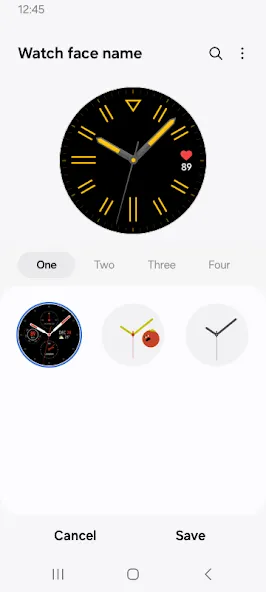
Open the Galaxy Wearable app, select your device from the list, and follow the on-screen pairing prompts.
When prompted, grant permissions for location and nearby devices, and confirm access to your phone, contacts, calendar, call logs, and text messages to enable core features.
Next, check for firmware updates and install any required plug-ins from the Galaxy Store to complete the initial setup.
Afterward, you can customize notification preferences and choose how calls, text messages, and calendar events are synced to your watch or earbuds.
Finally, explore the "Find" tool to locate your devices when needed, configure audio controls for your Galaxy Buds, and review health settings for compatible watches and the Galaxy Ring.
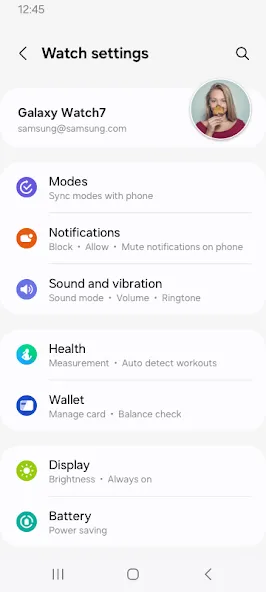
Pros:
Centralized management for pairing, updates, notifications, and watch settings.
Supports synchronization for calendars, text messages, call logs, and files.
Includes a "Find My Watch" feature.
Provides helpful setup guides.
Cons:
Requests access to various categories of sensitive phone data.
Does not support tablets, Gear VR, or Gear 360.
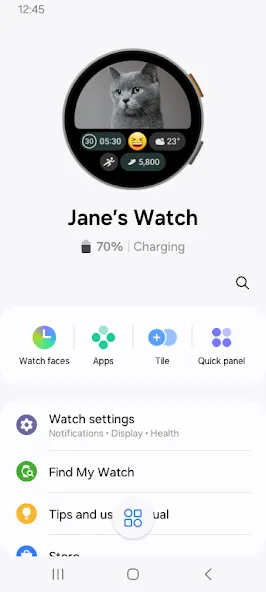
Galaxy Wearable serves as a one-stop hub for setting up and managing Samsung wearables—including watches, rings, earbuds, and fitness trackers. By consolidating pairing, configuration, and daily management into a single interface, the app saves you time by eliminating the need to switch between different settings menus for each device.
Size:14.54MB Version:2.2.72.26092361
Requirements:Android Price:Free
Package Name:com.samsung.android.app.watchmanager Signature:2c631af7a18e9cf4d99bd7c6aa002267
Utility apps are indispensable in our lives, making our daily routines more convenient. To help you find these apps more easily, this site has created a collection. This collection brings together a series of practical tools covering various aspects of life, work, and education, meeting all your needs. What are you waiting for? Try these apps now and make your life easier!
Transform your mobile device into a powerhouse of efficiency with these handpicked essential tools. Whether you need professional-grade photo editing, seamless file organization, smart task management, or real-time weather updates, our curated selection of premium apps delivers unbeatable performance. Streamline your daily routine, automate repetitive tasks, and boost your productivity with intuitive interfaces and powerful features. Designed for both professionals and casual users, these editor-approved applications will revolutionize how you work and play. Don't settle for an ordinary phone - upgrade your digital experience today and unlock your device's full potential!
With the development of mobile hardware and software, many practical tool software have emerged, covering a wide range of aspects and becoming a good helper for everyone in work and life. Today, the editor provides you with a list of useful tool software downloads. These tools are not particularly complex types, and after reading them, everyone can quickly learn how to use them. Proper use can bring great convenience to life and work.
About us | Contact us | Privacy policy| DMCA
Copyright © 2026 Xiaohei All rights reserved.