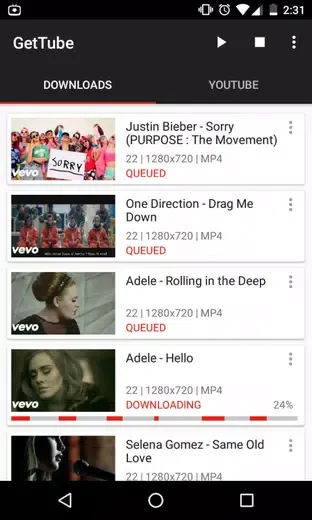
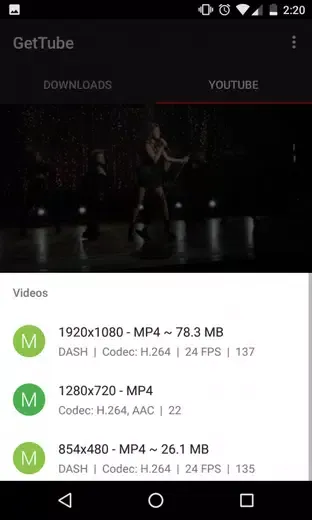
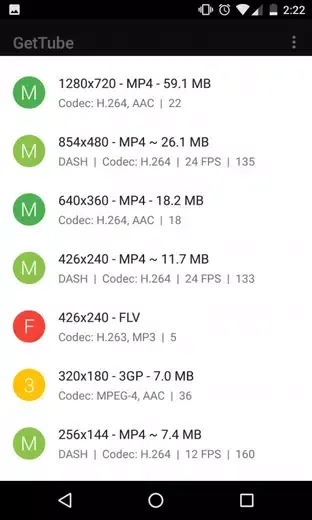
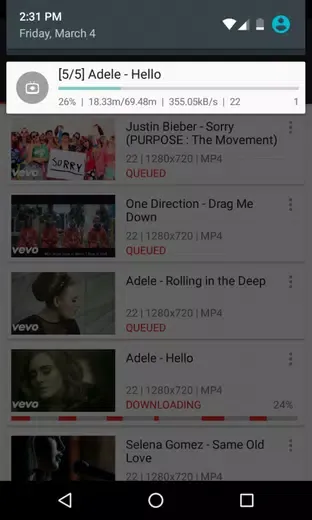
GetTube is an excellent tool for downloading YouTube videos. This app offers powerful features that allow users to download any video to their device and watch it repeatedly at any time without consuming data. With GetTube, users can pause or resume download tasks at any time. Downloaders on the network will automatically enter a waiting state and resume downloading once the network is restored, without any manual intervention. Additionally, when you click the download button, you can choose the video format and quality according to your personal needs or your phone's storage space.
Supports multiple downloads.
We can pause and resume downloads whenever we want.
Play videos in the background.
Built-in player for offline videos.
Support for gesture control.
Support for the download of videos with subtitles.
Download videos in different resolutions.
Video qualities to choose: download videos choosing from a variety of range 144p poorest to the high quality 4K video. Not only that you can choose various file format as per the compatibility and performance of your phone formats like 3gp, mp4, mkv etc are available. Downloading these videos are quite simple and easy task to do.Adding on it also support age restricted videos.
Audio feature: you can also download download the audio of the video , as in the case of songs in formats like AAC (M4A), Vorbis, or Opus format in all bitrates
Subtitles: you can also download subtitles of the video if available on selected videos without any hindrance.
Great efficiency: when it comes to the performance of the application, it is equally as good as the original youtube, with the similar interface and user friendly display that will make able to learn this app very easily. furthermore you can also pause and resume of the downloading as you require network concentration on other work.
Different modes for downloading: three differents mode Classic, Smart (like IDM) and Pieces (like Torrent client) are available and you can choose according to your own requirement.

Floating video player can block all ads.
All your videos, playlists that you have made will be available in GetTube for you to use.
Popup Video Player Tube.
Allows you to play videos with "floating'' mode. Now, you can play games, watch movies, and do other tasks.
No ads in this mode too!
You can resize the video player, and move it to any corner of your phone.
Watch Funny Short Videos With High Quality.
Play millions of trending videos with up to 8K resolution. You can also adjust the speed of videos.
Once you find and select the video, you just have to tap the download button. Then, you'll see a menu with all the download options, where you can select the quality you want depending on how much memory space you want the video to use. This app also gives you the possibility to extract only the audio, letting you create your own music library via YouTube videos.
Size:10.33MB Version:0.9.4
Requirements:Android 4.1+ Price:Free
Package Name:com.dsm.gettube Signature:5d0423011b56dbacdf65e3c15926b0f8
A truly outstanding movie is not just about an engaging plot-it also requires seamless transitions between scenes. When these transitions are natural and fluid, they help the audience stay immersed in the story without feeling disconnected. The same principle applies to video games. Games that ensure smooth, uninterrupted gameplay, whether through well-designed animations, intuitive controls, or seamless scene changes, create a more immersive and enjoyable experience for players. A game that flows effortlessly from one moment to the next demonstrates a level of craftsmanship that deserves recognition and admiration.
Video Player is a software application or hardware device designed to decode and display digital video content. Modern video players are highly versatile, capable of handling both locally stored files and real-time streaming media from online platforms. Over time, technological advancements have transformed video players from basic format-specific tools into sophisticated systems supporting a wide range of codecs, resolutions, and playback features. Today’s players offer enhanced functionality such as subtitle synchronization, playback customization, and adaptive streaming, ensuring a seamless and user-friendly viewing experience across various devices.
About us | Contact us | Privacy policy| DMCA
Copyright © 2026 Xiaohei All rights reserved.