Glory Fit is an auxiliary tool designed specifically for the Q18 smartwatch. Simply pair it with a compatible smart device to automatically record the user's activity trajectory, heart rate changes, and sleep patterns, generating corresponding statistics to help users achieve higher workout efficiency. Glory Fit will also automatically remind the user when others make calls or send messages, ensuring no important information is missed. Glory Fit also allows users to set workout goals and plans, recording user activity data around the clock via Bluetooth to ensure the successful execution of your workout plan.
Record your health data: With GloryFit, you can monitor your daily steps or workout sessions, and the tool also allows you to look at all the health data captured by your Q18 throughout the day. For example, you can access an electrocardiogram on the main screen to monitor your heart rate continuously. This way, you can find out if your heart rate is related to the type of activity you're doing.
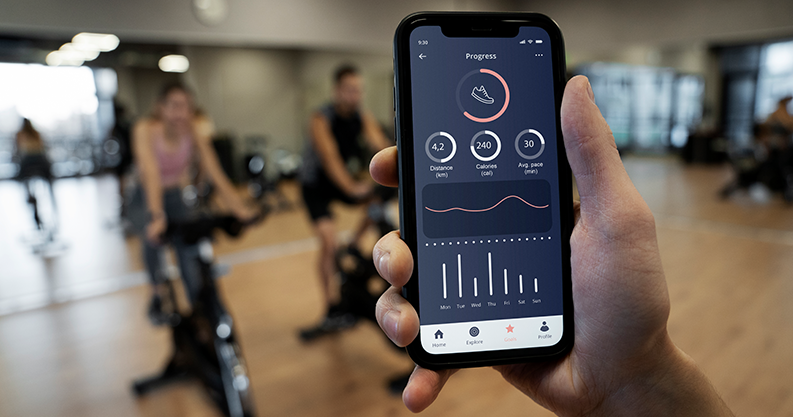
See easy-to-understand graphs: The graphs let you see your progress over a certain period at a glance. For example, you can easily spot days you haven't reached your step count goal. Similarly, GloryFit helps you determine the quality of your sleep, detecting possible patterns that might result in an effective and longer rest.
Manage alerts and notifications: From the settings, you can select which apps you want to pair with the GloryFit smartwatch. By doing this, the smartwatch will notify you whenever you receive calls, emails, or messages from other external apps. You can quickly turn off any notifications whenever you like.
Customization and Notification Control: Glory Fit allows users to tailor which notifications are pushed to the watch, reducing distractions during workouts or daily activities. Watch face customization adds a visual touch, letting users match their device with their personal style.

Almost everything about this app is great. One major complaint is answering phone callsvia the watch. It seems to be hit or miss. Could be a range thing, but I have yet to find apattern. Getting Apple Music to work is always a gamble. Works when it wants to. As faras monitoring, I compared the data from it to the data from my Apple Watch, and they arenearly identical. The only thing that was off was the steps. This app reports quite a fewmore steps than my Apple Watch. It's usually around20% higher in this app than Apple'sapp. Sleep monitoring is always super accurate, with the difference being less than a fewminutes. For the price of the watch, this is a great alternative to the more expensiveones. So if you wanna save some money and still get relatively accurate reports anddon't mind a couple minor bugs, you can't go wrong with this one!
Sooo after reading some of the reviews here I wonder if they read the instructionsbecause if you do, you shouldn't have any problems with the watch. It explainseverything in English, someone said the instructions were in another language but that'snot true, the watch comes with a pamphlet, one side is English and even online you cansee the instructions, step by step. If you are having issues I would recommend for you toeither watch a tutorial or read instructions step by step accordingly. If you can't recordsleep mode it might be because you are wearing the watch loosely and it keeps moving.You don't have to have your phone with you in order to track your steps however youmust sync the info if you want to see it. With music I mean, you need to be somewhatclose to the phone but I'm guessing you already knew that. About the bp, mine has beenthe same, I checked it with an actual cuff and I get the same readings so again I don'tunderstand why many people kept having issues with it.
The watch keeps you in the know with notifications and has some of the best functionsI've seen in a Bluetooth/smart watch. Including; the battery life, health features, theflashlight and the ability to use voice to message. My only problem is with the app itself,you can't make updates to it nor can you download a new watch wallpaper. I wish thiswould have been tested before they started putting out devices. Besides this, I love thewatch. Fix this and I'll give you 5 stars.Update: One day I went to the app for a newwatch face, Io and behold I realized that the watch gave me the option to update thewatch face and update the whole system. I was like yeahhhh!!!! This watch deserves 10stars. I love it. I wear it more than the Apple Watch now. Guys be patient with the updatesand all, it's slow moving. You'll love the watch.

App can’t search the smart device?
Please try pressing the button on the device. If the screen does not light up, you can connect the device to the power adapter to make sure it is fully charged.
If the smart device is connected to another mobile phone, please turn off or unbind the Bluetooth on the phone, then search and rebind with the current mobile phone.
For iPhone, try to ignore the device in the Bluetooth settings. Setting path: System settings → Bluetooth →Tap the icon on the right i → Ignore this device.
If the device is not in a low-battery state, it can’t be searched even if you get the mobile phone close to the device. Please try to turn on Bluetooth again on your phone.
For Android devices, if it doesn’t search for the device, please check if the phone’s information location (GPS location service) is turned off; if turned off, please go to the system settings interface to turn the GPS location on, and then search for the device again.
The smart device keeps on connecting and disconnecting?
Is there any obstacle between the smart device and the mobile phone? The human body or metal jewelry can interfere with the stability of Bluetooth connection.
Please check if the device is fully charged.
For iPhone, try to ignore the device in the Bluetooth settings. Setting path: System settings → Bluetooth → Tap the icon on the right i → Ignore this device.
If your iPhone is bound with too many Bluetooth devices, please ignore a few devices in the system’s Bluetooth settings.
When does the smart device start counting steps?
In order to identify daily behavior and improve the accuracy of step count, real-time steps can only be counted when you walk more than 10 consecutive steps (20 steps at night).
Can’t receive notification calls or app messages?
Make sure that in the device app, push notification service is enabled for the apps that need to get alerts or notifications.
Check if the device turns on the “Do Not Disturb” mode. (Some devices feature this function)
In the phone system settings, find the app notification permissions and opt-in for push notifications.
When there is a message, make sure the app notification pops up in the notification panel & status bar.
Push notifications for calls and text messages are required to keep Bluetooth turned on. Please do not turn off Bluetooth on the phone.
If your iPhone can’t receive notifications, please check if the Bluetooth has been paired with the device (in the system Bluetooth settings, check if the corresponding device name is followed by an exclamation mark).
For the Android device, please check if the app has been added to the whitelist; open the back-end permissions (in terms of some mobile phones, you need to enable the following settings, such as “allow self-starting”, “auto-start management”, “allow back-end activities”, “lock a drop-down at the back-end”, “unlimited use time” ‘, “auto-start apps”, “allow system to wake-up”, “close frozen apps”).
GloryFit is a companion app for the smart watch Q18. This app works with the smart watch Q18 to record your exercise details, such as step counting, sleep, heart rate, etc.In addition, GloryFit also supports SMS reminder, call reminder, SMS quick reply, APP reminder and other functions.
Size:122.6MB Version:3.9.2
Requirements:Android Votes:426


Fit Apps offers smart health tools that help you track exercise, nutrition, and daily activity. Easy to use and works across devices. Reach your fitness goals with motivation and clarity.
As 2023 comes to a close, you (like many of us) are probably in the “new year new me” planning phase. When it comes to writing resolutions, along with winning the lottery, ramping up on fitness is a top priority for most. That being said, overhauling your fitness regimen that doesn’t work in favor of a new one can be costly. Fortunately for you, we’ve put together a roundup of the best free fitness apps to try in 2024. See which free fitness apps made our “nice” list for 2024.
Sports competitions have been an integral part of human history for centuries, showcasing skill, endurance, and the spirit of competition. Each sport offers its own unique thrills-whether it's the speed and agility of soccer, the strategic depth of basketball, or the sheer power of weightlifting. While experiencing these activities in real life is exhilarating, stepping into the world of virtual sports can be just as exciting. Games allow you to immerse yourself in different sports, refine your techniques, and enjoy the thrill of victory-all from the comfort of your own space. Why not dive into the action and experience the joy of sports in a whole new way?
About us | Contact us | Privacy policy| DMCA
Copyright © 2026 Xiaohei All rights reserved.