KingoRoot is a rooting tool that allows your phone to quickly gain superuser privileges. Users may find that some system apps cannot be deleted because superuser privileges are not enabled. If you root your phone, you can uninstall those system apps that you've never even used, thus freeing up phone storage space. The rooting process is simple, and most models can be rooted with a single click. Tech enthusiasts should definitely give it a try!
If you've owned a smartphone, you've doubtless noticed that there are certain apps and programs that come standard with the phone. With many of these programs, you can't uninstall them, even if you've never used them. It can be frustrating when you can't save your favorite pictures or download new apps when you're forced to keep apps that you don't use.
This is because even though you own your device, you actually don't have admin privileges as you might on a Mac or Windows computer that you own. When you buy your phone, by default the manufacturer is the only party that has administrator privileges. Android devices are built with Linux, and factory devices are missing part of the Linux code required to give you those admin privileges that allow you to install or uninstall any program you like.
KingoRoot installs those missing pieces of code, giving you quick and easy root access to your device. Once you have root access, your phone is totally yours to customize and control. You can download any program you don't want and clean up bloatware to give your device more CPU power and extend battery life, among other benefits.
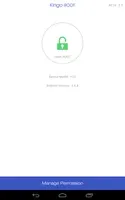
Step 1: download the application to your device. For such purpose, just click on our green Download button.
Step 2: install and run the tool.
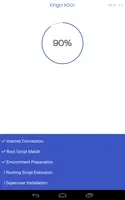
Step 3: click on the button to root your phone.
Step 4: wait for it to reboot and that's it, you'll have a rooted device.
Pros
Roots Almost Any Device As long as your device runs Android Cupcake (1.5) or higher, you’ll be able to gain full SU on any tablet, phone, or wearable in seconds.
One Click Operation There are no weird scripts to run, no backdoor software programs you have to sneakily install while tethered to a Windows computer – just hit a single button and you’ll be rooted in no time.
Check and Backup Devices This app includes a root checker so you can verify if a device has been rooted before or not, as well as backup tools to save your data before you root!
Cons
Doesn’t Work on Some Devices Sometimes it just doesn’t work; it’s important to note that this isn’t a problem with the app (in most cases), some OEMs patch holes in the software to prevent you from unlocking full administrative privileges to your device.
Highly Compatible – KingoRoot APK download is compatible with all of the Android versions. It doesn’t matter if you own a device with an older version of Android or the latest version of Android, the KingoRoot app supports all of the versions. You’ll face no issues rooting the device running on the Android KitKat version or latest Android 10 version. Although, the developer team will take a few days to support the rooting of the device running on the latest version of Android. In our case, we have full compatibility of KingoRoot APK for Android 10.
High-Success Rate – Usually, the One-click root apps face a lot of hurdles while rooting Android smartphones. But KingoRoot APK is so powerful that it clears all of the technical hurdles. Due to which, the latest KingoRoot APK has the high-success rate for all version of Android. I’ve personally used this app on my older Samsung Galaxy device, and the app allowed me to get root access within two minutes. There are only a few apps that can perform One-click rooting, and KingoRoot App is the fastest one amongst all of the available options.
Additional Security – When you are rooting the device, there is a high chance of Data Loss or the Soft-brick. Also, some of the malicious apps may gain root access and can destroy your smartphone. But thanks to the developers of KingoRoot, you will not face any such issues while rooting the device. There is a high chance of data loss during the manual rooting process, but with the KingoRoot app, there is zero chance of data loss. All your data is safe if you use KingoRoot App. Although, it is advised to take a backup of your data before proceeding just to be on the safe side.
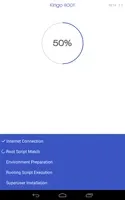
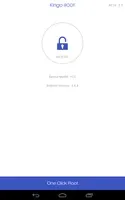
One-Click Root – One-Click Root or One-Tap Root is the feature that allows you to root the device with a single tap. After checking the compatibility with the device, the KingoRoot app will show the on-tap button to root the device. After tapping the “Root” button, the app will perform all of the necessary procedures in the background to root your device. You don’t have to enter any complex command or anything else. Just One-Tap and the app will immediately root your device. It’s a hassle-free procedure and won’t take more than a few minutes to completely rooting the device.
Due to the excessive bloatware and performance restrictions on Android smartphones, rooting the smartphone has become a necessity. Millions of Android users are facing bloatware issues due to the pre-installed applications from the device manufacturer. To remove such apps and increase the performance, you need root access. Thanks to KingoRoot app apkpure, you get to root your device with a single tap. Security, speed, and convenience are the three important features of KingoRoot APK, which will help you to rely on the app for hassle-free Android rooting.
Size:6.23MB Version:4.8.0
Requirements:Android Votes:444
Package Name:com.kingo.root Signature:bffa72d22268c7a31dcddad227e2f346
Discover our File Management Apps hub! Here, you can explore essential tools like Google Drive for cloud storage, Dropbox for simple file sharing, and File Commander for managing files directly on your device. Easily organize and access your files across your phone, or tablet. Our platform is designed to help you quickly find reliable apps to streamline your digital file management.
Utility apps are indispensable in our lives, making our daily routines more convenient. To help you find these apps more easily, this site has created a collection. This collection brings together a series of practical tools covering various aspects of life, work, and education, meeting all your needs. What are you waiting for? Try these apps now and make your life easier!
Transform your mobile device into a powerhouse of efficiency with these handpicked essential tools. Whether you need professional-grade photo editing, seamless file organization, smart task management, or real-time weather updates, our curated selection of premium apps delivers unbeatable performance. Streamline your daily routine, automate repetitive tasks, and boost your productivity with intuitive interfaces and powerful features. Designed for both professionals and casual users, these editor-approved applications will revolutionize how you work and play. Don't settle for an ordinary phone - upgrade your digital experience today and unlock your device's full potential!
About us | Contact us | Privacy policy| DMCA
Copyright © 2026 Xiaohei All rights reserved.