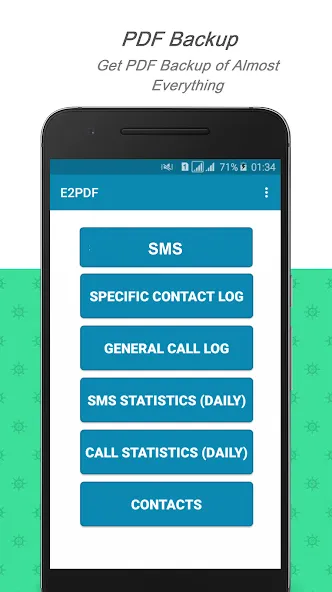
E2PDF is a communication manager that helps users quickly manage SMS messages and calls, back up call logs, analyze and statistically track the frequency and time of each call, back up contact lists to PDF files for easy operation, save files locally for sharing via other communication methods, and also function as an e-reader capable of opening various text file formats. It is very convenient and helpful to users.
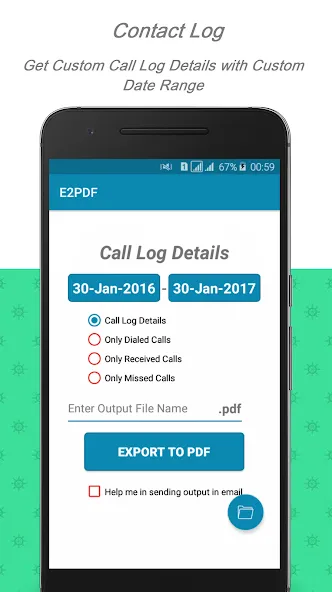
Save your call logs
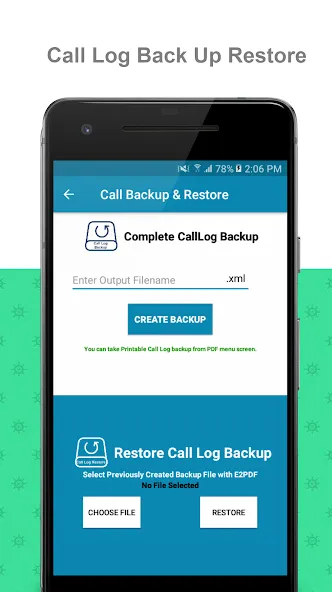
Apart from SMS, the app handles call logs with finesse. Opt to back up all your calls or just selected types like dialed, received, or missed calls. Moreover, tailor your backup by selecting individual contacts, ensuring you keep the precise data you need.
Usage statistics for your SMS and calls
Analytics enthusiasts will appreciate the Call and SMS Statistics features, which provide insights into communication patterns, such as the frequency of sent and received messages or calls, along with the total duration of calls within a specified timeframe.
Manage your contact list
The application also addresses contact management by enabling backups that include names, numbers, and email addresses—even those not directly linked to your phone's contacts. It also facilitates the backup of Google Contacts to PDF with an easy-to-navigate process.
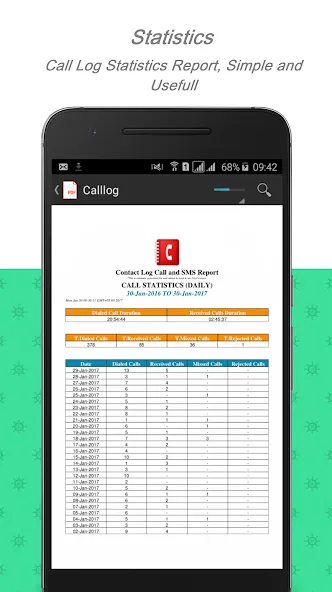
E2PDF APK also includes call and SMS statistics. These reports can show sent and received SMS counts, missed calls, received calls, dialed calls, rejected calls, and total call duration across a chosen date range. This is useful for people who need a simple activity report without manually counting entries.
The biggest advantage of E2PDF is convenience. The files can be saved locally or shared through email, messaging apps, cloud storage, Bluetooth, and similar options. PDF output also makes the records easier to open on many devices and PDF readers, which is helpful when sharing files with clients, family members, or official parties.
Pros
Powerful backup and restore capability
SMS and call statistical information
Compatible with many known e-reader apps
Qorks perfectly with other SMS tracker app
Cons
Limited period call details shown
Not available for all numbers
What is E2PDF used for?
E2PDF is used to back up SMS messages, call logs, contacts, and phone statistics into PDF or XML files for storage, sharing, printing, or record keeping.
Can E2PDF save SMS conversations as PDF?
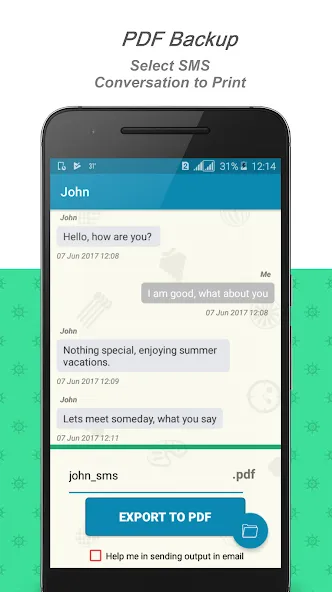
Yes. E2PDF can create PDF files from SMS conversations, including chats from selected contacts, so users can keep readable copies of important messages.
Does E2PDF support call log backup?
Yes. E2PDF supports call log backup and restore, with options for dialed, received, missed, or complete call history records.
Who should use E2PDF?+
E2PDF is useful for users who need organized phone records, such as business users, people saving personal chats, or anyone preparing SMS and call logs for documentation.
What are the main limitations of E2PDF?
E2PDF may depend on Android permissions and device compatibility. Exported files can also contain sensitive data, so users should store and share them carefully.
Discover the E2PDF SMS Call Backup Restore app, your comprehensive solution for safeguarding your critical communications data. With this application, you have the power to back up and restore your SMS messages, call logs, and contacts effortlessly. It stands out for its capability to convert your SMS and call logs to PDF, a format widely compatible with numerous readers, ensuring your backups are easily accessible across devices.
Size:33.28MB Version:21.06.2026
Requirements:Android Votes:74
Package Name:com.tekxperiastudios.pdfexporter Signature:8ec89ad981e99d4588ff3c7e8546fa4b
Discover our File Management Apps hub! Here, you can explore essential tools like Google Drive for cloud storage, Dropbox for simple file sharing, and File Commander for managing files directly on your device. Easily organize and access your files across your phone, or tablet. Our platform is designed to help you quickly find reliable apps to streamline your digital file management.
File Manager offers both graphical and command-line interfaces, allowing users to efficiently organize and control files and directories on their phone. With a file manager, users can perform a wide range of tasks, including creating, renaming, moving, copying, and deleting files and folders. Additionally, it enables users to view file properties, access content, and modify file permissions as needed. Advanced features may also include cloud storage integration, file compression, and secure encryption, enhancing file accessibility and management on mobile devices.
About us | Contact us | Privacy policy| DMCA
Copyright © 2026 Xiaohei All rights reserved.