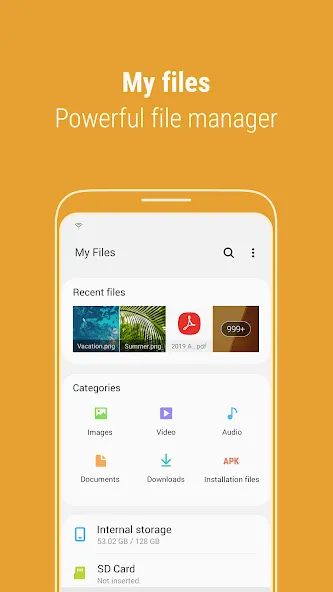
Samsung My Files is a file management tool that quickly analyzes your phone's storage space and frees up space based on usage. It neatly organizes files into partitions, supports decompression and compression, and offers cloud storage. When your storage space is insufficient, files are uploaded to the cloud and downloaded directly when needed. The app boasts a clear and intuitive layout, making it easy for users to quickly fall in love with.
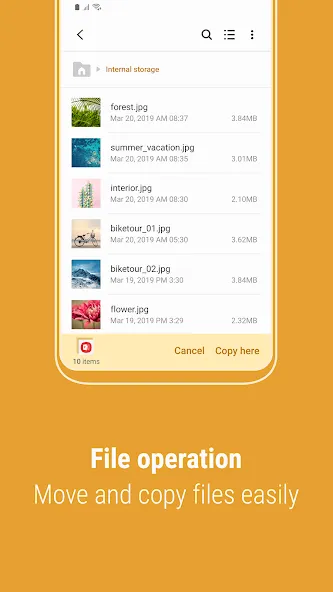
Free up and tidy storage
Samsung My Files latest version adds Storage Analysis on the main screen and an option to hide unused storage spaces from the home view. Use these tools to check usage and free up space quickly.
Complete file management
Create folders and organize items
Move, copy, share files, and view details
Compress and decompress archives
See long file names fully with List view
Find items faster
Recent Files shows what you opened or downloaded
Categories group documents, images, audio, videos, downloads, and installation files
Add shortcuts for folders or files to your device home screen or the app main screen
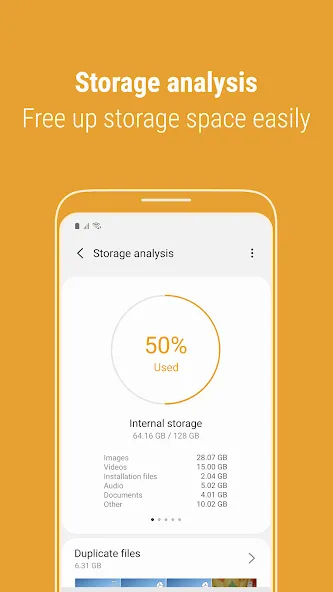
Samsung My Files also features a storage analysis function that enables users to assess their storage usage. By tapping the "Storage Analysis" button on the main screen, users can identify which files are taking up space and take action to free up storage if needed. This can be particularly useful for those who may be running low on space or who want to keep their device organized.
For those who prefer a customized view, the app allows users to hide unused storage space from the main screen via the "Edit My Files home" option. This functionality can streamline the user interface, offering a more personalized experience. Users can also switch to a Listview mode to view long file names without them being truncated by ellipses, ensuring that all relevant information is visible at a glance.
Cloud services are integrated into Samsung My Files, allowing users to manage files stored in popular cloud platforms such as Google Drive and OneDrive. This integration makes it easier for users to access their files from various locations and ensures that important documents are always within reach, regardless of device.
Pros
Clean and modern UI
Supports external storage devices
Detailed breakdown of space used
Cons
Search function bug
I Really this app but it's app for the Abeleble latest version from my mobile phone,,Gorgeous apps Samsung Electronics Co., Ltd. Network service
Samsung My Files is clean, organized, and makes file management completely effortless. The category layout (Images, Videos, Documents) lets me find exactly what I need in seconds. The built-in storage analysis tool is fantastic for clearing out junk and saving space. It is incredibly stable and fast!
for me the app works great that is because I don't update the app because all those features you keep trying to add on are useless to me I don't use cloud services of any kind I don't need to have my files transfer across the internet and I don't have issues of running out of space the ability to use an SD card to help store. and one last thing I'd love it if Google Play Store would stop trying to forcefully make me update apps from Samsung's Galaxy store that I've never will
Samsung My Files is the official file manager for the Korean company Samsung. Thanks to this utility you can view and manage each of the files and folders on the internal or external memory of your device.
Size:56.22MB Version:15.6.00.74
Requirements:Android Votes:89
Package Name:com.sec.android.app.myfiles Signature:2b562ecc0a1e748462d4e713aeee8483
Discover our File Management Apps hub! Here, you can explore essential tools like Google Drive for cloud storage, Dropbox for simple file sharing, and File Commander for managing files directly on your device. Easily organize and access your files across your phone, or tablet. Our platform is designed to help you quickly find reliable apps to streamline your digital file management.
File Manager offers both graphical and command-line interfaces, allowing users to efficiently organize and control files and directories on their phone. With a file manager, users can perform a wide range of tasks, including creating, renaming, moving, copying, and deleting files and folders. Additionally, it enables users to view file properties, access content, and modify file permissions as needed. Advanced features may also include cloud storage integration, file compression, and secure encryption, enhancing file accessibility and management on mobile devices.
About us | Contact us | Privacy policy| DMCA
Copyright © 2026 Xiaohei All rights reserved.