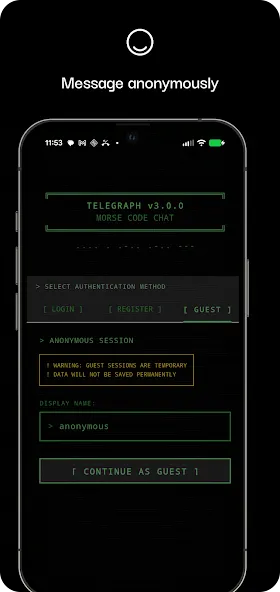
Telegraph is an unofficial instant messaging app. The app boasts an intuitive user interface and an easy-to-use operating system, offering more features that allow users to set passwords or fingerprint locks to protect the app and enhance their Telegram experience. With Telegraph, users can create their own personalized communication style by choosing their favorite theme through built-in personalization options. In addition, the app offers multi-account support, allowing you to log in to multiple accounts simultaneously and switch seamlessly between them, making it ideal for users who need to manage both personal and work communications at the same time.
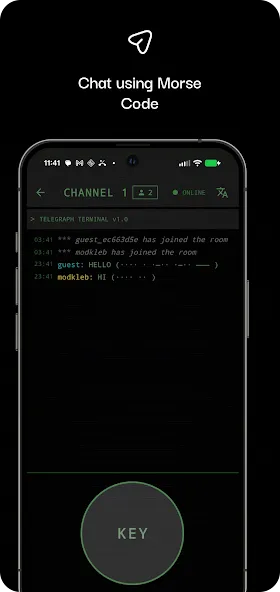
Designed for Android devices, it provides a practical and engaging way to immerse yourself in Morse code while connecting with like-minded users.
With Telegraph, you can explore Morse code at your own pace through an intuitive interface, making it an excellent tool for both beginners and those looking to sharpen their skills.
The app combines education and communication, enabling users to practice in an enjoyable and interactive environment.
Telegraph takes learning further by allowing you to chat in Morse code, fostering a sense of community and interaction.
This feature not only enhances your fluency but also connects you with other enthusiasts who share your interest in this classic communication method.
Learning Morse Through Conversation
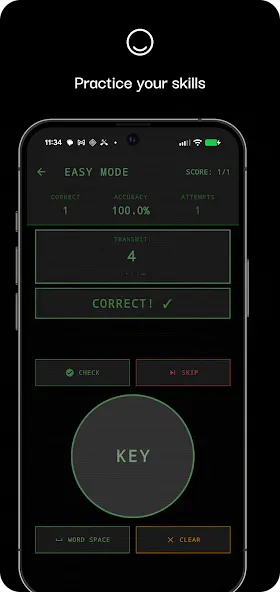
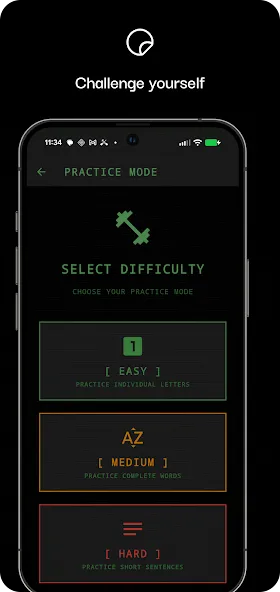
The app includes interactive lessons and practice modes for building recognition speed and accuracy. It can also translate between ordinary text and Morse code, so beginners can check messages without decoding every sequence themselves. Telegraph best suits Morse hobbyists, curious newcomers, and pairs of friends who want to practice together rather than people seeking a complete technical training course.
Conversation is the clever part of the design. Instead of memorizing dots and dashes in isolation, users can send them as actual messages. That gives the code a purpose and may make practice less repetitive.
The Tapper Needs Better Control
The input system appears too rigid for experienced users. Feedback indicates that recognition speed cannot be adjusted, forcing some people to tap more slowly than they would prefer. This limits Telegraph's usefulness as skills improve: a training app should adapt to faster operators, not hold them to one pace.
Audio is another notable omission. Morse code is commonly learned by sound, yet users report that Telegraph only interprets transmitted taps as letters and cannot play received messages. That makes it less suitable for developing listening skills and weakens the conversational illusion.
Chat Works Best With a Friend Already Waiting
Telegraph's social side depends heavily on participation. Public servers may have few active users, so finding a spontaneous conversation can be difficult. Bringing a friend into a private server appears to be the most reliable way to use the chat feature.
Users have also reported pop-up ads appearing while they are entering Morse. Advertising during a timing-sensitive input exercise is especially disruptive because it can break concentration mid-message.
Pros
Can hold multiple accounts on one app
Robust security measures
Fun additions like themes and voice changer support
Cons
Bugs and crashes
Can be late to updates compared to the official app
You can even establish 'special contacts.' When one of your 'special contacts' is online, you'll get a notification. Telegraph is an excellent alternative client for Telegram that, unlike other similar apps that don't offer anything new, brings you tons of interesting improvements.
Size:22.95MB Version:3.1.2
Requirements:Android 7.0+ Votes:437
Package Name:com.caleblafeve.telegraph Signature:e9971837f7ec86b058985cdf3fd62a55
Keep in touch effortlessly with the world’s best free messaging and calling apps. Whether you're chatting with friends, video calling family, or coordinating with colleagues, these apps offer seamless communication-no subscriptions needed. Enjoy crystal-clear HD video calls, fun stickers, group chats, and reliable messaging across devices. Perfect for work collaboration, sharing special moments, or staying close to loved ones while traveling. Download today and experience premium connectivity without spending a penny!
Nowadays, social networking apps are constantly emerging, and one of the most popular ones is the fully free chat app. This type of software not only provides high-quality calling and information transmission functions, but also has rich and diverse features and personalized settings. Whether it's text chat, voice call, video chat, or fun elements such as emojis and stickers, they can all be found in these software. The advantage of a completely free chat software is that users do not need to pay additional fees for call time or information volume. In addition, they also widely support multiple operating systems, which can meet the needs of different users. Whether communicating with family, friends, colleagues, or strangers, a fully free chat app is a convenient and efficient choice. It should be noted that when downloading any software, the source should be reliable to protect personal information security. Choose a fully free chat software that suits you, making communication more convenient and enjoyable.
About us | Contact us | Privacy policy| DMCA
Copyright © 2026 Xiaohei All rights reserved.