Kapi Cam is an excellent photography app. The app offers a range of exquisite effects and filters with realistic DV, CCD, and film textures, providing users with a unique shooting experience. With Kapi Cam, users can quickly switch between filters and effects to find their favorite visual style and capture perfect images. Additionally, the app includes a library of presets tailored to various scenarios; you can easily toggle between them and compare options to find the style that best suits the moment, ensuring a seamless visual experience.

Simulates real DV and CCD effects, taking you back to the millennium in one second.
Provides a variety of retro-style filters and special effects, allowing you to create different visual effects as you like.
Supports real-time preview of effects, allowing you to easily capture your favorite images.
Simple and easy-to-use operation interface, making creation at your fingertips.
Preset library for different scenes
You can choose from a wide set of retro filters and special effects tuned for varied lighting and subjects. Quick preset switching makes side by side comparisons fast, which helps you pick a look that fits the scene before you shoot.
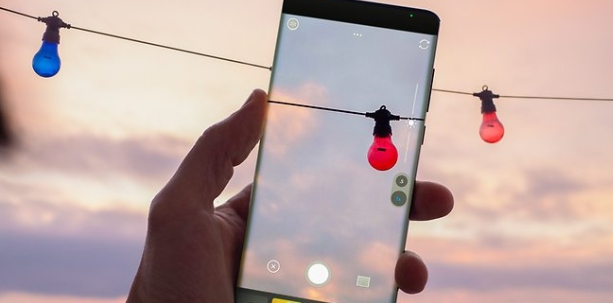
Real time preview before capture
The viewfinder shows the final look as you compose, so your photo or clip matches what you see on screen. This approach reduces guesswork and retakes, and it works the same way for photos and videos.
Streamlined controls for fast capture
Kapi Cam keeps the interface focused on essentials so you can change modes and save without searching through menus. New users can get to a usable result quickly, while experienced users can move through shots at speed.
Consistent rendering and growing styles
The imaging team tunes output for stability across devices, which helps keep the vintage look consistent from session to session. Updates add more DV, CCD, and film styles over time at a low cost, expanding options without raising the learning curve.

Real DV Feel: With this app, you can capture every moment without having to perform many complicated steps. With just one touch, you can quickly take a photo.
True CCD Tone: The app delivers incredibly realistic colors. Clear and sharp colors will give you high-quality photos, as if they were taken by a professional studio.
Film Grain Magic: With this app, you’ll experience the film grain effect. This effect will make your photos more unique and interesting, giving you immense satisfaction with the final result.
Live Preview Shooting: In this app, you can choose your desired color filters before shooting. It offers a wide variety of filters for you to choose from and use, resulting in images with incredibly perfect colors.
Simple Clean Interface: With this app, you can quickly learn to use it without spending too much time getting familiar with it. Because the app has an extremely simple and user-friendly interface.
Instant Creative Control: With this app, you can control your camera quickly and easily without too many difficulties or limitations. It gives you the most familiar camera experience.
Improved the subscription purchase experience and fixed known issues.
Discover new filters more easily with a “New” banner in the filter picker.
ColorWalk frames now support customizable dates.
Improved Live Photo cover selection. The shutter moment is now used as the default key frame.
Added location saving. Enable it in Settings to record where new photos are taken.
Fixed an issue that prevented some imported Live Photos from being viewed or saved when their cover frames were missing.

Effect options and real-time preview work together to support an experimental approach to visual composition. Users can try different effects and aesthetic treatments during the recording process, seeing immediate feedback on how each choice affects their footage, which allows for creative exploration without requiring post-capture editing to evaluate effect selections.
Size:162.45MB Version:4.39.2
Requirements:Android 7.0+ Votes:100
Package Name:com.sensemobile.action Signature:35c74051f232e21efe34c904c535cb20


Photography is an art form that has been around for over a century and has evolved greatly over the years. With the advent of technology, photography has become more accessible and convenient, especially with the rise of mobile photography. Mobile photography has revolutionized the field of photography, making it possible to capture and edit high-quality photos right from your smartphone. As mobile photography continues to grow in popularity, there is an abundance of mobile apps available for photography enthusiasts. However, with so many options available, it can be difficult to determine which apps are worth your time and investment. In this article, we’ll take a look at the top mobile apps for photography and provide you with a comprehensive guide to help you choose the best app for your needs.
The demand for taking and editing images is increasing among modern people, and free image editing software has become an ideal choice to meet this demand. Through these apps, users can easily edit images, including cropping, rotating, adjusting brightness and contrast, and more. At the same time, they also provide rich filters and special effects to make your photos more vivid and artistic. In addition, these software also support adding elements such as stickers, text, and graffiti to make your pictures more personalized. Most importantly, these apps are very easy to use and do not require professional skills. Just a few steps can make your photos stand out. Whether you want to post a stunning photo on social media or add some creativity to your album, these free photo editing apps can meet your needs. Try one out!
Recently, I have noticed that many friends are asking about the photography skills of their mobile phones. In fact, even the best skills cannot compare to an excellent mobile phone photography app. Nowadays, the mobile phone selfie tool can automatically beautify the photos while taking pictures, and the photos taken are beautiful and particularly natural. Which mobile camera app is good? The editor has carefully compiled the ranking of popular photo apps for mobile phones. The editor recommends several excellent mobile photography apps for those who love taking photos. Let's start taking more beautiful photos now.
About us | Contact us | Privacy policy| DMCA
Copyright © 2026 Xiaohei All rights reserved.