Big Timer is a colorful, feature-rich timer application. The app offers intuitive visuals and simple operation, combining countdown timers, reward mechanisms, and parental controls to help users manage their daily lives, schedules, chores, study tasks, and screen time. With Big Timer, users can easily create tasks, set durations, and select appropriate visual and sound effects through a striking progress ring, color changes, and simple animations. At the same time, you can fine-tune the timing duration according to the actual situation until the task can be completed stably within the specified time.
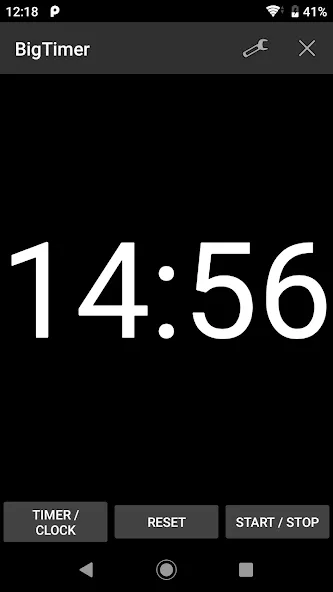
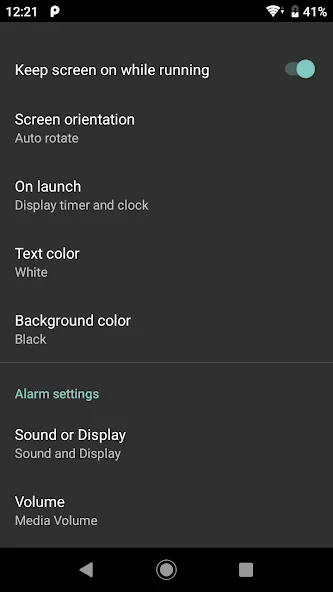
You can set the display to timer only, timer and clock, or clock only.
You can set the timer in 10-minute, 1-minute, or 10-second increments.
You can also use it for longer timers, such as those lasting several hours.
You can set the screen orientation to automatic rotation, portrait, or landscape.
You can customize the screen and text colors.
You can prevent the screen from turning off while the timer is running.
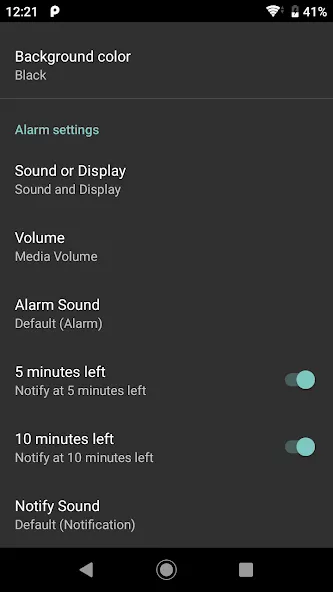
You can enable sound, screen blinking, vibration, or any combination of them when the countdown reaches zero.
You can choose the notification sound and the alarm sound.
You can turn the 10-minute and 5-minute notifications on or off separately.
Set Time: Tap the big display to quickly adjust minutes and seconds with the smooth wheel selector.
Mode Selection: Toggle effortlessly between Countdown mode for timed tasks and Count-Up Stopwatch mode for track sessions.
Start & Pause: Single-tap anywhere to start or pause the timer instantly.
Auto-Theme Matching: Enjoy 8 purpose-driven color themes automatically matched to your activity (Focus, Workout, Cooking, Presentation, Meditation, Deadline, Break, General).
Flexible Screen Options
Choose between automatic rotation, fixed portrait, or fixed landscape for the optimal view.
Customizable Display Settings
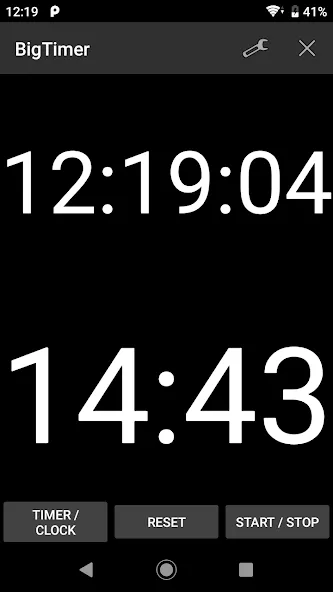
Switch anytime between “timer only,” “clock only,” or a combined view.
Enhanced Visibility
Enjoy a large digital clock for easy time checks, especially useful during presentations.
Persistent Timer Functionality
Keep your timer running in the notification area, even when multitasking with other apps.
Stay Awake Mode
Prevent your device screen from tu rning off during crucial timing sessions.
Personalized Alerts
Set up sound and screen notifications, including reminders at the 10- or 5-minute mark.
Use Big Timer to structure clear transitions: announce the chosen mode, let the child set the timer when appropriate, and make the end tone the agreed signal to stop or switch tasks.
Incorporating short rewards or gentle routines tied to the timers helps build motivation and reinforces time-awareness skills.
Because the interface is intentionally minimal, Big Timer can be a reliable tool for building routines that transfer from classroom to home without introducing unnecessary technology complexity.
One of the standout features of Big Timer is its ability to customize the digits' font, color, and brightness. This allows users to personalize the app to their liking and make it easy to read in any lighting conditions. Whether you need a timer for cooking, working out, or any other task, Big Timer is a versatile option that can meet your needs.
Size:6.43MB Version:1.6.2
Requirements:Android 7.0+ Price:Free
Package Name:jp.gr.java_conf.jun0201.bigtimer Signature:d71f0b4f59d66fda2ededcdede009d6e
Utility apps are indispensable in our lives, making our daily routines more convenient. To help you find these apps more easily, this site has created a collection. This collection brings together a series of practical tools covering various aspects of life, work, and education, meeting all your needs. What are you waiting for? Try these apps now and make your life easier!
With the development of mobile hardware and software, many practical tool software have emerged, covering a wide range of aspects and becoming a good helper for everyone in work and life. Today, the editor provides you with a list of useful tool software downloads. These tools are not particularly complex types, and after reading them, everyone can quickly learn how to use them. Proper use can bring great convenience to life and work.
About us | Contact us | Privacy policy| DMCA
Copyright © 2026 Xiaohei All rights reserved.