HDWifiCamPro is an excellent remote monitoring application. It offers features such as real-time remote surveillance, playback of recorded footage, and support for multiple devices, allowing users to view live camera feeds whenever they have an internet connection. With HDWifiCamPro, whether you want to check on your home or office or simply ensure everything is safe, it allows you to get live video anytime, anywhere via your mobile phone. With its simple and intuitive user interface, you can view the camera's live feed anytime with just a tap.
HDWifiCamPro’s main function is to let users remotely access live footage from compatible cameras. This direct connection helps individuals keep an eye on their property and family members, especially when they are away from home or at work.
This functionality caters to those needing consistent monitoring without additional complexity, as the app focuses on core viewing features rather than advanced monitoring tools.
HDWifiCamPro includes a video playback feature that allows users to review footage recorded in the last several hours. This offers an added layer of security by enabling remote review of recent events captured by the cameras.
By providing playback alongside live viewing, the app supports basic review of recorded content within the same interface, allowing users to switch between real-time footage and recorded video as needed.
Live Remote Viewing
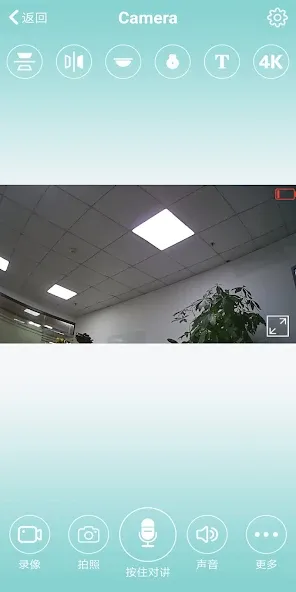
Want to know what’s happening right now while you’re out and about? Just open up HDWifiCamPro and you’ll see live video from your camera, anywhere you’ve got an internet connection.
Watch Previous Footage
Miss something important? No problem. The app lets you play back recorded video so you can rewind and see past events anytime.
Simple to Use
No need to stress about complicated menus or hard-to-find settings. The clean interface means most tasks are just a couple taps away—easy for anyone to pick up and use.
Efficient Security Tool
With everything just a tap away, staying in control of your space feels quicker and less of a hassle—so you can relax a little, wherever you are.
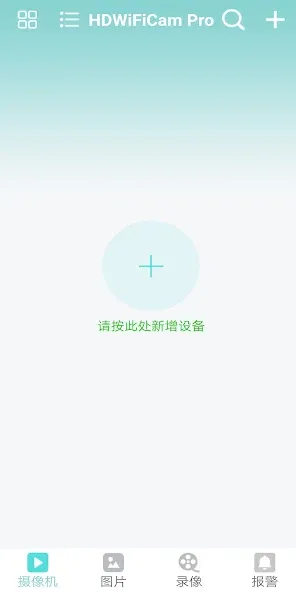
The primary function of HDWifiCamPro is to provide users with a user-friendly interface to view live camera feeds. This capability allows individuals to monitor their homes or businesses from anywhere with an internet connection. The app supports multiple camera connections simultaneously, making it suitable for users with more than one device. With the ability to switch between different camera views, users can efficiently manage their surveillance needs.
One of the notable functionalities within HDWifiCamPro is its recording feature. Users can record video footage directly from the camera feed, either manually or set up to trigger based on motion detection. This feature is essential for users who want to keep a record of events occurring in their camera’s field of view. Recorded videos can be saved directly to the user's device, providing easy access for future reference.
The app offers motion detection alerts, which notify users when movement is detected within the camera's monitoring area. This feature can help enhance security by alerting users to potential intrusions or unexpected activity. Users can customize the sensitivity of the motion detection to ensure they receive relevant notifications without unnecessary alerts.
Pros
Live remote viewing from compatible cameras
Playback of footage from the previous several hours
Focused interface for basic monitoring
Cons
Connection and reconnection can be unreliable
Limited tools beyond viewing and recent playback
In summary, HDWifiCamPro is the holistic surveillance solution that brings together convenience, reliability, and security, fitting smoothly into your daily routine. Whether you are checking in on your home while traveling or keeping an eye on your business after hours, trust that this surveillance system has you covered.
Size:73.51MB Version:8.3
Requirements:Android 6.0+ Price:Free
Package Name:com.shix.qhipc Signature:f8c4acd9dadfba607d838566385d13bf
Transform your mobile device into a powerhouse of efficiency with these handpicked essential tools. Whether you need professional-grade photo editing, seamless file organization, smart task management, or real-time weather updates, our curated selection of premium apps delivers unbeatable performance. Streamline your daily routine, automate repetitive tasks, and boost your productivity with intuitive interfaces and powerful features. Designed for both professionals and casual users, these editor-approved applications will revolutionize how you work and play. Don't settle for an ordinary phone - upgrade your digital experience today and unlock your device's full potential!
With the development of mobile hardware and software, many practical tool software have emerged, covering a wide range of aspects and becoming a good helper for everyone in work and life. Today, the editor provides you with a list of useful tool software downloads. These tools are not particularly complex types, and after reading them, everyone can quickly learn how to use them. Proper use can bring great convenience to life and work.
About us | Contact us | Privacy policy| DMCA
Copyright © 2026 Xiaohei All rights reserved.