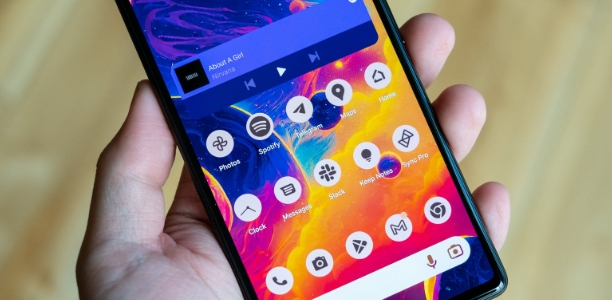
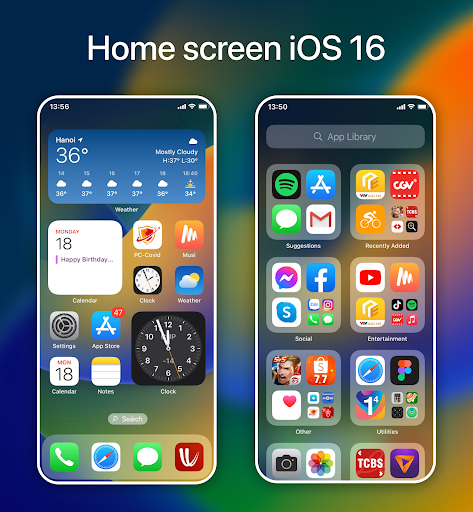
iLauncher is a beautifully designed Android app. It boasts powerful features, providing users with a robust and customizable launcher experience. With iLauncher, you can easily access important apps and personalize your home screen with themes and widgets. You can set a password or pattern and customize what's displayed on your lock screen. The quick access bar shows recently used apps, including shortcuts and your chosen apps. Furthermore, you can adjust the desktop grid, enable infinite scrolling, show or hide the search bar, and more to keep your home screen clean and uncluttered.
Quick view: Enjoy experiencing and viewing all news in the fastest time it provides. Every day, many notifications will be sent to you. You will save a lot of time and your work will also be easier to complete sooner when you receive notifications.
At a glance: When coming to the application, many users are extremely satisfied and feel it is great because it allows them to see everything without spending too much effort and time.
Customization: Based on your aesthetic taste and preferences, search for and choose the most beautiful wallpaper and lock screen for yourself. You can also take your profile picture to remove the cover photo.
Security: In high-security mode, except for the owner of the phone, no one can unlock your phone. It will have an automatic password. If you want to see the phone, you need to enter the password, and the phone will automatically open.
OS17 style: Everyone has their own way of looking at it, so everyone has the right to freely create their own unique wallpaper.
Personalization: Adjust the colors, images, and fonts that appear on the screen to the style you like best. This application will support all diverse features so you can do what you like.
Uplift your interaction
The iLauncher program is a robust tool that enables the enhancement of the aesthetic appeal and customisation of your mobile device. It offers numerous more advantageous features compared to the device's native launcher. This package offers an extensive selection of appealing themes for your selection. Consider using iLauncher; it is likely that you will find it enjoyable.
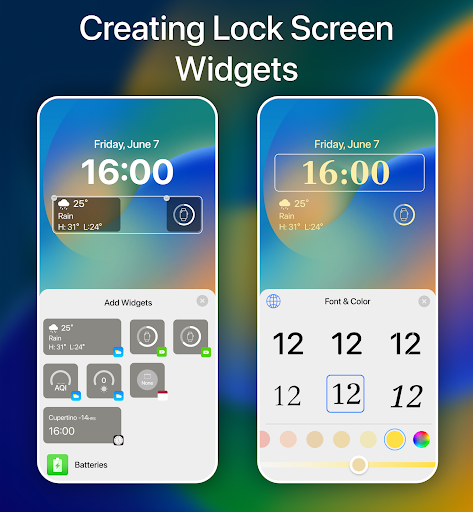
Alter the aesthetics of your lock screen.
A pattern lock and a passcode are two examples of security features that should be incorporated into the lock screen display. The applications you utilise most often can be swiftly accessed via Siri's suggestions, presented in the Quick Bar (Accessed Apps). All applications can be accessed via the drop-down menu, which further displays the most recently used applications. The search bar can be personalised by incorporating preferred shortcuts and applications. This is an alternative option accessible to you.
Ability to access customizing tools
The desktop grid is customizable, endless scrolling may be activated, the search bar can be seen or concealed, the folder view can be tailored, and other extra functions can be investigated. The application has pledged not to collect or disseminate any user information pertaining to this accessibility right. Applications require accessibility permissions for several reasons, including the following: To utilise the functions, one must first navigate to the home screen, access the most recent applications, return to the previous screen, and then activate the lock screen.
Readily adjustable to suit your personal preferences
You can conceal programs from the launcher if you choose not to display them on the HOME screen. Modifications to the icon (including both the application icon and the shortcut) are feasible. Your preferences can be integrated into the nomenclature of any application and the icon that symbolises it. Users can freely choose icons to replace from an existing library, icons used by other applications, or various icon sets created by other users.
Utilize Weather Widget: Stay up to date with the weather forecast by adding the Weather Widget to your home screen. Get real-time and local weather information at a glance.
Explore Other Widgets: Take advantage of the wide range of built-in widgets available on Launcher iOS17 - iLauncher. Colorful and functional widgets such as the clock, calendar, and battery widget can enhance your home screen and provide quick access to important information.
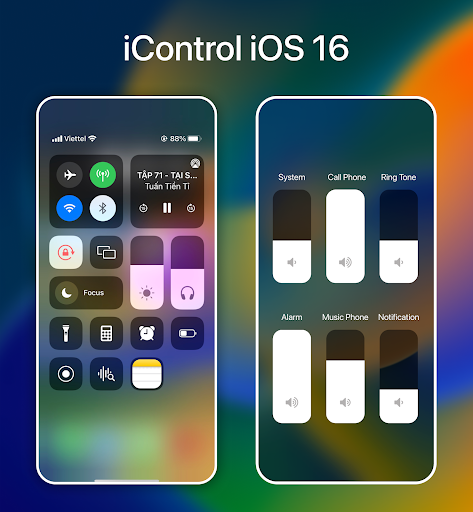
Customize Control Center: Make the most out of the Control Center feature by adding controls for your frequently used apps, settings, and features. Personalize it according to your preferences for convenient and quick access to your most-used functions.
Pros
Easy to customize and personalize the look of your phone with a wide range of themes, wallpapers, icons and more.
Offers quick access to frequently used apps from the home screen without having to search for them in the app drawer.
Automatically sorts all installed applications into categories making it easier for you to find what you need quickly.
Allows users to hide their private apps behind password protection or pattern lock which ensures privacy is maintained on the device at all times.
Comes packed with many useful tools such as task manager, power saver mode & battery monitor that help save time by managing system resources efficiently.
Cons
Ilauncher Mod Android app can be unstable and cause crashes.
It may not work with some apps or devices, leading to compatibility issues.
The user interface of the launcher is often outdated compared to other launchers available on the Google Play Store.
Some features such as notification badges are missing from this version of the launcher which makes it less attractive than its counterparts in terms of functionality and aesthetics.
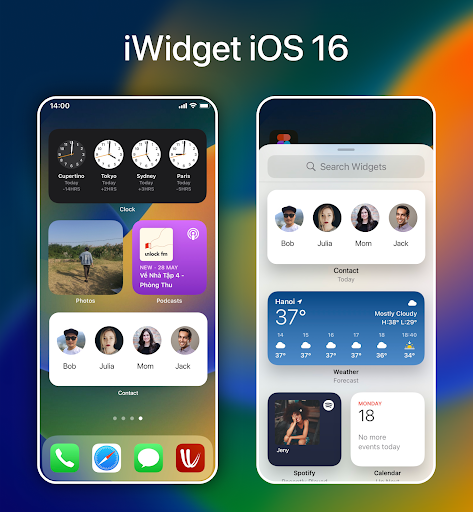
It boasts attractive features such as easy transition, lag-free performance, extensive customization options, vibrant widgets, and a user-friendly control center. With its seamless transition and customizable options, users can enjoy a sleek and personalized interface on their Android devices. iLauncher brings the best of both worlds, combining the functionality of Android with the aesthetic appeal of iOS. Experience the iOS interface on your Android phone and unlock a new level of productivity and personalization with iLauncher.
Size:19.3MB Version:2.1.6
Requirements:Android Votes:314
Package Name:com.launcheros15.ilauncher Signature:64f73a10d91d65e8cd2b19b35449c609f7a76043
The Ultra HD Wallpaper app allows you to find a wide range of clear wallpapers, which can be displayed with great clarity on any phone screen. You no longer have to worry about unclear wallpapers when changing devices. Today, the editor has compiled a complete app for ultra HD wallpapers, which you can choose and use according to your own needs. Generally, wallpapers are classified in great detail within software, and you can find wallpapers of any style you like. At the same time, there are super rich dynamic wallpapers for you to choose from, using cool wallpapers to make your phone desktop and lock screen stand out. Friends who like to collect ultra high definition wallpapers, welcome to download related software and experience it on this website!
The Ultra HD Wallpaper app allows you to find a wide range of clear wallpapers, which can be displayed with great clarity on any phone screen. You no longer have to worry about unclear wallpapers when changing devices. Today, the editor has compiled a complete app for ultra HD wallpapers, which you can choose and use according to your own needs. Generally, wallpapers are classified in great detail within software, and you can find wallpapers of any style you like. At the same time, there are super rich dynamic wallpapers for you to choose from, using cool wallpapers to make your phone desktop and lock screen stand out. Friends who like to collect ultra high definition wallpapers, welcome to download related software and experience it on this website!
About us | Contact us | Privacy policy| DMCA
Copyright © 2026 Xiaohei All rights reserved.