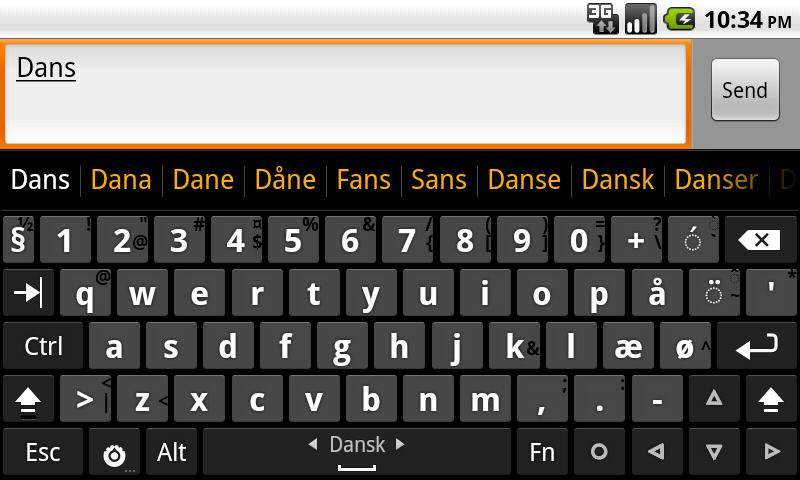
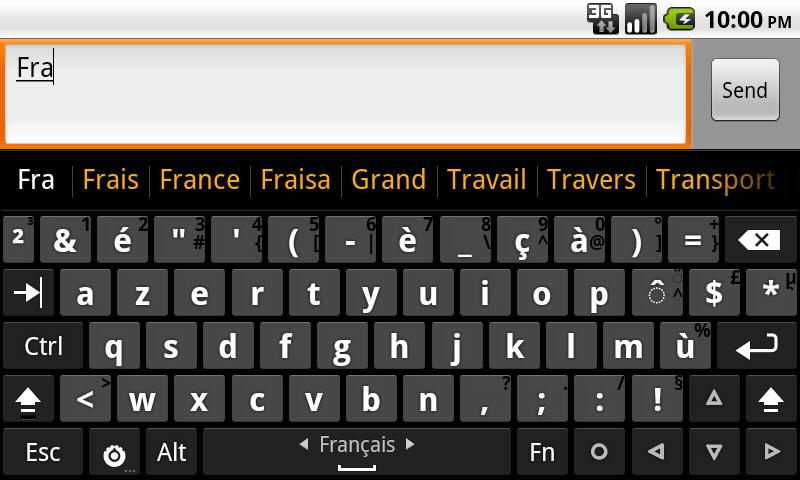
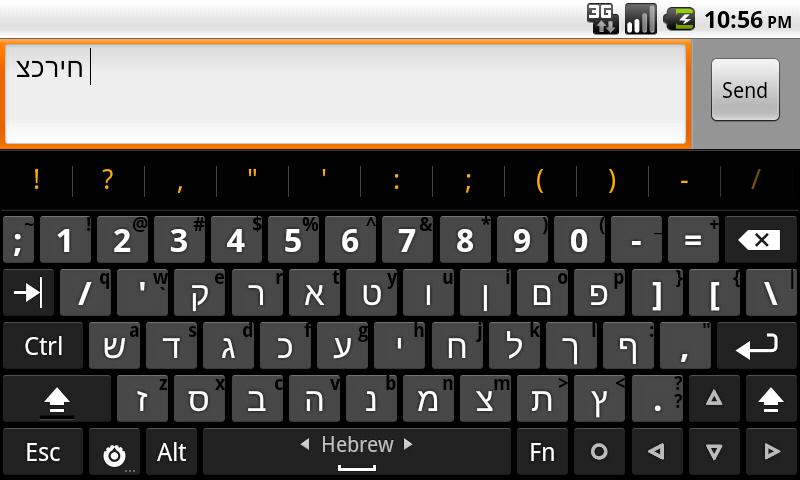
Hacker keyboard This is a desktop keyboard for Android systems. It provides your Android device with a complete computer keyboard experience, perfectly replicating the look and function of a real computer. It supports multiple languages to meet the needs of users in various countries, and users can customize the keyboard layout to their liking for a comfortable user experience. This keyboard does not steal any user information, making it a very secure application. If you happen to need a computer keyboard, then this software is perfect for you.
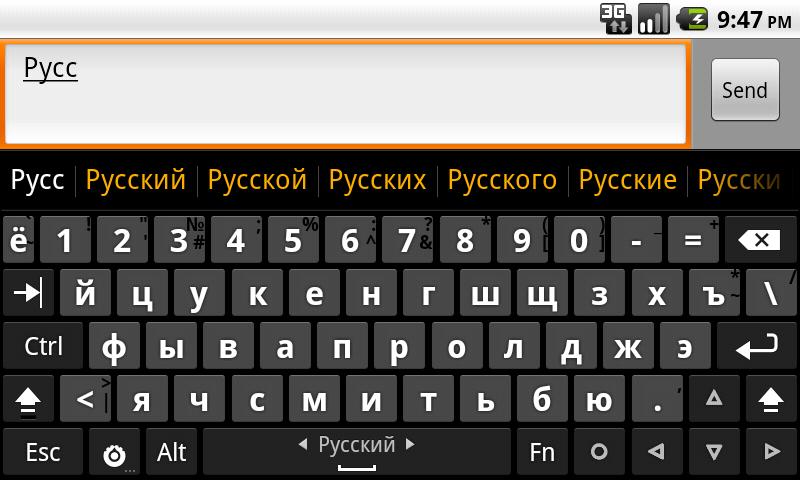
Complete PC-style keyboard layout optimized for coding and technical input
AI-powered suggestions and auto-correction tailored for programming languages
Extensive customization: key mappings, themes, and layouts to suit your workflow
Fast, accurate typing designed for developers, hackers, and tech pros
Supports multiple languages, emojis, and coding symbols
Privacy-first approach with no intrusive permissions or data sharing
Rich Array of Features
What sets Hacker's Keyboard apart is its accessibility to keys that are missing or hard to access on most mobile keyboards. Dedicated Tab, Ctrl, Shift, and arrow keys enable efficient navigation and text manipulation, improving workflows, especially when using terminal emulators, remote desktop clients, coding apps, or chat tools relying on keyboard commands.
The app supports multiple language layouts, catering to international users. Users can download additional language packs and switch layouts to suit their preferences. Handy features like auto-capitalization, predictive text, and customizable key size help tailor the typing experience.
Practical Customization Options
Hacker's Keyboard provides robust configuration options, including adjustable keyboard height, custom themes, and variable key labeling. Users can fine-tune the keyboard’s behavior, adjust vibration and sound feedback, and modify appearance for improved readability. Power users will appreciate the ability to enable or disable key rows, redefine modifier behavior, and control advanced settings such as swipe gestures and long-press actions.
Performance and User Experience
In terms of performance, the keyboard maintains consistent responsiveness during fast typing and switching between key layouts. The design is lightweight, ensuring minimal lag even on older devices. While the initial setup involves a few permission dialogs and manual activation, clear on-screen guidelines facilitate the process.
The settings menu is comprehensive, which may feel daunting for beginners. However, those who spend a few minutes exploring the available customization options will find the app highly adaptable to individual typing habits.
Ideal Use Cases
Hacker’s Keyboard shines in scenarios where precise input is required—such as software development, system administration, SSH sessions, or remote desktop work—where access to function keys and shortcuts is vital. It's also beneficial for language learners or those typing in scripts and dialects not fully supported by standard keyboards.
Pros
Comprehensive PC-style key layout including function and control keys
Wide support for multiple languages and layouts
Highly configurable appearance and behavior options
Beneficial for coding, remote desktop, and terminal use
Lightweight and responsive performance
Cons
Settings menu can be complex for new users
Initial setup requires manual activation steps
Visual design may feel dated compared to modern keyboards
How do I switch my keyboard to Hacker Keyboard?
After installing Hacker Keyboard on your Android device, go to your device settings, select Language and Text Input, and then select Hacker's Keyboard as your default keyboard.
Is Hacker Keyboard secure?
Yes, Hacker's Keyboard is a secure application. However, like other virtual keyboards, it can access everything you type. Therefore, you should be extra cautious when entering sensitive information such as passwords or credit card numbers.
Can I use Hacker Keyboard without an internet connection?
Yes, Hacker Keyboard can be used without an internet connection. After installation, you can use it normally without an internet connection.
Hacker Keyboard is a one-of-a-kind app as it is similar to a physical keyboard, boasting all the necessary keys you need to type efficiently—from function keys to “PgUp” and PgDown” buttons. It offers multilanguage support as well as the option to change the keyboard behavior, layout, and many more. Should you install this app, do bear in mind that you have to enable the keyboard yourself.
Size:19.1MB Version:3.0.1
Requirements:Android Votes:174
There must be many friends who decorate their phones with theme wallpapers, etc. So which theme stores are free? The editor has selected a variety of free and easy-to-use mobile theme software for everyone, providing a massive amount of exquisite wallpapers in various styles, dynamic and static, to meet everyone's download needs. Fine classification helps users quickly find their favorite themes, and supports users to preview application effects!
These software have the most comprehensive collection of wallpaper themes, and you can update your phone or computer wallpaper at any time. There are various styles of wallpapers with complete classifications, and you can search freely. Moreover, all wallpapers are high-definition images that can be freely adapted to your screen and support downloading and saving locally. The theme wallpaper application software recommends the hottest, latest, and best wallpapers for you. Millions of ultra high definition wallpapers are updated in real-time every day, with a wide variety of themed wallpapers available. There are no samples for changing wallpaper every day.
The Ultra HD Wallpaper app allows you to find a wide range of clear wallpapers, which can be displayed with great clarity on any phone screen. You no longer have to worry about unclear wallpapers when changing devices. Today, the editor has compiled a complete app for ultra HD wallpapers, which you can choose and use according to your own needs. Generally, wallpapers are classified in great detail within software, and you can find wallpapers of any style you like. At the same time, there are super rich dynamic wallpapers for you to choose from, using cool wallpapers to make your phone desktop and lock screen stand out. Friends who like to collect ultra high definition wallpapers, welcome to download related software and experience it on this website!
About us | Contact us | Privacy policy| DMCA
Copyright © 2026 Xiaohei All rights reserved.