AIReel is a video generation tool that integrates the latest AI technology. It offers multiple AI models to choose from, allowing users to easily convert static text and images into videos simply by inputting their requirements or uploading pictures, fulfilling their creative needs. Even with just a simple idea, users can quickly add more keywords through the built-in expander to make their videos more engaging. For users who don't want to input text, the software also provides the latest and most popular video templates to help them create videos. The software offers rich customization options, allowing users to freely export videos in various formats and aspect ratios to share with friends or on social media, garnering numerous likes.
Text to video: Enter a short description, and AIReel builds a clip with scenes and music. You can preview the result and save a short video for quick sharing. This suits updates, event invites, and quick tutorials.
Photo to video: Upload a JPG or PNG. AIReel animates real people, anime art, or pets to add motion. This is useful when a still image needs a dynamic look. Results fit profiles, product shots, and pet clips.
Prompt assistant: When an idea is rough, the prompt assistant suggests clearer wording. It reduces guesswork and helps you get closer to the outcome you want. You adjust ideas step by step until the prompt matches your target.
Social Media Sharing: With AIreel, users can generate short videos perfect for sharing on social media platforms. Stay connected with friends, family, and followers by creating and posting dynamic video content with just a few taps.
Trending Template Collection: AIreel provides users with access to a curated collection of templates covering popular categories. Stay up-to-date with the latest social media trends and create eye-catching videos that resonate with your audience.
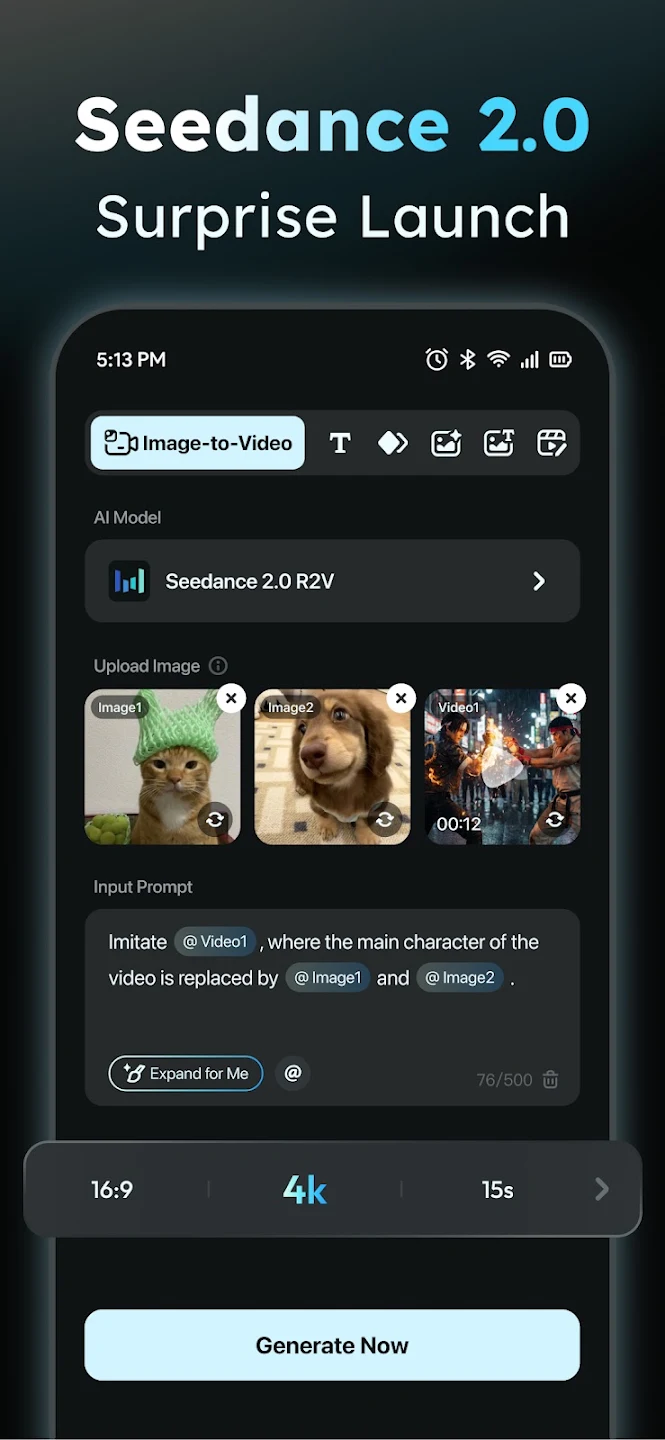
Write Detailed, Visual Prompts: AIreel works best when your imagination is clear. Instead of writing “a dancer on stage,” describe the scene with sensory details:“A graceful ballerina performing under warm spotlight beams, slow camera pan, orchestral background.”The more visual cues you include — lighting, colors, emotions — the closer the output will match your vision.
Use the Prompt Expander for Smarter Scripts: Even if you struggle with writing creative ideas, AIreel’s built-in Prompt Expander refines your thoughts automatically. It transforms short descriptions into cinematic scripts that the AI understands perfectly.Saves time and reduces trial and error.Ensures your scenes have logical flow and style.Produces richer, more detailed storytelling outputs.
Polish the Final Output: AIreel already gives impressive results, but small touches elevate professionalism:Add subtitles for clarity.Adjust brightness and contrast.Apply LUT filters for consistent color tone.Insert your watermark or brand intro.These micro-edits can turn a great video into an unforgettable one.
Choose the Right Aspect Ratio Early: Before generating your video, select the aspect ratio that fits your destination platform:9:16 (Vertical): TikTok & Reels,16:9 (Horizontal): YouTube or widescreen playback,1:1 (Square): Instagram feed.By setting this in advance, you save time and avoid resizing later — keeping your visuals crisp and well-framed.

Honestly this is like my first time actually using a proper AI editing app. I don't hate it, I actually really like it, and this is based off the single creation I've made so far.
Wow,., a simple photo, a plain prompt,. Then there is the ai support to enhance your prompt,.it is far more detailed than I had input, and then it came to life,. A playful little video, fully enhancing a 360 degree view and tidying up personal features etc. Fabulous,. a good start!
This is going to be my main tool for mount on runway or grok or the other tool size this one. It is the best one. If there's somebody like me, trust me, God, trust me. God, trust me, on God, you should get this tool. You should get it even if you're an Android user or an iPhone user, Hey, I know you, I see you. Pause me, get this tool right now. Please get this tool, it is so good.
100 credits given, 90 credits needed for a video creation, be mindful how you gonna test this. that being said: the result is absolutely great. and it has the option to buy credits without a subscription, perfect!
WOW I wasn't expecting how good it was first try it came out perfect . best part I can just buy credits if I choose. great app. ok update. the credits are really reasonable I got some and made some cool videos. I like that they have other programs like kling so one can make good Hollywood effects worth it. keep it up...

What is AIReel?
AIReel is an all-in-one AI image & video creator that transforms text or images into professional-quality content, making users focus on ideas, not editing.
What do I need to get started?
Just an idea. Enter text or upload an image, and AIReel takes care of the rest.
How does AIReel generate AI videos?
It uses multimodal AI models, including AIReel AI, Veo 3.1, Kling 3.0, Vidu Q3, Seedance 2.0, Wan 2.5, Hailuo AI, Pixverse AI and Runway AI, to transform text and images into realistic motion visuals.
What if I don’t know how to write a good prompt?
No problem. AIReel includes a built-in prompt assistant that helps you refine your input. Simply describe your idea in plain language — AIReel will suggest and optimize the prompt to generate the best possible video or image.
Can AIReel automatically extend short videos?
Yes. AIReel App’s adaptive generation engine can lengthen videos by synthesizing additional frames, scenes, or dialogue based on the existing context.
Does AIReel offer ready-to-use templates?
Yes. AIReel provides a large library of templates with built-in AI effects that you can reuse instantly—just pick one and generate your video or image in seconds.
AIreel empowers you to produce professional, platform-ready videos with minimal effort, whether for personal use or growing your online presence. Its groundbreaking AI models and creative tools redefine what’s possible in video creation. Download the AIreel APK today to start creating cinematic content instantly.
Size:71.1MB Version:3.1.2
Requirements:Android Votes:514
Package Name:com.aireel.app Signature:46c2feb3b35284efba04dec29b69892a03fcb3f3



Transform your smartphone into a powerful editing studio with the best video editing apps for Android! Whether you're a content creator, social media enthusiast, or just looking to polish personal videos, these apps offer professional-grade tools right at your fingertips. Enjoy intuitive interfaces, advanced features like multi-track editing and filters, and seamless exporting options - all optimized for mobile devices. Download now and start creating stunning videos anytime, anywhere!
Video Editor is a powerful software tool designed for crafting, refining, and enhancing video content. It enables users to transform raw footage into compelling visual narratives or effective communication platforms. As digital media continues to evolve, video editing has grown in significance - no longer just a professional necessity but also an accessible skill for everyday creators. Modern editing tools now offer intuitive interfaces, AI-powered features, and cross-platform compatibility, making high-quality video production achievable for both experts and casual users alike.
Mobile video editing tools are highly popular, with complete functions and professional tools that provide a strong atmosphere for various materials. Rich video templates can be operated with just one click, saving time and without too high a threshold. So what are the free versions of mobile video editing software? Editing software should have high popularity, but most of them require membership. Next, I recommend several platforms that can be used for free.
About us | Contact us | Privacy policy| DMCA
Copyright © 2026 Xiaohei All rights reserved.