Verizon Messages is a feature-rich communication app. This app has a variety of functions, including group chat, sending and receiving messages on tablets, computers, and web browsers, and integrating various multimedia options, supporting users to send text messages, photos, and videos across multiple platforms. With Verizon Messages, users can also personalize their communication experience using themes and stickers, making interactions more lively and engaging. Furthermore, the app stands out from similar offerings by providing cloud-based message storage.
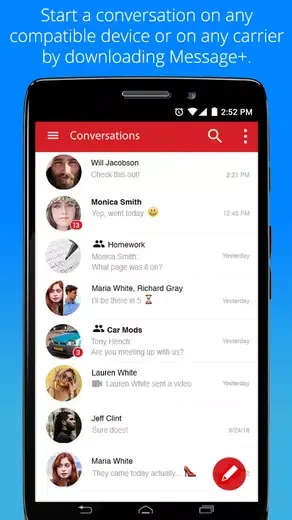
It can be used to send SMS messages but it's also very similar to other instant messaging and chat apps that we're so used to using as is the case of WhatsApp, Telegram, Facebook Messenger...
We only have to choose a contact from our list to write whatever we want. However, we'll need an operative SIM card as it doesn't work over the Internet.
Another noteworthy aspect of this app is the possibility to customize its functions and interface, therefore, if you need an application to be able to send SMS text messages this is probably one of the best options you can get your hands on... with many more functions and features than the native Android app.
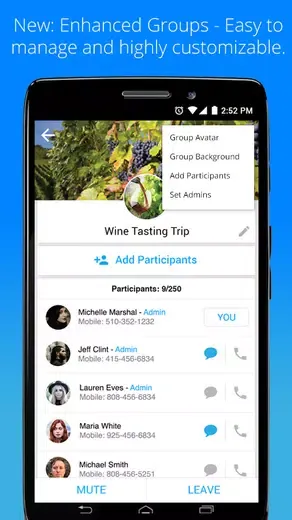
GROUP CHATS – Create larger group chats with up to 250 people. Send and receive photos/videos in seconds. Personalize your chat experience with avatars, backgrounds and more. You can even mute a conversation or add or remove members or without creating a new group.
YELP INTEGRATION – Tap the plus menu and easily access Yelp from within the app. Search for restaurants, entertainment and directions. Make plans and share the details all within your chat.
SHARE YOUR LOCATION – Glympse™ lets you share your location with the people you choose for the length of time you set. Perfect for meeting up, or letting people know you’re running late.
SEND AN eGIFT – Tap the plus menu and select eGifts icon. Easily send an eGift card right through text message. eGifting has been expanded to include eGift cards from more than 30 brands
SYNC ACROSS DEVICES – Download Verizon Messages on all your devices, and sync messages across your smartphone, tablet and computer. Switch devices whenever you want. Make calls with your tablet anywhere.
DRIVING MODE – Turn on driving mode to send an Auto-Reply message and disable incoming message notifications so you don’t get distracted on the road.
HD VOICE CALLING – Eligibility rules apply. Link your phone number to the Verizon Messages app on your tablet and make and receive calls wherever they want on any network (cellular or Wi-Fi).
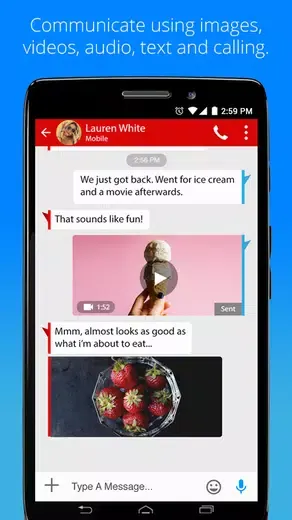
Verizon Messages ensures that your access to your messages remains synced across smartphones, tablets, laptops, desktop PCs, smart watches and other devices.
Message+ lets you send messages to people in your contacts.
It also lets you create or join groups.
If you are a group admin, you can add or remove members.
Group chats can involve as many as 250 people, which is quite large and probably much bigger than the average user is ever going to need.
Message+ is not just a simple messaging app either.
It supports sending and receiving images and videos.
You can make GIFs from videos and send those.
You can also personalize your experience with items only you see, such as backgrounds, and items that all recipients see, such as avatars.
The app has a range of colors, fonts, signatures and more to use.
Pros
Powerful messaging app
Extensive personalization options
Synchronization across devices
Cons
Sync is unreliable at times
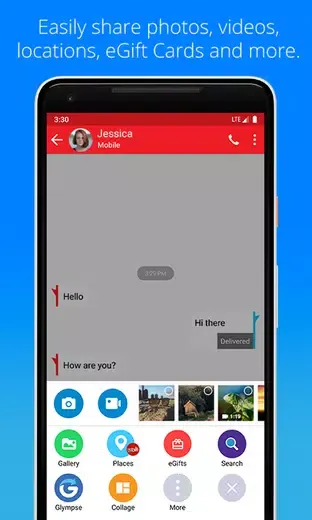
Additionally, features like scheduling messages for future delivery, searching for images and gifs via Yahoo search, and expressing emotions through a vibrant range of Emojis transcend the boundaries of traditional messaging. The capability to send and receive messages over Wi-Fi bridges communication across various devices, including iOS devices, PCs, Macs, and web browsers.
Size:89.79MB Version:9.5.9
Requirements:Android 6.0+ Price:Free
Package Name:com.verizon.messaging.vzmsgs Signature:0ec9cd0893e83d3c8b101d6389870bd4
Keep in touch effortlessly with the world’s best free messaging and calling apps. Whether you're chatting with friends, video calling family, or coordinating with colleagues, these apps offer seamless communication-no subscriptions needed. Enjoy crystal-clear HD video calls, fun stickers, group chats, and reliable messaging across devices. Perfect for work collaboration, sharing special moments, or staying close to loved ones while traveling. Download today and experience premium connectivity without spending a penny!
Mobile chat software is one of the essential mobile applications on people's phones. Chat software can connect people who are far apart, allowing you to communicate with friends anytime and anywhere. The software can also support various ways such as text, voice, video, etc. Now, the editor brings you a special topic on mobile chat software. You can choose the software you need and install it for free on your phone. If you need it, come and choose the software you need!
About us | Contact us | Privacy policy| DMCA
Copyright © 2026 Xiaohei All rights reserved.