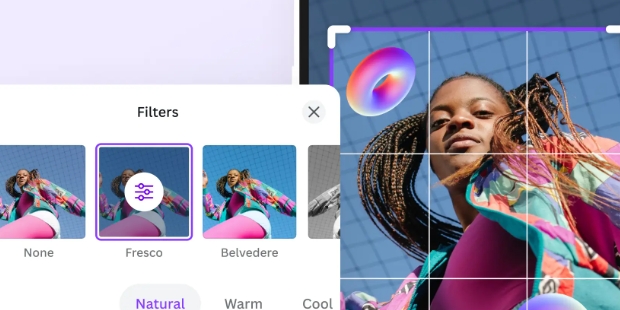
Intervalometer is designed to help users capture more beautiful photos, providing diverse time-lapse photography and photo editing tools. With just a few simple steps, users can set the time-lapse duration in seconds and create exquisite works using the built-in editing tools after shooting, satisfying their personalized creative needs. Intervalometer supports sharing, allowing users to easily share their creations with friends or on other platforms, garnering numerous likes and comments.
Time-lapse photography: The app automates the process of taking a sequence of shots at specified intervals, allowing you to capture nature scenes, cityscapes, or long events without manually starting and stopping the camera.
Long-exposure mode: It offers a longer shutter speed than the default camera setting, making it ideal for low-light photography or capturing light trails.
Compatibility with any Android camera: The app works with any Android camera, providing additional functionality and control over your phone's camera settings.
In-app purchases: Additional features can be unlocked through in-app purchases, such as the ability to save intervalometer settings as presets or remove the app's watermark from photos.
Easy to use: Once installed, the app's user-friendly interface allows you to configure shooting intervals, number of shots, and output location with ease.
Diverse photography techniques: The app enables you to explore various photography techniques, including low-light time-lapse, HDR time-lapse, light-painting time-lapse, long exposure time-lapse, star trails/milky way time-lapse, and ultra-wide angle time-lapse.

Capture the sky: We’re living in a world filled with many amazing tools and technologies today. Unlike before, we’re now capable of doing many things even when we don’t leave the couch.We can access so many apps with the power of our smartphones and do many things. Whether we do them for business, work or personal purposes, there are a lot of things to do. If you’re looking for an app that can capture the night sky, then Intervalometer is for you.This is the perfect app to use so you can capture images and videos of various night scenarios. You’ll be able to easily capture timelapses so you can enjoy image stacking, star trails, lightning stacking and more. With this app, you’re able to enjoy so many timelapses like holy grail of time lapses.This is an app that’s perfect for hobbyists, professionals and people who are just curious. There are many controls for you to fiddle as you can enjoy creating the best sights now. Download the app and enjoy now.
Various types of timelapses: If you’re a fan of timelapses, then you can create the best ones using just your phone. It doesn’t matter what your smartphone is if you have a camera, you can enjoy many things.With this app, you can enjoy different types of timelapses like the Milky Way, Light Painting, Ultra Wide, Holy Grail, and many more. This app allows for many possibilities so you can freely download it now. Enjoy fiddling and discovering new features to use anytime you want.
Many modes: With this app, you can access many modes available today like the Bulb Mode, Infinite Mode and many more. You’re able to enjoy so many modes to use thanks to this app right now. Here, you can create various effects that would normally be impossible for typical smartphones.But with the help of this advanced app, you can create a lot of effects so you can share your love for the galaxy. Enjoy different modes which are perfect for various situations and scenarios now. You can capture the sky, satellites, planets, lightning, stars and many more.

Is the intervalometer compatible with all Canon cameras?
The intervalometer by Richard Buhmann is specifically designed for various Canon models, but compatibility may vary; check the product specifications for your specific camera.
How do I set the timer on the intervalometer?
The intervalometer comes with an easy-to-use interface; typically, you can set the intervals and duration through the menu buttons.
Can I use the intervalometer for long exposure photography?
Yes, the intervalometer can be used for long exposure photography by setting a longer shutter speed.
Does the intervalometer require batteries?
The intervalometer is usually powered by batteries; refer to the product manual for specific power requirements.
What features does the intervalometer offer?
Common features include programmable intervals, variable exposure times, and delay settings for timed shots.
Can I use the intervalometer while the camera is in bulb mode?
Yes, many intervalometers allow you to utilize bulb mode for extended exposures.
Is there a warranty or guarantee on the product?
Richard Buhmann usually offers a warranty; check the packaging or website for details.
Intervalometer is a useful application (as well as a full-fledged device for ordinary cameras) for all people who shoot timelaps and other similar projects in mechanics. With the help of the interval meter, the user will be able to use their mobile gadget to achieve such goals without having to invent something complex and time-consuming. A set of settings and parameters, features and ready-made presets for certain working conditions, as well as many other things will significantly simplify life and allow you to avoid using professional equipment to create, for example, a beautiful night sky.
Size:36MB Version:2.9.12
Requirements:Android Votes:487


AI Photo Editing Apps - encompassing both image generation and enhancement tools - utilize cutting-edge machine learning algorithms to produce, refine, or transform visuals using text prompts, uploaded images, or artistic preferences. These powerful applications are reshaping digital art, photography, and media production by streamlining sophisticated processes such as professional-grade retouching, artistic style replication, and completely AI-generated artwork. By combining automation with creative control, they empower users to achieve stunning results with unprecedented speed and precision.
Enhance your photos effortlessly with the best free photo editing apps for Android! Whether you want to apply stunning filters, adjust brightness and contrast, remove blemishes, or create professional-quality edits, these apps offer powerful tools at your fingertips. From simple one-tap enhancements to advanced editing features like background removal and AI-powered effects, you can transform your images with ease. Explore a wide range of user-friendly and feature-rich apps, all available for free download. Start editing and make your photos stand out today!
Nowadays, with the popularity of intelligent technology, this new intelligent technology will provide faster content creation in daily life. In the face of today's intelligent landscape application creation, it supports the creation of text content for different themes, provides intelligent image creation and painting, and even realizes various personalized AI creation functions such as intelligent image cutout. In terms of using intelligent tools, you can gain more information, knowledge and inspiration. The editor recommends the following popular AI creation tools for you to experience the help that intelligent AI brings to different scenarios such as life, work, and study.
About us | Contact us | Privacy policy| DMCA
Copyright © 2026 Xiaohei All rights reserved.