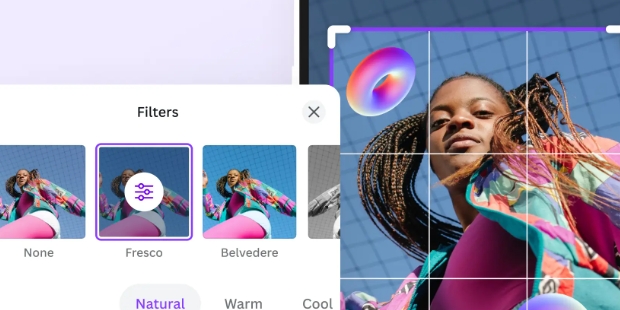
Fotor Photo Editor is a popular photo editing tool that makes your editing process easier, allowing you to create stunning photos and share them with friends or on other social media platforms, garnering likes and comments. Fotor Photo Editor offers users a variety of fun editing tools, allowing you to freely add various styles of filters, text, and stickers. It uses cutting-edge AI technology to further optimize photo details such as backgrounds and skin tones, creating the most beautiful images. Fotor Photo Editor is continuously being updated, adding more types of editing tools and materials to provide users with an even easier editing experience.
Advanced Photo Retouching: With the AI Retouch tool, users can achieve flawless skin, remove blemishes, and even adjust facial features effortlessly. This feature is especially popular among social media influencers and photographers who require high-end retouching capabilities.
AI Headshot Generator: Creating professional headshots has never been easier. This tool enables users to generate high-quality profile pictures suitable for LinkedIn, resumes, and other professional platforms.
AI Expand and Extend: This innovative tool allows users to expand photo subjects and backgrounds to fit different frame sizes without distorting the image quality. It is useful for social media posts, advertisements, and design projects that require resizing images to specific dimensions.
AI Replace for Outfits and Hairstyles: Ever wondered how you would look in different outfits or hairstyles? The AI Replace tool lets you experiment with various styles by changing clothing and hair colors in photos.
AI Colorize and Photo Restoration: Fotor includes AI-powered tools that can restore old black-and-white photos by adding realistic colors and enhancing image quality. This feature is a favorite among users who wish to preserve family memories.
AI Face Mimic and Animation: A fun and creative tool, AI Face Mimic allows users to animate their photos, make faces sing, or add amusing expressions. This feature is great for entertainment purposes and creating engaging social media content.

Special effects, backgrounds and unique stickers: From the first moments, it is not difficult for you to realize that Fotor Photo Editor contains a lot of special effects with perfectly fine-tuned color points from professional photographers. Moreover, they are also classified into many different styles such as classic, vintage, retro, romantic, cold or Hollywood.Not only that, you can also combine many effects together to create unique and attractive color image combinations in your own style. Comes with a feature to insert borders into the background of the image, with more than 100 types of background frames from topics such as New Year’s party, year-end party, thanksgiving or Christmas party. Indeed, the developer has almost fully updated the most popular and trending topics for users.More specifically, Fotor Photo Editor also owns more than 200 beautiful, exclusive and handcrafted stickers designed by the publisher itself – this is a very bright advantage that few photo editing applications have.
Optimize the ability to edit personal photos for users: Next, it is impossible to ignore that Fotor Photo Editor is very well optimized for personal photo editing for users. With a variety of tools and shortcuts, users can merge, delete, collage or rotate and adjust the aspect ratio extremely conveniently.What’s more, you can stitch multiple photos onto a pre-built detailed layout with as much depth as any professional photo editing app on the market. It must be said that if I have to compare this feature separately with Instagram, Facebook or Snapchat, Fotor Photo Editor has gone a few steps away.
Supported by real photographers: More specifically, if the user wants to edit more complex with detailed parameters, the application will still satisfy the user in the most perfect way. With just a few basic tasks, a series of detailed indicators of each small position will be fully displayed with the absolute precision of a real mechanical camera frame.Even more deeply, you can also edit the image’s hot and cold points, highlights, shadows and saturation or contrast extremely impressive. These in-depth elements and tools alone will help you get the most natural images with the best color schemes possible.

Loving the app so far, just learning. Learning as l go Have had to ask a couple questionsand the response time was good. Will review more as l go along.Used this program to puttogether a church photo album, loved it. Just started using the old photo restorer andWOW LOVING THIS! So simple and really cleaned up better than l expected.Thank you,may need a little help in finding things sometime, but l did not use for a few months.
There are so so so many features to enhance your photos and there's always new ai toplay with. From cartooning yourself to whitening teeth or changing hair color, thepossibilities are endless! One of my favorite features is making older family photos "comealive". lt's like re-living a moment, especially if you have loved ones who have passed.Thank you to developers! Only editing app !'ll ever forever want/need.
Enjoy using fotor. Erasing does great. Changing design of photo can be fun.The only frustration I have, when erasing a person in the photo - fotorautomatically creates another person with a different look. l wish l knew howto erase a person from the photo all together. Maybe some day l'll figure itout. Otherwise very happy with fotor.
I ran across Fotor while looking for a mobile app to clarify & enhance 70+ year old photosfor the funeral of my Uncle James. After scanning the photos with the Google PhotosScanner, l ran them through the Al Upscaler.The improvement was overwhelming. lemailed the Cropped & Upscaled photos to my dear Texas family & they were thrilled toadd them to the multimedia presentation of my Uncle's life.

Is Fotor’s online photo editor free to use?
Yes, Fotor’s online photo editor offers a free plan that allows anyone to edit as many images as they want and export the edited photos without watermarks. Those who want even more advanced features can upgrade to Fotor Pro.
Can I use Fotor’s free photo editor on PC and mobile?
Yes, our photo editor is available on Windows, Mac, iOS, and Android devices. You can edit and enhance your photos from anywhere and anytime with just one account.
What's the difference between Fotor and Photoshop?
Fotor is a user-friendly online photo editor like Photoshop. With a variety of photo editing features, Fotor can help you quickly improve and edit photos. You can resize and crop images, adjust brightness and contrast, beautify portraits, add text and overlays, remove backgrounds, create photo collages, and more using Fotor.
Moreover, our photo editor is less complex than Photoshop, making it ideal for amateurs and professionals alike.
How to add text to a picture?
With just a few clicks, you can quickly add text to a picture using Fotor’s online picture editor.
Firstly, upload your picture to Fotor and click "Text" to insert text into the picture.
Type the words you want to add, and drag and drop the text wherever you want. You can change the font, size, color, and spacing to customize the text, and curve the text for a more creative touch.
Finally, save and download your edited picture in the desired format. It’s that easy!
What is photo editing?
Photo editing is the process of digitally enhancing an image to make it look better. Photo editing can range from simple adjustments such as cropping and resizing to more advanced editing techniques like color correction and retouching.
With photo editing software such as Fotor's online photo editor, you can easily enhance the appearance of your digital photos. With just a few clicks, you can adjust color, brightness, and contrast, improve image quality, add photo effects, remove unwanted items from photos, blur images, and much more. With a user-friendly interface and powerful editing features, Fotor simplifies the process of photo editing and helps you achieve stunning results with minimal effort.
How to edit the background of image?
This can be achieved in several ways in our AI photo editor. Easily edit photo background and perfect your image in seconds.
Using our Blur Tool, you can blur out the background of an image to highlight the subject and create a depth of field effect.
You can use our background eraser to remove background from image automatically, and get transparent background image for new look.
You can also replace the background by Fotor AI background generator. Generate professional backgrounds for any occasion automatically, even product photo backgrounds.
Fotor Photo Editor is a great app for background editing. The app offers a comprehensive photo editing and design experience. Application suitable for amateur and professional photographers. Of course, raw images should be edited for the best quality. The app offers a handy photography experience for free, and has been developed by Everimaging Ltd. You can completely alter your image, or match the quality through automatic capabilities such as skin softening, blemish removal and natural makeup along with a wide range of editing tools . In addition, the app also offers interesting capabilities like wrinkle removal, blemish removal, image reshaping, teeth whitening, red-eye removal, eye color change, and enhancement of your photos.
Size:180MB Version:7.8.10.0
Requirements:Android Votes:64


AI Photo Editing Apps - encompassing both image generation and enhancement tools - utilize cutting-edge machine learning algorithms to produce, refine, or transform visuals using text prompts, uploaded images, or artistic preferences. These powerful applications are reshaping digital art, photography, and media production by streamlining sophisticated processes such as professional-grade retouching, artistic style replication, and completely AI-generated artwork. By combining automation with creative control, they empower users to achieve stunning results with unprecedented speed and precision.
Enhance your photos effortlessly with the best free photo editing apps for Android! Whether you want to apply stunning filters, adjust brightness and contrast, remove blemishes, or create professional-quality edits, these apps offer powerful tools at your fingertips. From simple one-tap enhancements to advanced editing features like background removal and AI-powered effects, you can transform your images with ease. Explore a wide range of user-friendly and feature-rich apps, all available for free download. Start editing and make your photos stand out today!
Nowadays, with the popularity of intelligent technology, this new intelligent technology will provide faster content creation in daily life. In the face of today's intelligent landscape application creation, it supports the creation of text content for different themes, provides intelligent image creation and painting, and even realizes various personalized AI creation functions such as intelligent image cutout. In terms of using intelligent tools, you can gain more information, knowledge and inspiration. The editor recommends the following popular AI creation tools for you to experience the help that intelligent AI brings to different scenarios such as life, work, and study.
About us | Contact us | Privacy policy| DMCA
Copyright © 2026 Xiaohei All rights reserved.