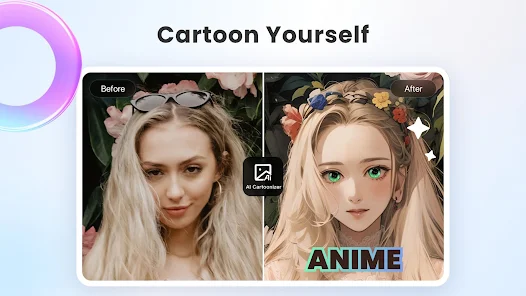
Cymera is a user-friendly photo editor that provides users with numerous editing tools and resources to help them take beautiful photos and share them with friends or on other social media platforms, garnering likes and comments. The software offers tutorials and FAQs, allowing users to add various filters, effects, and text to their photos, adjust brightness, color temperature, and saturation, and fine-tune details such as skin and body shape to make themselves even more radiant. The software is constantly releasing more beautiful photo editing resources and tools to help users create even more stunning photos.
Beauty Camera: A feature that allows your camera to automatically edit and remove unnecessary things on the user’s face. Even changing their skin or changing their skeleton. Everything will be edited according to community standards. If you want, you can use RAW images to edit them to your needs.
Photo Editing: As one of the basic features of this application, here will be where you perform the fundamental processes of the photo you have chosen. For example, resizing, cropping, rotating, etc. does everything to get the perfect sample photo. Then when you have confirmed, you can continue with the next step, where you will know the high capabilities of this application.
Filter: To help people create an atmosphere and a beautiful color for photos, they just need to use the right type of filter. There are more than 100 different types of filters for women. They can use these filters extension features to view all of them and their categories. Each filter always brings a different mood and a different set of colors. So users can use filters instead of manual blending.
Lens: As a feature that allows this application to change the camera, it has the ability to make your camera better or let you take pictures with a new style. Depending on the type of lens you choose, the image quality and sharpness will vary. There is a reason why allowing users to change lenses. You can discover its effects later.
Beauty: Unlike Beauty Camera, this is where you change your beauty with the magic tools of the application. You can change everything on your face in a way that makes you younger, prettier, and even more attractive. Make it possible for men to be attracted immediately after witnessing your beauty through this photo. Not only the face, but it also interacts with the body’s appearance, surprising.

Adjustment brush: The adjustment brush is a key tool for photographers because it allows you to make small changes to the tone of your photo. If your photo is too bright, you can easily adjust the exposure level. Sometimes, though, you may want to change a specific area of your photo’s tone like skin tones or shadows. Using the adjustment brush, you can apply individual adjustments to these areas in a single step.
Crop your images like a pro: Thanks to the amazing crop tool in Cymera which can be used to improve the composition of your photos. If you want to crop a photo, select the crop tool from the toolbar and drag a rectangle around the area you want to keep. You can then adjust the size and shape of the rectangle or use the manual controls to fine-tune the cropping.It is quite helpful for removing distracting elements or highlighting specific areas of the image. Feel free to change the aspect ratio of a photo, which can give it a more professional look.When cropping a photo, it’s important to consider how it will affect the overall composition of the image. Sometimes it is necessary to make small adjustments to the position of the subject to create a more balanced composition.
Sharpening and Noise Reduction: The sharpening and noise reduction tools are two of the most important tools for enhancing details in photos. However, the sharpening tool increases the contrast between neighboring pixels, while the noise reduction tool eliminates digital noise from an image. Both tools are essential for improving the quality of photos taken in low light or high ISO settings.

Cymera has been my "go-to" photo-shop app for years now! I've tried many of them. None are as user-friendly, with a good selection of filters, etc. Minimal ads are a +! A few things I would like to see are additions to the existing filters, light effects, and frames. There haven't been any up-grades in awhile. Also, adding in new effects for advanced users would make Cymera a step above. With these items I doubt I would bother to look at other apps!
I'm giving it 5 star for Past Performance I've been using app has 2be 4 almost 10 years. Love it. Easy interface. Doesn't give you 1000s options but all you need are there. 1 of my main uses was adding text 2 images. Ever since I got my new phone A25 and did update things have not been right. No matter what I do the text box is always crooked. Can't use art filters at all and picking Text colors has glitches. I tried uninstall n reinstall. Nothing. Help!?! uninstall m reinstall.
This is one of my favorite photo editing apps from waaay back. I love the "liquify" feature. It has allowed me to fix everything from bad hair days to droopy eyelids. The rest of the features are standard and pretty typical. I love being able to reshape my chin(the second one), my lips(which are too small for my face) and my upper arms(they're 51 years old). Try it!
I have been using Cymera app for yrs. But lately it stuck on loading black screen with Cymera written in the middle. Will try uninstalling then re-install it again, hope its better. I like everything about Cymera, most of all is that it lets me change the shape/ size of anything in the photo. Other photo reshaping apps restrict you from resizing/ reshaping anything else apart from what is specified. Cymera doesn't restrict you, it allows me to reshape/ resize the precise any spot I need.

Is internet connection necessary for using camera?
Internet connection is not necessary for using Cymera's camera and editing tools.You can enjoy taking and editing photos without network or wifi!
How to set a Silent Mode?
In camera mode, find the setting button on the right hand of the screen. Or in home menu, access to [Settings]-[Camera Settings] then select to turn ON/OFF the silent mode.When the silent mode is on, flash use is not available.When the silent mode is on, photo resolution is possibly lower.
How to use flashlight?
In the camera mode, select the flash icon on the left hand of the screen to turn on the flashlight.However, if the camera stays in the silent mode, flash use is not available.
How to change the phone wallpaper?
From Cymera gallery, choose a photo you want to set as the phone wallpaper.Find the wallpaper icon at the bottom tab and click on it then finish!
Is it possible to save photo on SD card?
Android OS 4.4 (kitkat) and above don't support saving photo on SD card(external memory). Since it is under google's authority, it is difficult for Cymera to take any action on this.
By combining powerful editing features with user-friendly design, Cymera - Photo Editor Collage serves as a comprehensive solution for anyone looking to enhance their photography experience. With its extensive array of filters, editing tools, and collage-making capabilities, users are equipped to create visually appealing images ready for sharing on social media platforms. The app is suitable for various user needs, from casual selfies to more curated collections of photos.
Size:97MB Version:4.5.5
Requirements:Android Votes:344
Package Name:com.cyworld.camera Signature:48b476938961042c3bffa621005ed5c1c2f1f156


Visuals serve as a primary gateway for players to engage with games, where distinctive art direction immediately captures attention and creates lasting impressions. An unconventional aesthetic not only stands out in crowded markets but also enhances immersion and emotional connection. When executed with creativity and polish, striking visuals elevate gameplay into a memorable artistic experience. That's why titles with truly exceptional art styles deserve recognition - they offer both visual delight and meaningful interactive expression that resonates with players long after the session ends.
AI Photo Editing Apps - encompassing both image generation and enhancement tools - utilize cutting-edge machine learning algorithms to produce, refine, or transform visuals using text prompts, uploaded images, or artistic preferences. These powerful applications are reshaping digital art, photography, and media production by streamlining sophisticated processes such as professional-grade retouching, artistic style replication, and completely AI-generated artwork. By combining automation with creative control, they empower users to achieve stunning results with unprecedented speed and precision.
Enhance your photos effortlessly with the best free photo editing apps for Android! Whether you want to apply stunning filters, adjust brightness and contrast, remove blemishes, or create professional-quality edits, these apps offer powerful tools at your fingertips. From simple one-tap enhancements to advanced editing features like background removal and AI-powered effects, you can transform your images with ease. Explore a wide range of user-friendly and feature-rich apps, all available for free download. Start editing and make your photos stand out today!
About us | Contact us | Privacy policy| DMCA
Copyright © 2026 Xiaohei All rights reserved.