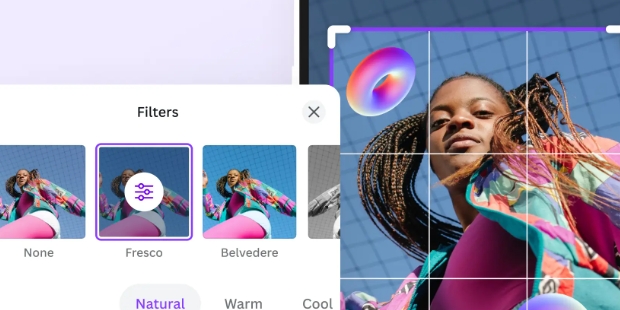
PhotoRoom is an AI-powered photo editing software that generates corresponding images in seconds simply by inputting your requirements and photo style, satisfying users' personalized creative needs. It also supports photo editing functions, allowing you to change photo backgrounds and perform batch editing in just a few simple steps, exporting to your device at any time or sharing with friends. The software provides users with a variety of photo editing templates, quickly converting your photos into videos while ensuring consistency in clothing and details, bringing your photos to life.
Premade Backgrounds Templates: There is a collection of professionally designed backgrounds that you can instantly apply to your photos. They save you the hassle of creating your own backgrounds from scratch and can significantly enhance the visual appeal of your images.
Pro membership Activated: With the Pro membership activated, you have access to all premium features without needing to pay for a subscription. This includes advanced editing tools, exclusive content, and more customization options.
No watermark: Your edited photos will be free of any PhotoRoom branding, allowing for a clean, professional finish. This is especially useful for professional photographers, social media influencers, and anyone who wants to present their images without any distractions.
No Ads: The absence of ads ensures a smooth and uninterrupted editing experience. You can focus entirely on your creative process without being disrupted by annoying advertisements.

Remove Background: Photoroom background remover is one of the premium feature, in which users can remove and change image background with just one click. After removing the background, you can replace it with any color or favorite image as background. You can also use AI generated images as background.
Resizing of Photos: With resizing, users can increase the image size according to the requirements of the media platform by following simple steps. You can create the perfect image size for social media platforms like Facebook, Instagram, Twitter, YouTube and many more.
Remove Object from Photo: It is also a unique feature of the Photoroom. When you swipe on an object in an image to remove it, the object will disappear with 100 percent accuracy with AI retouch.
Photo Background Changer: It is a very amazing feature, adding the favorite color on the background of a photo with a single click. The best color on the background enhances creativity in photos. Increase the sales of your store with more prominent and attractive product pictures.
Profile Picture Maker: With Photoroom, you can convert your low-quality images into stylish, good-looking profile pictures for different social media platforms like Facebook, Twitter, Instagram and more.

Be sure to have a reliable Internet access during the seminar.
Try to use a strong and stable internet connection for flawless AI functioning and loading.
Opt for high definition images to get better results.
When your images have a high resolution, your edits will be clearer and your exports cleaner.
Shoot your photos so the lighting is even and well distributed.
When the lighting is balanced on all the sides of the photo, it helps clean backgrounds and improves the AI’s performance.
Updating the App from time to time is important.
Update to the newest Photoroom version to try out new options and solve any reported bugs.
Select a Device That Is Suitable and Recognized.

At first, I wanted to throw my phone across the room!!! But, the more I discover thethings I can do, AND figure out HOW to do them, I am finally beginning to enjoy it.At 57,I'm not too savvy with all this kind of stuff. And, I tend to get frustrated quickly andeasily, but I think PhotoRoom gives me just enough to keep me wanting to discover more.I have no delusions that I will become a pro at this, hehe... But for me, I'm OK with, "Sofar so good...." That's all I need.
l love this app since it makes images transparent, and all stuff. But there is a problem,every time when I create an image out of one image, I keeps having a white background,and no matter how I try to have a transparent background, it keeps doing the same! Evenwhen I import it through transparent, it keeps having a white background! I want this appto have an update to fix this problem so that all my transparent images would workwithout white backgrounds!
This app is amazing I love it and all of the wonderful options it offers. This makescreating anything a dream come true for crafting and photography and so much more! Ifyou're thinking about this I say go for the top subscription because you will not regret it!I absolutely love it and every feature and option it offers! This I would have to say is acreator's dream come true! And the options this offers for the business side is just asamazing hands down best app I have ever used!
Photoroom provides a professional service for editing, designing, and optimizing photos. It gives users the most powerful utilities to make their photos look as beautiful as possible. You can even use these photos as business documents. First, its most powerful feature is to remove or erase the background. Sometimes, the background makes your work look bad, so you only need an image of the subject. After that, the application will have many templates for you to make the image more beautiful.
Size:106.3MB Version:2026.12.01
Requirements:Android Votes:326



PhotoRoom Mod APK
Version:1.0
Size:32.50MB
Download
PhotoRoom MOD APK 2025.18.01
Version:2025.18.01
Size:90MB
Download
PhotoRoom
Version:2025.20.02
Size:61MB
Download
Photoroom AI Photo Editor Mod
Version:2025.24.02
Size:70MB
Download
Photoroom AI Photo Editor
Version:2025.33.04
Size:82.58MB
DownloadWelcome to our image editing apps! Perfect for beginners and pros alike, they make photo enhancement easy. Use PicsArt to crop, adjust colors, and apply filters. Remove backgrounds instantly with Remove.bg. Get creative with layers and advanced tools on Adobe Photoshop Express. Start transforming your images today!
Visuals serve as a primary gateway for players to engage with games, where distinctive art direction immediately captures attention and creates lasting impressions. An unconventional aesthetic not only stands out in crowded markets but also enhances immersion and emotional connection. When executed with creativity and polish, striking visuals elevate gameplay into a memorable artistic experience. That's why titles with truly exceptional art styles deserve recognition - they offer both visual delight and meaningful interactive expression that resonates with players long after the session ends.
Nowadays, with the popularity of intelligent technology, this new intelligent technology will provide faster content creation in daily life. In the face of today's intelligent landscape application creation, it supports the creation of text content for different themes, provides intelligent image creation and painting, and even realizes various personalized AI creation functions such as intelligent image cutout. In terms of using intelligent tools, you can gain more information, knowledge and inspiration. The editor recommends the following popular AI creation tools for you to experience the help that intelligent AI brings to different scenarios such as life, work, and study.
About us | Contact us | Privacy policy| DMCA
Copyright © 2026 Xiaohei All rights reserved.