Hypic is a popular photo editor. This app boasts advanced AI capabilities, offering a rich and comprehensive suite of editing tools. It brings the latest styles to various platforms, ensuring your photos are highly sought after on social media. With Hypic, you can quickly and easily enhance photo quality and precisely adjust backgrounds using AI-powered editing tools. Furthermore, when dealing with a large number of images, you can edit multiple photos with the same style with a single click, saving time. In addition, the app provides a wealth of templates and overlay options to meet various creative needs and occasions, allowing users to create using the latest design elements and styles.
AI Magic in a Tap
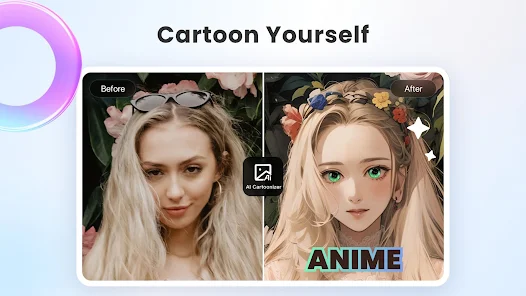
Turn photos into artwork instantly. Remove backgrounds, generate avatars, cartoon yourself, or enhance image quality — all powered by cutting-edge AI.
Stylish Filters & Effects
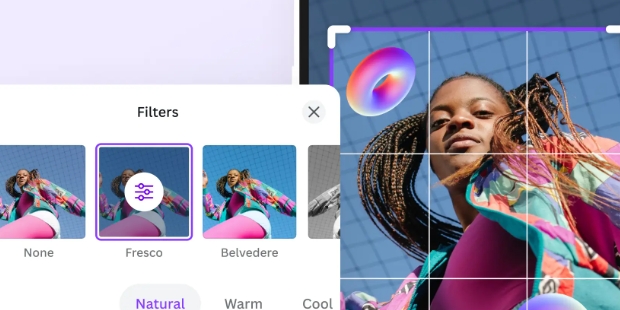
Explore trending aesthetic styles, including retro film, clean girl presets, and soft glow filters. One tap is all it takes to match your mood or feed vibe.
Smart Retouching Tools
Customize your look naturally with precision tools for smoothing, reshaping, and enhancing. Adjust facial features with subtlety and ease.
Aesthetic Templates
Create stunning visuals in seconds using professionally designed templates. Whether it's for a photo dump, a story, or a daily vlog, Hypic’s templates make your content look effortlessly curated.
AI editing features
Hypic uses AI to remove or replace backgrounds, clean unwanted objects, and improve image quality. You get quick transformations with minimal manual work. Therefore, it is easy to create clean product photos, profile pictures, or styled scenes in a few taps.
Face retouch with natural controls
Hypic offers skin smoothing, brightness adjustment, and subtle reshape tools for eyes, lips, and proportions. Results aim to look natural rather than over-edited. In addition, sliders help you fine-tune the effect level with clear previews.
Aesthetic filters and effects
Hypic includes retro film looks, soft glow, and lo-fi styles to match different moods. You can apply a preset to keep a consistent feed across posts. Also, quick compare helps you check before and after to confirm the style.
Social templates and layouts
Hypic provides ready designs for Stories, Reels-style frames, daily vlogs, and photo dumps. You can drop images into a layout and adjust text or stickers. Moreover, built-in sizes help you export formats that fit common social feeds.
Collage and batch editing
Hypic lets you combine multiple photos and apply the same edits across a set. This saves time when you have a series of events. Therefore, you can keep a consistent tone for albums, previews, or thumbnails.
Beginner-friendly workflow
Hypic uses clear labels and one-tap styles so new users can get started fast. The app guides you with simple steps and instant previews. In addition, core tools are free, with optional Pro tools for advanced edits.

Experiment with different filters to find the one that enhances the mood of your photo and makes it pop.
Use the "before and after" view to compare your edits and make sure the final result matches your vision.
Add text or stickers to make your photos more expressive, especially for creating fun or themed social media posts.
Take advantage of the collage maker to combine multiple images into one, creating a story or theme in your photos.
Don’t be afraid to use the adjustment tools to fine-tune every detail of your photo and make sure it looks perfect.
Batch Editing: The app also allows you to edit multiple photos at the same time and easily apply the same edits and filters to multiple photos with just one tap.
Photo Enhancement: The app provides tools so you can customize enhancements as you like, including adjusting sharpness, color, and other factors.
AI Filters: You can also use the app to transform your portraits into different styles like comics, classics, cartoons, and more.
Virtual Hairstyling: If you are planning to get your hair done but don’t know what style or hair color will suit you, you can also use the app to experiment with many different hairstyles to find the most suitable style without having to worry about it.

With Hypic’s numerous editing features, it proves to be a promising tool that anyone can use for anything from simple editing of flaws to creating something new out of a plain photo. While it can take time to apply the changes you make, the app still offers an otherwise simple and easy-to-use platform that you can use in a snap.
Size:202.6MB Version:9.0.0
Requirements:Android Votes:335
Package Name:com.xt.retouchoversea Signature:f325a8d4ed670f0441fd89906f2267427a592a55


Welcome to our image editing apps! Perfect for beginners and pros alike, they make photo enhancement easy. Use PicsArt to crop, adjust colors, and apply filters. Remove backgrounds instantly with Remove.bg. Get creative with layers and advanced tools on Adobe Photoshop Express. Start transforming your images today!
AI Photo Editing Apps - encompassing both image generation and enhancement tools - utilize cutting-edge machine learning algorithms to produce, refine, or transform visuals using text prompts, uploaded images, or artistic preferences. These powerful applications are reshaping digital art, photography, and media production by streamlining sophisticated processes such as professional-grade retouching, artistic style replication, and completely AI-generated artwork. By combining automation with creative control, they empower users to achieve stunning results with unprecedented speed and precision.
Nowadays, with the popularity of intelligent technology, this new intelligent technology will provide faster content creation in daily life. In the face of today's intelligent landscape application creation, it supports the creation of text content for different themes, provides intelligent image creation and painting, and even realizes various personalized AI creation functions such as intelligent image cutout. In terms of using intelligent tools, you can gain more information, knowledge and inspiration. The editor recommends the following popular AI creation tools for you to experience the help that intelligent AI brings to different scenarios such as life, work, and study.
About us | Contact us | Privacy policy| DMCA
Copyright © 2026 Xiaohei All rights reserved.