Are you frustrated by photos with a lack of focus and cluttered backgrounds? Then try Focos! Users can simply tap the subject after shooting to reset the focus point, optimizing photo details without needing to retake the shot. The software also supports background blur; a simple swipe highlights the subject, drawing more attention. Furthermore, the software offers diverse aperture options, allowing users to freely adjust its shape and range for more aesthetically pleasing images.
Large aperture and real bokeh effect: Focos brings DSLRlike photography to your iPhone with big aperture and real bokeh effect, which most photographers have always desired.
Erase with the touch of a finger: Tap to focus after shooting.Portrait photo with depth data allows you to focus after shooting like the hacker technology.
Kinds of diaphragms: Various diaphragms generate different bokeh spot effects. It's the fun of outoffocus.
Professionalgrade lens: Professional options simulate the pro lens such as creamy, bilinear, swirl and so on.Creamy is the characteristic of good lens and makes the edge of bokeh spot softer.Bilinear is the shortcoming of some lens but can stoke spot.Swirly lens highlights center object surrounded by swirly bokeh.
3D Lighting: With lighting tool, you can check the portrait picture in true 3D space, add lights and adjust color, brightness and so on and so forth. It is more powerful and flexible than portrait lighting which Apple provides.

Bokeh: Allows users to create beautiful bokeh effects on their photos with adjustable blur size and shape.
Blur Image Android App: Offers a range of tools for blurring images, including customizable brush sizes, shapes and strength settings.
Easytouse Interface: Simple user interface makes it easy to quickly apply the desired effect without having any prior knowledge or experience in photo editing software.
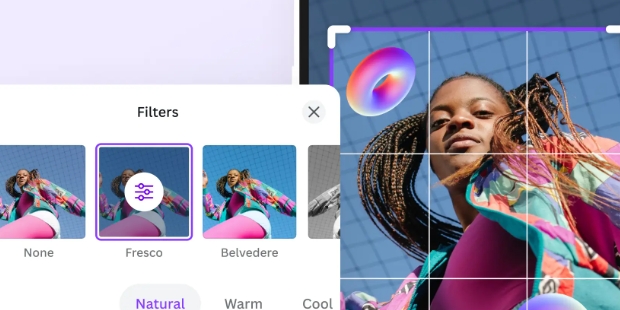
Variety of Filters & Presets Available: A wide selection of filters are available within the application which allows you to easily achieve different looks from classic film styles through modern digital ones. Additionally, there are also several preset options that make getting started even easier!
Adjustable Effects Settings: Users can adjust various parameters such as intensity, focus area size/shape and background colour when creating their own unique look for each image they edit using Focos app.

Can I edit depth on my photos with Focos?
Yes, Focos allows you to adjust the depth of field on your photos, giving you more control over the focus and blur effects.
Are there inapp purchases in Focos?
Yes, Focos offers inapp purchases for additional features and effects.
Does Focos support portrait mode photos?
Yes, Focos supports editing portrait mode photos and allows you to enhance the bokeh effect.
Is there a community or sharing feature in Focos?
Yes, Focos includes a community where users can share their edited photos and videos with others.
Can I use Focos for video editing?
Yes, Focos allows you to edit videos with realtime effects, offering a unique way to enhance your video content.
Does Focos offer tutorials or guides for new users?
Yes, Focos provides tutorials and guides to help new users get started with the app's features and functionalities.

Once you have perfected your photo using FOCOS, sharing it on social networks is straightforward and hasslefree. The app is designed to integrate seamlessly with various social media platforms, allowing you to showcase your enhanced images effortlessly.Experience the benefits of artificial intelligencedriven background blurring with FOCOS and bring a professional touch to your photos with minimal effort.
Size:23.7MB Version:3.0
Requirements:Android Votes:212
Package Name:com.focos.editor Signature:89d23a0a128e4af4d4cdcb567be8196c2424eea6


Visuals serve as a primary gateway for players to engage with games, where distinctive art direction immediately captures attention and creates lasting impressions. An unconventional aesthetic not only stands out in crowded markets but also enhances immersion and emotional connection. When executed with creativity and polish, striking visuals elevate gameplay into a memorable artistic experience. That's why titles with truly exceptional art styles deserve recognition - they offer both visual delight and meaningful interactive expression that resonates with players long after the session ends.
AI Photo Editing Apps - encompassing both image generation and enhancement tools - utilize cutting-edge machine learning algorithms to produce, refine, or transform visuals using text prompts, uploaded images, or artistic preferences. These powerful applications are reshaping digital art, photography, and media production by streamlining sophisticated processes such as professional-grade retouching, artistic style replication, and completely AI-generated artwork. By combining automation with creative control, they empower users to achieve stunning results with unprecedented speed and precision.
Nowadays, with the popularity of intelligent technology, this new intelligent technology will provide faster content creation in daily life. In the face of today's intelligent landscape application creation, it supports the creation of text content for different themes, provides intelligent image creation and painting, and even realizes various personalized AI creation functions such as intelligent image cutout. In terms of using intelligent tools, you can gain more information, knowledge and inspiration. The editor recommends the following popular AI creation tools for you to experience the help that intelligent AI brings to different scenarios such as life, work, and study.
About us | Contact us | Privacy policy| DMCA
Copyright © 2026 Xiaohei All rights reserved.